

Victims can decrypt files locked by PshCrypt ransomware for free
PshCrypt virus is a low-level ransomware program[1] that encrypts files and adds .psh file extensions after the original file extensions. Victims can already decrypt .psh files because malware researchers have analyzed the virus and discovered that the decryption key is HBGP. Entering this key in the “Serial Code” section on the blue screenlocker that appears on victim’s computer screen will unlock the computer and restore all files back to normal. The virus’ author asks to pay 0.05 Bitcoin to his Bitcoin wallet[2] and suggests that the first four characters of the transaction ID is the key required to unlock files. In fact, the virus author is lying, and all that you need to do is to enter the code we provided earlier and remove PshCrypt malware using anti-malware software like FortectIntego.
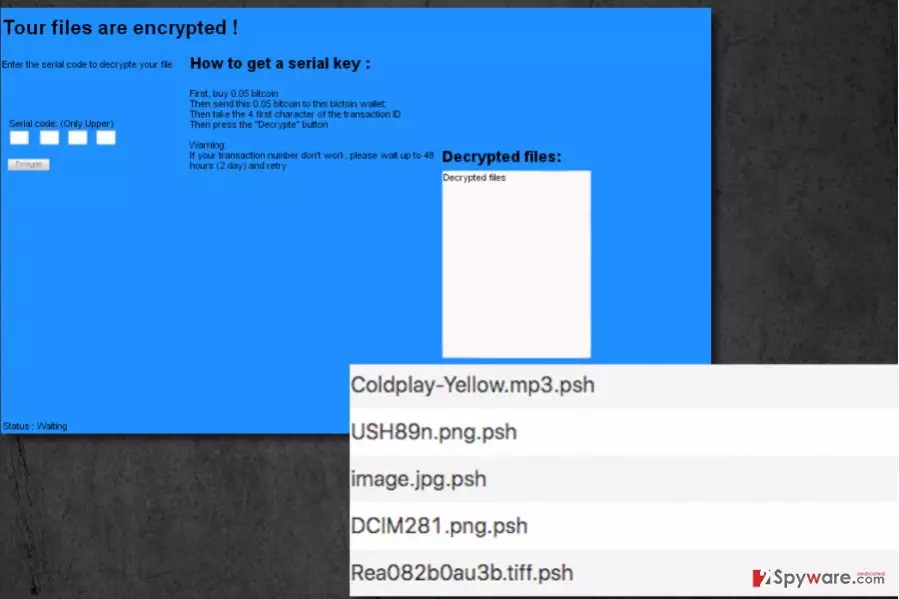
All small details about this virus simply scream that it was developed by an inexperienced amateur who, in fact, has quite a childish mind and thinks that leaving stupid jokes about human’s private body parts in virus’ code is funny. There is no surprise that even the ransom note that appears on the screen contains obvious typing mistakes – instead of stating “Your files are encrypted!”, the screenlocker window says “Tours files are encrypted!” Some details in the virus’ source code suggest that the developer might be a French-speaking individual. However, there are no more relevant details about this ransomware. Our team simply recommends users to start taking actions regarding PshCrypt removal to make the computer safe to use again. Remember – even if the virus is poorly programmed, it is still dangerous to have it on the system, because it can serve as a vulnerable point that can allow other viruses to break in.

How can I avoid ransomware viruses?
To avoid ransomware viruses, users should be interested in their distribution techniques[3], and at the moment the most popular ones are spam[4], malvertising, and exploit kits[5]. The last two are unlikely to be used in PshCrypt distribution campaigns, considering that the author of the ransomware has really poor coding skills and can clearly be called a “script kiddie.” Therefore, it seems that the virus author uses spam to attack users, so we suggest you to stay away from suspicious emails that come into your Inbox folder. It goes without saying that you should stay clear of Spam and Junk email folders as well. Even if the email sender promises to be working at a legitimate company, do not believe him/her. Check sender’s email and if it raises any suspicions to you, delete such letter right away. Be extremely careful with email messages that contain hyperlinks or strange attachments – these can instantly infect your PC with malware if you open them.
Best way to remove PshCrypt ransomware from the system
The best way to remove PshCrypt virus is to allow an anti-malware software do it for you. Such software can professionally check the entire computer system and identify dangerous files and Registry entries related to the malware. The reason why we recommend using anti-malware software and not an antivirus is that anti-malware application usually can detect a wider range of malicious programs including spyware. We suggest you start PshCrypt removal by reading these instructions we prepared.
Did this guide help?
4 comments
space20
Decryption code works! THANK YOU
Gerberts
I swear, this is the best day of my life. I thought this was a serious virus! However, it taught me that backups are essential. I will create one now.
MeghFayeton
Thanks for the help. I was in state of hopeless despair. I thought I accidentally destroyed all my files. This, however, was a good lesson to me. I wont open suspicious emails ever again!
Janiel
yessss!!! it works!!! decrypted my .psh files ! thank youuu!