

Files encrypted by QuakeWay can be restored without paying the ransom
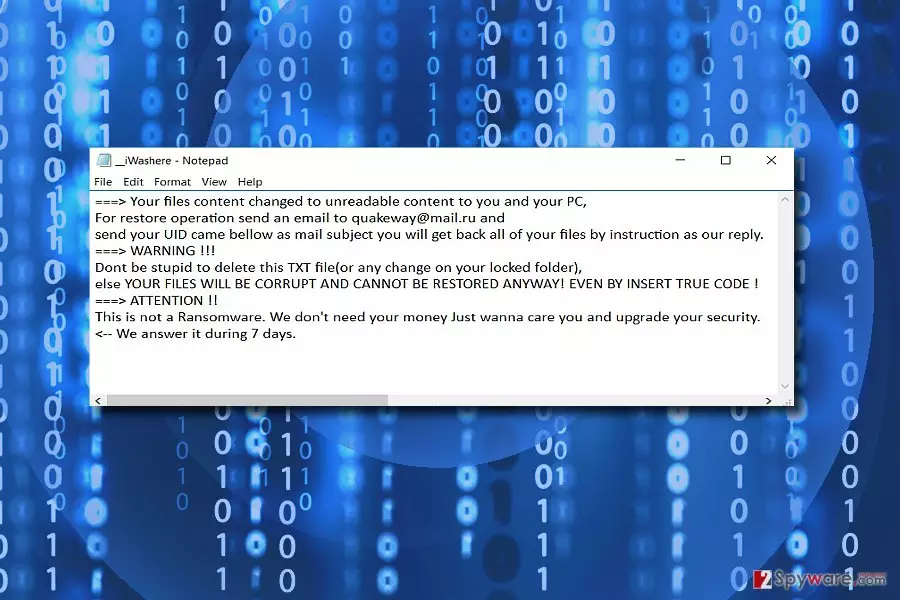
QuakeWay is a crypto-malware[1] that locks targeted files with .org file extension. Authors of the ransomware[2] present the demands in the __iWasHere.txt where victims are asked to send an email to quakeway@mail.ru and wait for further instructions. However, it’s unnecessary.
In the ransom demanding message, cyber criminals tell that this threat is not a ransomware virus. However, they behave like any other developer of the file-encrypting virus. They warn victims not to delete the text file and encrypted files. Otherwise, they will experience irreversible damage and data loss.
It’s quite strange that crooks claim to be not interested in swindling the money from victims. All they want is to “upgrade your security.” The developers explain that they answer during 7 days.
Since this malware seems to be still under development or rather a cyber joke, we do not recommend wasting time but rather focus on QuakeWay removal. FortectIntego or MalwarebytesMalwarebytes helps you deal with the malware faster.
Malware researchers discovered that victims could recover their files without paying the ransom. Undoubtedly, data backups are useful in this situation. However, if you do not have them, scroll down till the end of the article and try our presented recovery options.
Furthermore, it's unknown what other purposes authors of the QuakeWay virus might have. Thus, contacting them is not recommended even if you are just curious. You might be tricked into installing fake security or data recovery program, and that might be another malicious program.
Nevertheless, data recovery seems like the most important task after the ransomware attack; there’re other problems caused by this cyber threat. For instance, it might make changes to the system in order to run at system startup. What is more, the virus might modify Windows Registry and install numerous dangers files on various directories.
Thus, it definitely weakens computer’s security and prevents from working safely. In order to get back control over your computer and restore encrypted files, you have to remove QuakeWay. However, you should follow our prepared instructions instead of shady hackers’ guidelines.

Developers use multiple ransomware distribution strategies
Just like any other crypto-malware, QuakeWay ransomware is also distributed via several channels. Thus, you can experience the hijack when:
- You open a malicious email attachment or click on infected link;
- You download fake program;
- You install bogus update;
Malicious emails are one of the main strategies to spread malware executable. Usually, cyber criminals disguise under the names of officials from governmental institutions. Thus, it is crucial to identify the authenticity of an email[3] before reviewing its contents.
Additionally, the trojan of this malware may be distributed via P2P file sharing domains or corrupted browser extensions[4]. Do not overload your browser with shady toolbars and extensions. Even if they are legitimate, they drain the capacity of the browser to operate quickly and efficiently.
Keep in mind that visiting high-risk sites, clicking on suspicious ads and keeping software installed on your PC outdated might also help QuakeWay and other malware to get on your PC.
Thus, computer users all over the world, including Japan, Spain[5] or Australia, should be aware of this cyber threat and take all necessary precautions to avoid it.
Terminate QuakeWay virus from the computer and recover your files
QuakeWay removal is more efficient when employing a malware removal tool, such as FortectIntego or MalwarebytesMalwarebytes. It’s crucial to eliminate all records associated with this cyber threat, and professional software is the only safe way to do it.
Before installing security program, you may need to reboot your computer to the Safe Mode with Networking. It helps to disable the virus and run automatic removal. Below you will find detailed instructions how to deal with such obstacles.
Once you remove QuakeWay, you can finally recover your files. Plugin external storage device with backups or explore other recovery methods presented below.
Did this guide help?
Be the first to comment