

RanDsomeWare: a virus with a strange name warns you before encrypting your files
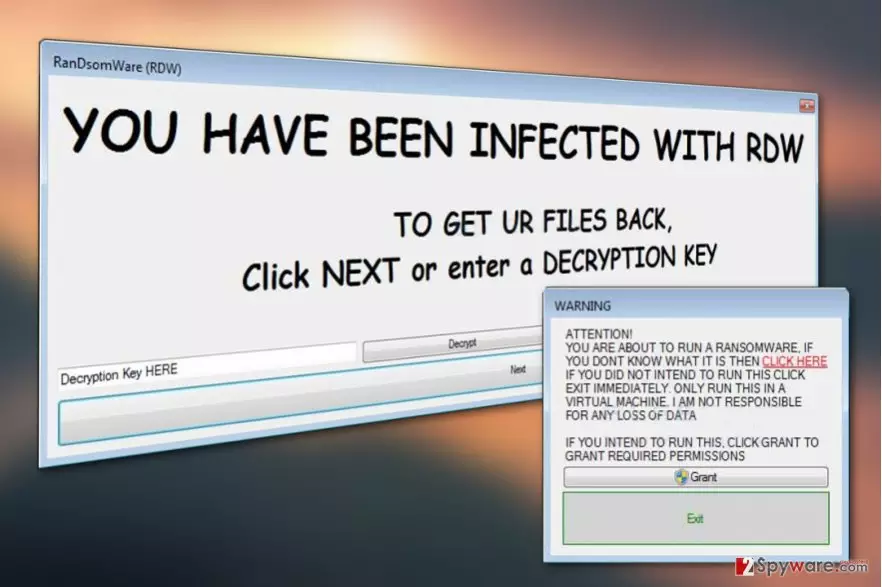
RanDsomeWare virus or simply RDW is a new computer parasite which encrypts files, this way rendering them inaccessible to their owners. Virus appends processed files with .RDWF extensions, which is a typical thing the majority of ransomware [1] viruses are designed to do. On the other hand, RDW virus does not exactly match the usual image of ransomware.
It is interesting that before running the malicious executable, perpetrators warn the victims with the following message:
WARNING
ATTENTION!
YOU ARE ABOUT TO RUN A RANSOMWARE, IF
YOU DONT KNOW WHAT IT IS THEN CLICK HERE
IF YOU DID NOT INTEND TO RUN THIS CLICK
EXIT IMMEDIATELY. ONLY RUN THIS IN A
VIRTUAL MACHINE. I AM NOT RESPONSIBLE
FOR ANY LOSS OF DATAIF YOU INTEND TO RUN THIS, CLICK GRANT TO
GRANT REQUIRED PERMISSIONS[“Grant” button]
[“Exit” button]
Looking at this message, we can presume that the purpose of this ransomware variant is more of an educational nature [2] than focused purely on financial gain. Nevertheless, as the history has shown, such programs are just one step away from being converted into full-blown ransom-demanding pests. It only takes an evil-minded programmer to change things up in the program's code, and the hybrid version starts making them easy money.
Luckily, this virus has not undergone such changes yet, and you can remove RanDsomeWare from your PC without having to face unpleasant consequences such as financial loss of destruction of files. But don’t try to perform the elimination yourself. Antivirus software such as FortectIntego should be able to detect the malicious executable on your device and dispose of it risk-free.

When executed, the program opens the following pop-up:
YOU HAVE BEEN INFECTED WITH RDW
TO GET UR FILES BACK,
Click NEXT or enter a DECRYPTION KEY
While we don’t know the conditions for the data recovery, experts managed to uncover a way to disable the encryption. All you have to do is enter SUPER_SECRET_KEY into the fill-in box that says “Decryption Key HERE” and hit the “Decrypt” button next to it.
After you decrypt your files, make sure you perform the RanDsomeWare removal. Only when the malware is gone from your computer, you will be able to use your device normally and safely again.
Things you can do to protect yourself from ransomware
RanDsomeWare does not seem like a very sophisticated ransomware virus, but that does not limit it from successfully infecting computers. Currently, the distribution of this parasite is quite low — only a few cases of its attacks have been reported. Looking at this tendency, we can presume that RanDsomeWare file spreads directly, i.e. it does not employ exploit kits or spam campaigns.
If, however, you receive the suspicious .exe file in your email inbox — do not open it. A trick that your friends or random pranksters are trying to play on you may have serious consequences, so it is best to avoid it.
RanDsomeWare removal requires no professional training
Indeed, you can remove RanDsomeWare virus from your PC yourself. Well, not manually in the technical sense, but with the assistance of professional antivirus software. These programs easily deal with even more serious ransomware, so RanDsomeWare removal should not be a problem either.
Before the scan though, you should update your antivirus to the latest version to make sure it is fully functional and capable of performing virus removal properly.
Did this guide help?
Be the first to comment