

Ransom32 ransomware is a virus that locks all important files in order to demand ransom from its victims
Ransom32 ransomware is a very dangerous virus that encrypts files on the computer. After the encryption, the victim gets the message with an explanation of what happened. Cybercriminals say that the only way to use the locked files again is to pay the ransom and thus get the decryption key. But cybersecurity experts advise not to trust hackers.
This PC threat is written in Javascript. Ransom32 ransomware can infect not only Windows but Linux and Mac OS operating systems as well. The malicious file weights about 22Mb and it can extract itself without the user’s permission. Once the malicious program is launched, it places its files in the C:\Users\User\AppData\Roaming\Chrome Browser folder.
Then, it places a shortcut named ChromeService in the Start Menu. Clicking on this shortcut, which looks like a regular Chrome browser launcher, pulls the trigger and executes a deadly NW.js software pack, which encrypts personal files on the victimized PC.
As much as we know, Ransom32 ransomware does not touch files that are located in these folders: \winnt, \windows, \boot, \tmp, \temp, \recycle.bin, \programdata.
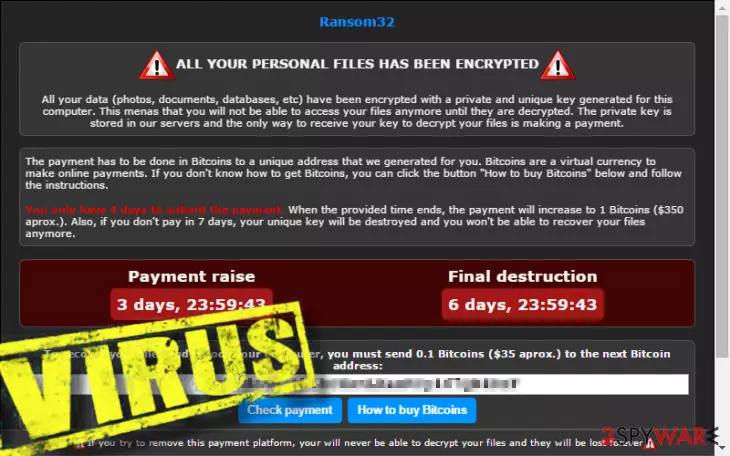
Still, this type of virus is very dangerous. It can affect many different files. Ransom32 can infect and lock files with these file extensions and extensions that are familiar to these:
.jpg ,.jpeg,.tif ,.gif ,.png ,.bmp ,.3dm, .raw ,.max ,.accdb ,.db ,.dbf ,.mdb ,.pdb ,.sql,.wma ,.ra ,.avi ,.mov, .3g2, .mp4 ,.3gp ,.mpeg, .asf ,.asx,.pdf ,.xls and many many more.
Keep in mind that after this virus encrypts the files, you will no longer be able to open, use them, or access them in any way. Ransom32 threat asks you to pay a ransom via the bitcoin payment system to get a decryption key to retrieve the encrypted files. We do not recommend paying the ransom, because, in most cases, you are not going to get the files back. Think about it – do you want to experience financial tear off, too?
If you notice that you cannot open your files or if you see that this ransomware has already left its frightening message with an explanation of what happened to your computer, you should remove Ransom32 ransomware immediately. For that, we advise using SpyHunterCombo Cleaner, MalwarebytesMalwarebytes, or another reputable anti-malware program.
In addition, the system needs to be repaired after successful Ransom32 ransomware removal. You can easily do that with FortectIntego. Once your computer is completely clean of viruses, you can try to recover the files using backups or other solutions.
There is an unusual fact about the Ransom32 ransomware virus. It allows joining its affiliate system. The developers allow becoming a cyber-criminal if you have a bitcoin address. This malicious threat allows people to spread the virus and asks for only a 25% share of the ransom that victims pay. It is a hideous technique to spread the virus with a help of greedy people.
Dangerous viruses spread through infected email attachments
This particular ransomware is spread just like the majority of ransomware viruses do – via infectious e-mails. The main point to prevent installing this dangerous virus is to stay away from letters from unknown senders. You should never open them, and especially you should not download or open files that might be attached to them.
This ransomware works like a Trojan – it might pretend to be a safe file, but in reality, it contains toxic components that can make you lose your personal data for good. However, this virus might be promoted via malicious sites online, so you should not browse through insecure web pages.
In case you want to remove ransomware manually, continue reading this article. We explain how to properly delete the virus and try to recover important files at the bottom of this text.
Remove Ransom32 ransomware and only then try to recover your files
Ransomware can be removed manually, but if you are an inexperienced computer user, we do not advise doing so. You might not notice and eliminate some infectious files, which can be harmful to your system. You can discover the manual Ransom32 ransomware removal guide below, but we strongly recommend using a powerful automatic malware removal utility, for example SpyHunterCombo Cleaner or MalwarebytesMalwarebytes.
To get all of your files back, you need to have a backup copy of them stored on an external drive. If you do not have such a copy, it is nearly impossible to retrieve the files. Lastly, you can try one of the solutions given above to recover your files but they may not help.
Also, keep in mind that it is often not enough to just remove Ransom32 ransomware. Even after successful removal, you may notice that your computer is running slower or even crashing. Therefore, it is important to use FortectIntego or some other reliable repair tool to fix system files.
Did this guide help?
4 comments
Milenna
i was infected!!! cannot believe it... i cannot open my files! are they lost forever?!
Zedd
You can become affiliate? wow. suprising. so who wants to make money easily? lol
Reggy395
Sounds like a plan, lmao.
However, i would never want to be infected like that. Losing all my files? Not something that Id want...
Thompson
Jesus, try the tools that decrypt the virus! BUT FIRSTLY REMOVE IT