

Ranzy Locker ransomware – a file-locking threat that appends .ranzy extension to all non-system files
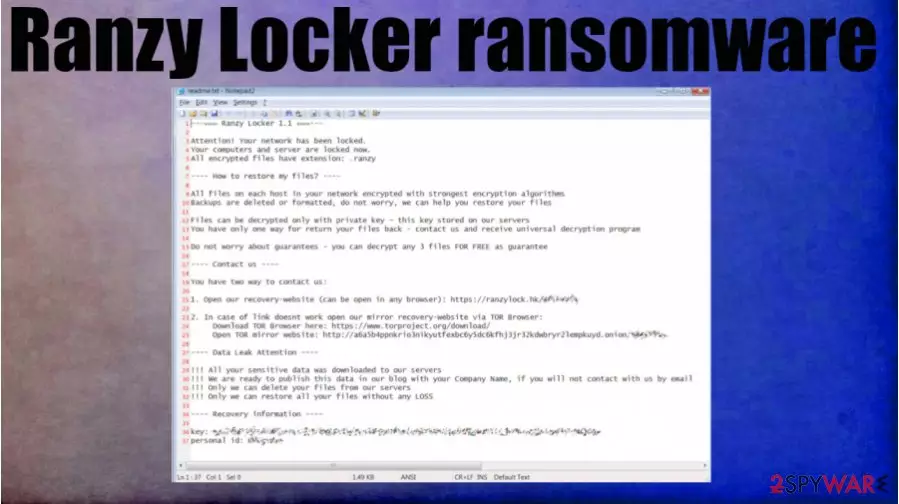
Ranzy Locker ransomware is a cryptovirus that encrypts all commonly used files on the whole network and demands cryptocurrency for the ransom. Cybercriminals claim that they have stolen many sensitive data from the infected computers and will publish it if an agreement isn't reached.
When this virus is locking text, image, video, or audio files, it also renames them by appending a .ranzy extension. Afterward, a ransom note, named readme.txt, containing threats and instructions is generated and scattered all over the device, making it very easy to find for the victims.
Instead of communicating through emails, developers of the .ranzy file virus created a website with a live chat option. One domain (hxxps://ranzylock.hk/N6CFBPYX) can be accessed through regular browsers, the other one only when using the TOR browser.
| name | Ranzy Locker ransomware |
|---|---|
| type | Ransomware |
| Appended file extension | .ranzy |
| ransom note | readme.txt |
| Criminal contact details | Victims can contact the criminals by visiting hxxps://ranzylock.hk/N6CFBPYX with their regular browsers. Or by downloading TOR browser and visiting http://a6a5b4ppnkrio3nikyutfexbc6y5dc6kfhj3jr32kdwbryr2lempkuyd.onion/N6CFBPYX |
| Additional info | The assailants state that they stole lots of sensitive information on would leak it to the public if the victims don't pay the ransom |
| Malware removal | Trustworthy anti-malware software should be used to get rid of any suspicious files, including the culprit of this article |
| System health | System repair tools like the FortectIntego app should be used to remove any changes the cryptovirus might have done to system settings and its files |
Ranzy Locker ransomware is primarily aimed at companies, but that doesn't mean that everyday computer users can't get their device infected. To prevent the ever-growing threats imposed by cyberattacks, a reliable anti-malware application is a must these days.
Most ransomware is downloaded while not paying attention to the visited pages, clicked ads, or opened emails. That's where a trustworthy anti-virus program would step in to save the day. It is our recommendation to use such software as SpyHunterCombo Cleaner or MalwarebytesMalwarebytes.
Message in the ransom note of Ranzy Locker ransomware virus starts with explaining that all files on computers and servers are locked. The only way to unlock them is by purchasing a universal decryption program. To convince their victims that such a tool exists, the criminals offer free decryption of any three files.
If the victims won't contact the assailants and meet their demands, they threaten to publish all downloaded sensitive data on their Ranzy Leak website. If the victims pay the ransom, the criminals promise to send the necessary tools and remove the stolen files from their servers.

Criminals should never be trusted. Research[1] shows that companies that pay the ransom end up losing twice as much money as the ones who didn't. That's why we recommend victims of this cyber attack to remove Ranzy Locker ransomware from all infected devices with the help of professional anti-malware software.
Victims should also consider using the FortectIntego tool or any other powerful system repair app right after Ranzy Locker ransomware removal to undo any changes the file-locking parasite might have made to the system registry and other core system settings.
Cybercriminals send this message in their readme.txt ransom notes:
—=== Ranzy Locker 1.1 ===—
Attention! Your network has been locked.
Your computers and server are locked now.
All encrypted files have extension: .ranzy—- How to restore my files? —-
All files on each host in your network encrypted with strongest encryption algorithms
Backups are deleted or formatted, do not worry, we can help you restore your filesFiles can be decrypted only with private key – this key stored on our servers
You have only one way for return your files back – contact us and receive universal decryption programDo not worry about guarantees – you can decrypt any 3 files FOR FREE as guarantee
—- Contact us —-
You have two way to contact us:
1. Open our recovery-website (can be open in any browser): hxxps://ranzylock.hk/N6CFBPYX
2. In case of link doesnt work open our mirror recovery-website via TOR Browser:
Download TOR Browser here: hxxps://www.torproject.org/download/
Open TOR mirror website: http://a6a5b4ppnkrio3nikyutfexbc6y5dc6kfhj3jr32kdwbryr2lempkuyd.onion/N6CFBPYX—- Data Leak Attention —-
!!! All your sensitive data was downloaded to our servers
!!! We are ready to publish this data in our blog with your Company Name, if you will not contact with us by email
!!! Only we can delete your files from our servers
!!! Only we can restore all your files without any LOSS—- Recovery information —-
key: –
personal id: –
Increasing cybersecurity level is a top priority
During the COVID-19 pandemic, cyberattack numbers drastically increased to a staggering 4000 per day.[2] That just reiterates the need for everyone, home users and companies, to increase their cybersecurity level so these attacks could be prevented.

Having that in mind, we comprised a short guide that might help people concerned about their cybersecurity to increase its level. These suggestions won't guarantee that you won't become a victim of cybercrime, but they will decrease its possibility.
- Purchase, update, and regularly use an anti-malware application.
- All software must be updated with the latest available updates from the operating system to the web browsers.
- Research how phishing campaigns and other hacker tricks work.
- If you have a company, invest in cybersecurity by teaching your staff about what's mentioned in the third step. You can do it either yourself or by hiring a cybersecurity expert.
- Always keep extensive backups on at least two different devices. One of which should be an offline storage.
Guidelines for Ranzy Locker ransomware virus removal with the help of anti-virus software
Meeting the demands of the cybercriminals is a terrible way out after suffering from a ransomware attack. Ransom money is usually used to attack other innocent people and to develop more sophisticated, harder to detect ransomware. So instead of fueling future attacks, victims should remove Ranzy Locker ransomware.
The best way to do it is with the help of anti-malware software like SpyHunterCombo Cleaner or MalwarebytesMalwarebytes. Run a full system scan and delete any suspicious files that the software recommends you to. However, if you didn't keep backups, export all encrypted files to an offline storage before doing that.
Please don't rush to recovering your data from backups right after Ranzy Locker ransomware removal. Experts[3] recommend performing a system tune-up first. To repair system files from the damage suffered from the cyberattack, use the FortectIntego app.
Did this guide help?
Be the first to comment