

Rapid Antivirus – rogue security software that shows fake alerts
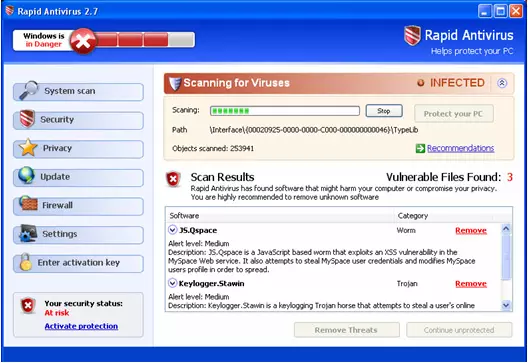
Rapid Antivirus (also known as RapidAntivirus 2.7) is a fake anti-spyware application that is likely appeared on your system without acquiring permission to do so. This is because this rogue is spread via methods that are very common to malware – fake online notifications about virus infections.
Once installed, the malware would show even more falsified data about user computer health. It would perform an alleged system scan that reports hundreds of infections and that the only way to remove them is by purchasing the full version of the program. Don't waste your money and pay for this malicious app – it won't protect you from anything. Follow the guide below in order to get rid of this rogue effectively.
| Name | RapidAntivirus |
| Type | Rogue antivirus, scam |
| Distribution | Fake online scanners and misleading advertisements |
| Function | Shows fake notifications on users screen; changes Windows functions in order to make people believe that they are infected; aggressively pushes its license |
| Elimination | To eliminate this threat, you should perform a full system scan with SpyHunterCombo Cleaner or another reputable antivirus program (access Safe Mode if required) |
| System fix | If your Windows starts to malfunction after you delete this program, we recommend you use FortectIntego to fully fix virus damage sustained due to the infection |
Malicious features of the rogue
Typically, this program is distributed using malicious websites that users can run into due to various reasons. Once there, they will be shown a fake alert that claims that Windows is infected with a virus and that a removal tool needs to be downloaded – which is RapidAntivirus.
Program distribution techniques (that are extremely sketchy, to say the least) are just the tip of the iceberg. When the parasite is on board, it will display messages that imitate system tray messages of Windows Security alerts.
These reports contain information about raft number of different infections and multiple system risks. Remember that all these notifications are faked, as there are likely no infections present on your PC – apart from this malicious program itself. To make it look like it is, the rogue would come up with random names of the alleged threats or used already existing ones, for example:
- Keylogger.Stawin
- Spyware.ActivityKey
- JS.Qspace, etc.
Besides, the app will find legitimate Windows components and other programs as malware. In fact, it might even stop users from launching web browsers such as Google Chrome or Mozilla Firefox.
Also, any click on these pop-ups, and you will be redirected to the rapidantivirus.com or rapidantivir.com websites. This aggressive advertisement is made to push people into unnecessary money wasting. It can be a reason for multiple problems on your computer like system slowdown, changed browser settings, and even limited internet connection.
So do not wait and remove the RapidAntivirus from your system immediately. For that, we recommend using a powerful antivirus tool.
Termination process explained
It goes without saying that rogue antivirus programs should never be trusted. These apps are designed to scam users and infect their systems, preventing them from using PCs normally. The only way to revert this is by deleting the program and all its malicious components once and for all.
As evident, using a reputable antivirus such as SpyHunterCombo Cleaner can help you with the elimination process. If you are unable to initiate a scan, access Safe Mode as explained below. Note that web browsers should also be cleared as there might be some compromised settings or web data. Finally, to repair damaged Windows system components and avoid errors or crashes after malware removal, use FortectIntego.
Did this guide help?
Be the first to comment