

RedEye ransomware can destroy files even without gaining any financial benefit for the hacker
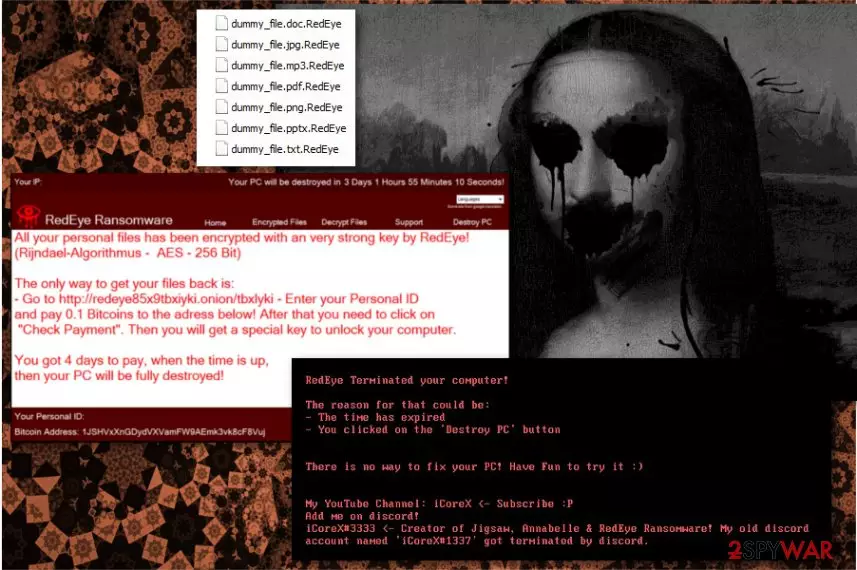
RedEye ransomware is a virus developed by the hacker iCoreX, who says to be responsible for creating Annabelle and Jigsaw viruses. This virus uses AES-256 Bit encryption algorithm and marks every file with .RedEye file extension. After the encryption, remaining files are left useless. Soon after that, a ransom note is generated and placed on the desktop. Additionally, victims hear a gruesome audio record, typically resulting in a jump-scare. The virus is capable of changing MBR (Master Boot Record) configuration and completely destroying the PC.
| Name | RedEye |
|---|---|
| Creator | iCoreX |
| Type | Ransomware |
| Encryption method | AES-256 |
| Extension | .RedEye |
| Ransom amount | 0.1 BTC |
| Danger level | High. Encrypts files, modifies MBR and Windows registry, makes other changes to the PC. Can lead to permanent data loss |
| Distribution | Spam email attachments |
| Elimination | FortectIntego is ta best tool for RedEye ransomware removal |
Usually, the virus infiltrates Windows computers when a user is tricked into opening an infected document provided in the spam email. It settles in the system immediately and makes various changes to boot on startup. Additionally, it downloads necessary files and components to launch a cyber attack.
Ransomware places this huge 35.0 MB file on your computer which contains images and audio files. Audio files scare the RedEye ransomware victims with creepy sounds. Three “.wav” files are placed:
- child.wav;
- redeye.wav;
- suicide.wav.
These audio files are used to grab victims' attention and shock them. The scary sounds should motivate unsuspecting victims to look up for more information what is happening with their computers. Additionally, victims receive a ransom-demanding message:
All your personal files have been encrypted with a very strong key by RedEye!
(Rijndael-Algorithmus – AES – 256 Bit)
The only way to get your files back is:
– Go to hxxp://redeye85x9tbxiyki.onion/tbxIyki – Enter your Personal ID
and pay 0.1 Bitcoins to the adress below! After that you need to click on
“Check Payment”. Then you will get a special key to unlock your computer.
You got 4 days to pay, when the time is up,
then your PC will be fully destroyed!
The ransom note is displayed in the program window which includes different tabs where the author of RedEye allows seeing the list of encrypted files, explains decryption, and even gives a support service. However, iCoreX also shows of his “talent” and advertises his YouTube channel on the MBR[1] window message.
If the timer of four days runs out, or when a user picks “Destroy PC” option (it leads to a GIF image with the “Do it” button, taunting the user to proceed. We obviously do not recommend clicking these buttons), the malware reboots the PC and replaces MBR with the creepy distorted Mona Lisa painting and following message:
RedEye Terminated your computer!
The reason for that could be:
– The time has expired
– You clicked on the 'Destroy PC' button
There is no way to fix your PC! Have Fun to try it 🙂My YouTube Channel: iCoreX <- Subscribe 😛 Add me on discord! iCoreX#3333 <- Creator of Jigsaw, Annabelle & RedEye Ransomware! My old discord account named 'iCoreX#1337' got terminated by discord._
The developer claims that files are encrypted using a sophisticated algorithm – AES-256; however, according to the research data by Blaze,[2] RedEye virus overwrites or fills files with 0 bytes, making them unusable.
Nevertheless, we never recommend paying ransom after the ransomware attack. However, this time it might not be even possible. The payment link is offline at the moment of writing. Though, it doesn't seem that any victim has paid the ransom and can confirm whether the hacker has working decryption software or not.

However, some of the files encrypted by RedEye virus can be still decrypted even if you do not have backups. But before that, you need to terminate this malicious program from your computer. The functionality of the ransomware is destructive. Apart from encrypting data malware also:
- disables Windows Task manager;
- hides computer drives;
- modifies or create new Windows registry keys;
- disables computer's security;
- turns off Windows Defender;
- modifies Image File Execution registry[3];
- makes programs unresponsive.
These features make RedEye ransomware removal difficult. Additionally, malware uses ConfuserEx and compression to protect the binary.
In order to get rid of the virus, you have to use reputable anti-malware software, such as FortectIntego, SpyHunterCombo Cleaner or MalwarebytesMalwarebytes. However, before downloading and installing security tool, you should reboot the computer to Safe Mode with Networking.
You should not delay virus elimination. The hacker in the ransom note is not bluffing, malware can actually cause irreparable damage to the machine. The only way to have a possibility of file recovery is by catching malware in the act. Thus, remove RedEye ransomware as soon as you hear creepy sounds and receive a threatening message on the screen.
Watch out for spam emails to avoid malware attack
Phishing emails are very popular among developers of ransomware. This is the primary distribution method that relies on social engineering. Crooks create legit-looking emails and include infected attachments. They tell various stories and urge to open a provided document. Many users cannot suspect anything because these files look like ordinary Word or PDF files.
Viruset.no[4] security specialist team advise you to check your emails very carefully before opening the attachment:
- Is the sender's address legit? If it does not represent a legitimate organization or does not match with the sender's credentials in the signature, it's clearly malicious.
- Do you expect to receive such email? If you haven't ordered anything from Amazon or you do not expect FedEx to bring you some parcel, stay away from emails sent from these companies. Crooks usually use the names of popular companies to scam people.
- Is there grammar mistakes? Worse spelling or ridiculous grammar mistakes are the clear sign that the message is sent by cyber criminals.
- Is it in the spam folder? Emails arrive in this folder for a reason. Something is wrong with them. Most of the time, they are used for phishing or spread malware.
- If there are no subject line or the body of the letter is empty, do not open the attachment. It's definitely dangerous.
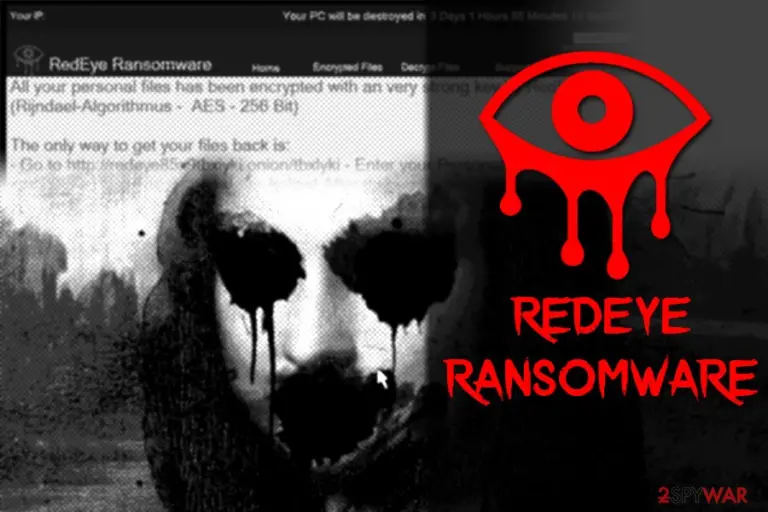

Delete RedEye ransomware from your computer by following our guide
For RedEye ransomware removal, you need to use anti-malware programs like FortectIntego, SpyHunterCombo Cleaner, MalwarebytesMalwarebytes. We are trusting these, but you can use any other certified tools. Elimination of any ransomware is essential for the whole computer system. But keep in mind that virus elimination does not recover corrupted files. For that, you will need additional tools.
In order to remove RedEye virus, you have to run your PC in Safe Mode with Networking or try System Restore (if malware does not disable this feature). Only then, you should be able to install, update and run preferred security software to clean malware from the system.
We have prepared instructions how to get rid of the virus and provided data recovery possibilities for those who do not have data backups. You can find them below.
Did this guide help?
Be the first to comment