

Risotoska.co.in push notifications produce potentially dangerous links and show scam messages
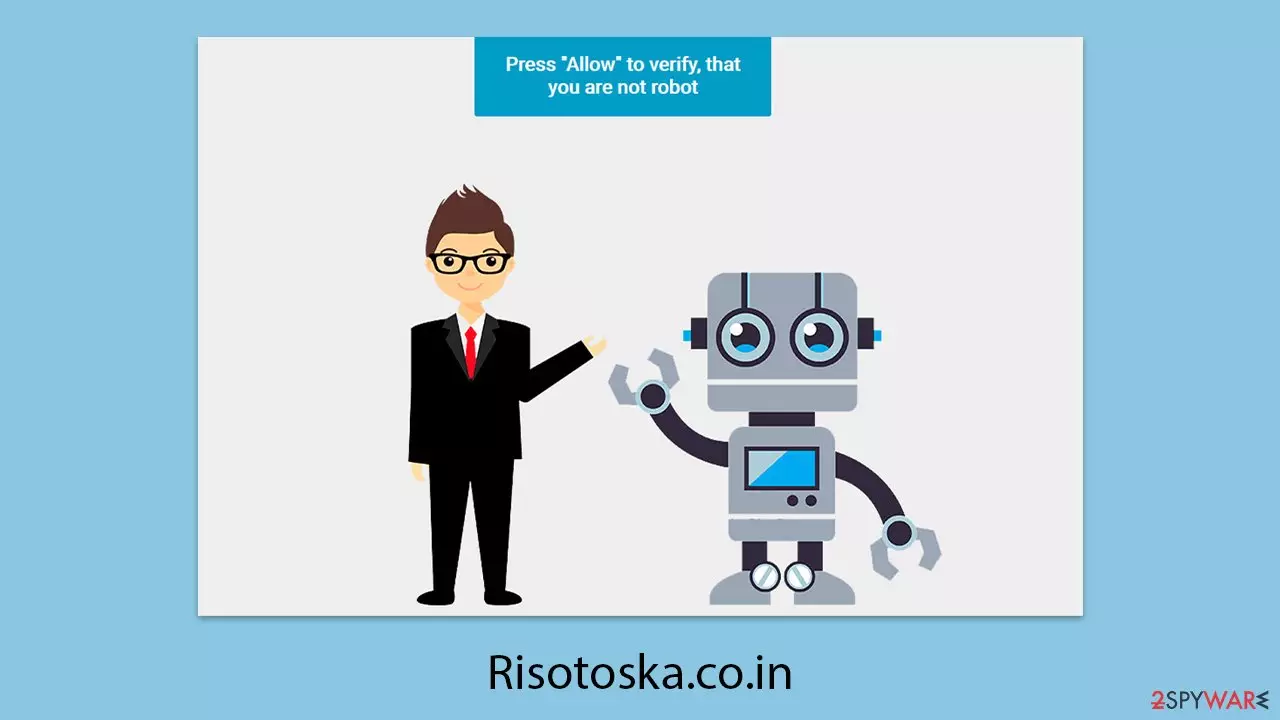
Risotoska.co.in is a misleading website designed by individuals seeking to take advantage of users for their own benefit. It attempts to deceive visitors by displaying false messages about push notifications, encouraging them to enable this feature. Once allowed, these notifications can appear unexpectedly, even when the browser is not actively being used but is still running in the background.
The content found on Risotoska.co.in is generally unreliable and associated with low-quality advertising networks. As a result, users may receive notifications promoting fraudulent giveaways, suspicious financial offers, or misleading virus alerts. These notifications often redirect users to unsafe websites, which may contain harmful software or attempt to collect personal data.
To prevent potential risks, it is best to avoid interacting with such notifications and ensure your device is free from adware. Additionally, disabling unwanted push notifications through browser settings can help reduce exposure to these deceptive practices.
| Name | Risotoska.co.in |
| Type | Push notifications, ads, pop-ups, scam |
| Distribution | Desktop notifications start showing up at random times after clicking on the “Allow” button upon the site entry |
| Symptoms | Pop-ups show up on a regular basis on the screen – these ads often include inappropriate, scam, phishing, or other similar content |
| Risks | Push notification prompts may contain links to harmful websites, potentially leading to financial loss, exposure of personal information, or malware infections |
| Removal | You can prevent the site from sending notifications by following the steps below. To enhance your computer's security, we also suggest scanning for adware using SpyHunterCombo Cleaner security software |
| Tips | We recommend using FortectIntego to fix any virus damage that might have occurred due to a system infection. The app can also remove various trackers for better privacy |
How online fraud spreads online
The internet serves as a valuable platform for communication and information access, but it also presents risks linked to cyber fraud. Its constantly evolving nature makes it an ideal space for deceptive sites like Risotoska.co.in to appear and target unsuspecting users.
This issue is worsened by unreliable advertising networks and loosely regulated platforms that promote harmful content. Users may encounter misleading ads, fraudulent 'Download' buttons, or even malware-infected files, all of which help online scammers expand their reach.
Websites offering pirated software, cracked programs, or illegal content pose an even greater threat. These sites can redirect visitors to phishing pages or expose them to malware, increasing the risk of data theft and system infections.
Adware further complicates matters by operating in the background, modifying the browsing experience with intrusive ads or inserting dangerous links into web pages. This increases the likelihood of users unintentionally visiting deceptive sites like Risotoska.co.in. Practicing caution while navigating the web is crucial to maintaining a secure online experience.
Scamming techniques explained
Most users do not intentionally visit websites that generate intrusive push notifications or other disruptive actions. To lure people onto their deceptive pages, scammers employ misleading strategies.
Risotoska.co.in, for example, often appears after users are redirected from unsafe online platforms, such as illegal streaming services, gambling sites, or peer-to-peer networks. These redirects may happen when someone clicks on a compromised link or when a hidden script on the page automatically sends them to the fraudulent site.
Upon reaching Risotoska.co.in, visitors may be caught off guard by misleading prompts. The site might display messages suggesting users need to verify their age, confirm they are not a robot, or enable a feature to access content. In some cases, it might claim that a video is unavailable due to browser settings or offer fake rewards. Common misleading prompts include:
- Click Allow to watch the video
- If you are 18+, click Allow
- Press “Allow” bot verify, that you are not robot
- Browser verification in progress – click the button “Allow” to access
- Click “Allow” to win a prize and get it in our shop!

Granting permission for push notifications allows Risotoska.co.in to continuously send messages, including fake alerts and deceptive links, even when the browser is running in the background. The best approach is to avoid interacting with such prompts and take the necessary steps to disable unwanted notifications.
How to get rig of all the threats?
Risotoska.co.in is known for redirecting users to sites that flood them with intrusive notifications and employ deceptive tactics. These unwanted programs often run silently in the background, making them difficult to detect as they operate without clear signs of activity.
Removing malware and restoring system integrity
To completely eliminate any hidden threats, performing a thorough system scan with reliable security tools such as SpyHunterCombo Cleaner or MalwarebytesMalwarebytes is crucial. These programs can detect and remove harmful software that may have infiltrated your device. Once the system is cleaned, FortectIntego can help repair any damage caused by malware, remove browser tracking elements, and improve overall digital security.
Blocking unwanted notifications
After ensuring your device is free from malware, it’s important to disable push notifications from Risotoska.co.in through your browser settings. While security tools can eliminate threats, they do not automatically revoke notification permissions granted to deceptive sites. You must manually block the website’s URL in your browser’s settings. Follow the detailed steps below for your specific browser to complete this process.
Google Chrome (desktop)
- Open the Google Chrome browser and go to Menu > Settings.
- Scroll down and click on Advanced.
- Locate the Privacy and security section and pick Site Settings > Notifications.
- Look at the Allow section and look for a suspicious URL.
- Click the three vertical dots next to it and pick Block. This should remove unwanted notifications from Google Chrome.


Mozilla Firefox
- Open Mozilla Firefox and go to Menu > Options.
- Click on Privacy & Security section.
- Under Permissions, you should be able to see Notifications. Click the Settings button next to it.
- In the Settings – Notification Permissions window, click on the drop-down menu by the URL in question.
- Select Block and then click on Save Changes. This should remove unwanted notifications from Mozilla Firefox.


MS Edge (Chromium)
- Open Microsoft Edge, and go to Settings.
- Select Site permissions.
- Go to Notifications on the right.
- Under Allow, you will find the unwanted entry.
- Click on More actions and select Block.


Safari
- Click on Safari > Preferences…
- Go to the Websites tab and, under General, select Notifications.
- Select the web address in question, click the drop-down menu and select Deny.


Internet Explorer
- Open Internet Explorer, and click on the Gear icon at the top-right of the window.
- Select Internet options and go to the Privacy tab.
- In the Pop-up Blocker section, click on Settings.
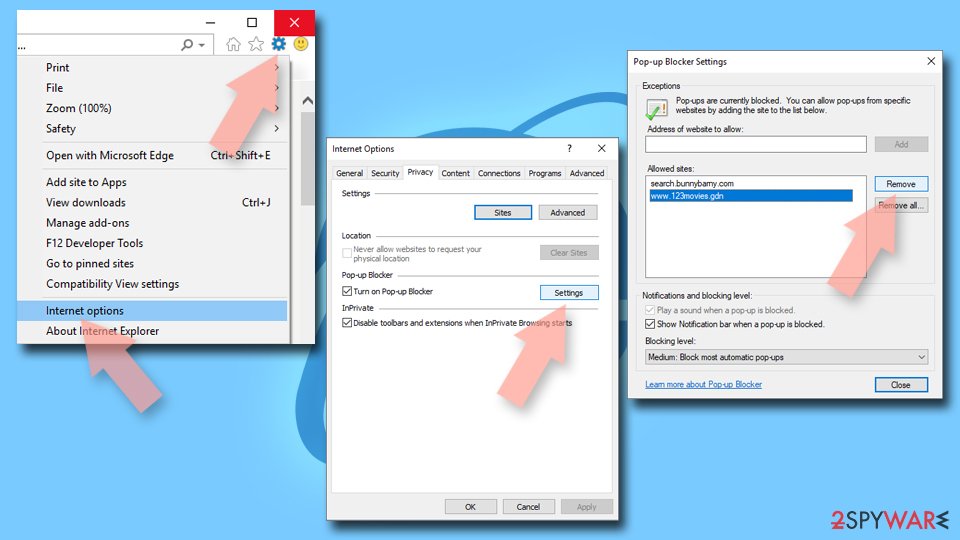
- Locate the web address in question under Allowed sites and pick Remove.

Did this guide help?
Be the first to comment