

New ransomware strain presents RoshaLock virus, which shuts files in password-protected archives
A newly discovered RoshaLock virus appears to be the All_your_documents ransomware, which was first discovered in February 2017[1]. The ransomware has evolved since then, and today we know that there are at least two RoshaLock ransomware versions so far. Users recently started to report RoshaLock 2.0 ransomware attacks, which means that the initial ransomware version was updated. The virus differs from other ransomware programs because instead of encrypting victim’s files, it gathers all target files and puts them into archives (one archive for each drive) and protects them with a password. When analyzing the ransomware, it was discovered that ransomware targets even 2634 different file types. In other words, there will barely any unencrypted files left once the malicious program finishes its work. The virus names these archives as All_Your_Documents.rar and saves them into a specifically created folder: [Drive letter]:\All_Your_Documents\All_Your_Documents.rar. Afterward, RoshaLock creates a ransom note[2] called All Your Files in Archive! .txt.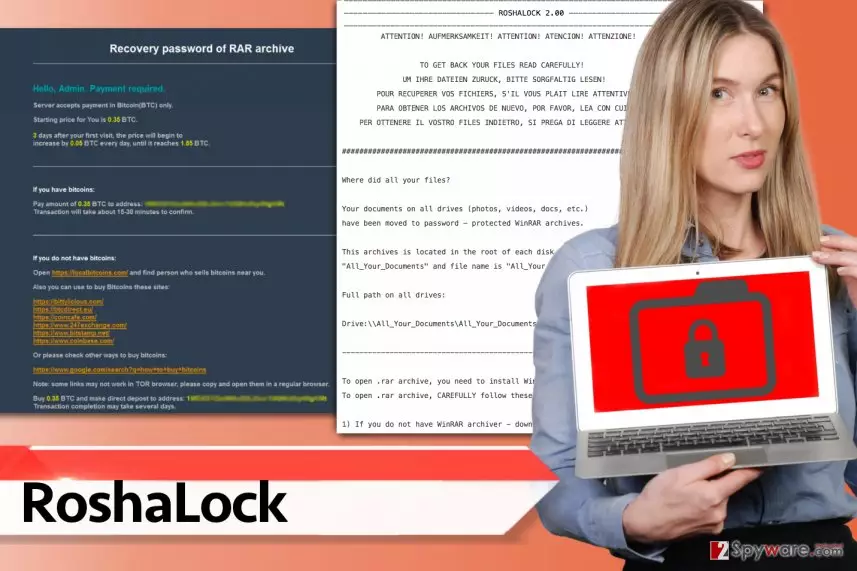
The ransom note refers to victims in five different languages – English, German, French, Spanish, and Italian. It tells the victim to read provided instructions carefully. First things first, it commands the victim to download WinRAR and also TOR browser. Then it explains how to access payment website via Tor browser to find instructions on how to purchase the password that can unlock these archives and set the files free. The payment website says that the server accepts payment in Bitcoins only[3], displays the initial ransom price and warns the user that the price goes up by 0.05 BTC each day if one fails to pay the ransom within 3 days starting from the moment of entering the website. Currently, it is unknown whether cybercriminals do as they say and provide victims who paid with a decryption solution. We advise you not to listen to cybercriminals and refuse to pay the ransom – if you pay, you only support cybercrime industry and allow it to grow[4]. Instead of doing what ransomware crooks ask you to do, remove RoshaLock ransomware from the system immediately. It may have entered your system in a bundle with other malicious programs, so we must advise you to use anti-malware software for RoshaLock removal. Our team suggests using FortectIntego software, but SpyHunterCombo Cleaner and MalwarebytesMalwarebytes are alternative options as well.
What is known about RoshaLock 2.0 ransomware virus?
Lately, malware analysts were informed about RoshaLocker malware version that presents itself as RoshaLock 2.0. It is obvious that this is an updated version of the ransomware, and it asks for a higher ransom than the initial All_your_documents.rar ransomware, this time it demands 1.05 Bitcoins meanwhile the initial version asks for 0.35 BTC “only.” The names of the ransom note and the password-protected RAR archives weren’t modified – the virus still creates All_Your_Documents.rar titled archives to store hostaged files, and creates All Your Files in Archive! .txt, which is the ransom note. Currently, there are no known methods to restore data usurped by this nasty ransomware virus.
Currently used distribution methods
According to user reports, the RoshaLocker ransomware spreads in the form of fake “excel file repair programs,” however, we do not exclude the possibility that the ransomware proliferates via deceptive emails or other ransomware distribution means. It might be distributed using exploit kits[5] as well. To reduce the risk of virus infection by following these rules:
- Keep your programs up-to-date. If you update your programs on time, you can minimise the risk of being attacked via exploit kits.
- Create a data backup. Even if you have the strongest antivirus, there is a chance to get infected with ransomware (in case you happen to become the first victim of a newly released ransomware). Having a data backup can be a life-saving thing in such situations.
- Do not open suspicious emails. Cyber criminals can pretend to be whoever they want to be, but do not let them fool you and trick you into believing in their lies. They might try to convince you that they are writing “from Amazon/Paypal/etc.” and sending you an /invoice/document/receipt that you must see. Do not rush to click on such attachments because they can be infectious.
Remove RoshaLock ransomware
No matter how disappointed we are to say this, RoshaLock virus is a well-structured ransomware threat. If it manages to sneak into the system, the files get locked, and the probability of seeing your files ever again goes away. It is not possible to guess the key because a password-protected RAR file is actually an encrypted and password-protected archive. If you do not know this, sophisticated encryption algorithms are impossible to break, which means you will not be able to use or see your files ever again. There is a slight chance that criminals might decide to provide you with a decryption key if you pay the ransom, but we highly doubt it; besides, we do not recommend supporting cybercrime industry by paying ransoms to criminals. For RoshaLock removal, start an anti-malware software and let it clean the system for you. Once you remove RoshaLock virus, search for your backup and import files from it onto the virus-free computer.
Did this guide help?
4 comments
Suzan
Ive been infected with this ransomware! Does anybody know how files can be recovered???
Ritto
I cant restore my files, oh my god, can somebody help me out???
Reynold_18
This ransomware seems to be dangerous! I have a backup, but hopefully I wont get infected with Roshalock. Id get scared as hell!
Skylar
great tutorial. Thanks, guys. I eliminated RoshaLock in less than a hour. :)