

Secure Dossier is an unreliable and fake system optimizer that could cause your computer harm
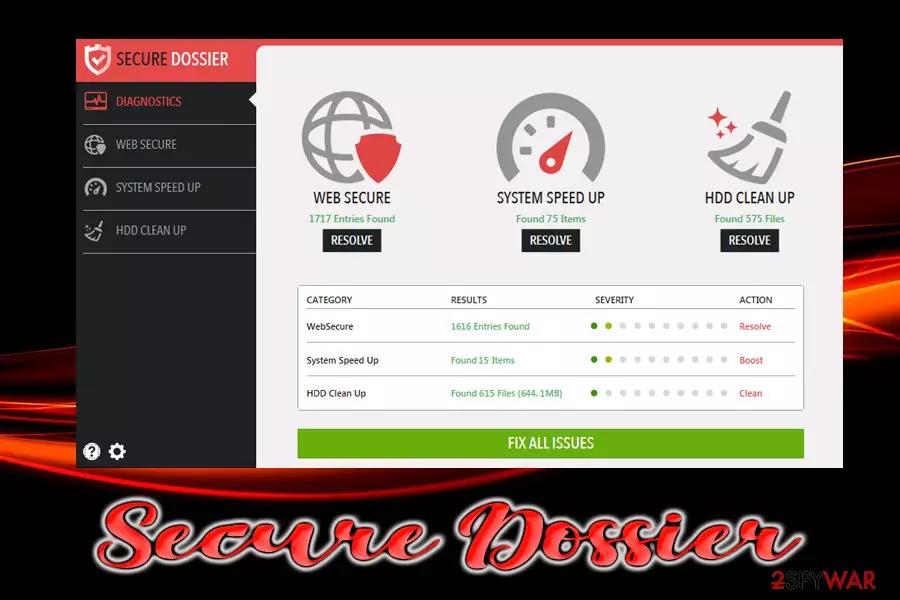
SecureDossier is considered to be a potentially unwanted program due to its stealth infiltration techniques, fake scan results and excessive prompts for users to buy its full version. While most of the scareware applications like this one usually take advantage of not-so-fair software bundling technique, this PUP is mostly presented on third-party site as a completely different program. Once downloaded and installed, users will notice Secure Dossier performing scans on their machine. According to the interface (UI) of the application, it can perform various system cleaning activities, such as cookies removal, HDD clean up, and system speed up. Once the full scan is completed, users will find that their machines are in an alleged terrible state and need immediate help. To fix the fake issues found by SecureDossier, users will be asked to acquire a license of the full application.
| Name | SecureDossier |
| Type | Scareware/PUP |
| Infiltration | Insecure websites, software bundling |
| Risk factors | Installation of other unwanted apps, money loss, malware infections, etc. |
| Symptoms | Secure Dossier will perform a scan that will imply that the computer is in trouble and the immediate repair is needed. The app will actively encourage users to buy its licensed version |
| Removal | Use anti-virus software or take advantage of manual guide below |
| Optimization and recovery | Use FortectIntego to recover from virus damage |
Fake system optimizers work very similarly to tech support scams.[1] Crooks often use computing terms that might not be understandable for novice users and threaten them with consequences. Then they ask to purchase bogus software that might not only fail to repair the system but harm it instead. Therefore, it is vital to remove SecureDossier from the device as soon as possible.
Those who proceed with the purchase of the fake system optimizer will unlock its “full functionality.” In the best case scenario, Secure Dossier virus will clear temp files and cookies[2] – a process that can be performed manually just as easily. In the worst case, however, it might remove necessary Windows registry files that are required for the system to function correctly.
This might cause major disruptions for the installed programs or even Windows OS. In some cases, the app might corrupt it so severely that a full reinstallation of the operating system might be required. Thus, never trust fake system optimizers like SecureDossier and install reliable software like FortectIntego instead – it can fix system issues by using legitimate copies of the files.
If your PC is performing scans that you did not authorize, it is time to take care of SecureDossier removal. You can opt for automatic elimination by installing security software that focuses on PUPs or make use of our manual uninstallation guide below.

Stay away from dubious third-party site downloads and watch new app installation procedure carefully
Software bundling is a tricky marketing practice. While there is nothing wrong in inserting optional applications into the installers of programs, using deceptive techniques to hide those apps is a whole different matter. In fact, the method should be beneficial for both parties, as developers can finance their operations and users get to try new programs for free.
Unfortunately, it is not how it works in practice. Most of the bundled software is completely useless and might harm the end users instead of offering a great product. Furthermore, developers go through great lengths to hide unwanted programs behind pre-ticked boxes, grayed out buttons, misleading installation instructions, and similar.
In the meantime, most of the apps have the terms and conditions section, which explains the whole procedure. It is not the first time a large portion of vital information is buried somewhere in a wall of text. Thus, experts[3] advise to be careful online:
- Download reputable anti-virus software and keep it up to date;
- Apply security patches as soon as they come out;
- Avoid third-party websites, especially those that do not use a valid SSL certificate;[4]
- Do not download questionable software that you are not sure about – check some reviews online;
- Use ad-blocker;
- When installing freeware or shareware, make sure you opt for Advanced settings instead of Recommended ones. This will allow you to remove all the unwanted programs before they manage to sneak into your PC.
Terminate SecureDossier fake system optimizer and use reliable software instead
To remove SecureDossier from your computer, you can check our manual instructions below. Make sure you go through each of the steps carefully and perform actions in the correct order. However, due to the nature of scareware or all PUPs, for that matter, it is highly advised using automated removal tools. Security app will make sure that all the additional programs that could have been installed together with SecureDossier virus are terminated.
Once you complete Secure Dossier removal procedure, you should employ reputable applications for your system security and maintenance procedures instead. If you already paid for the bogus software, you should immediately contact your bank and block any automatic payments for SecureDossier.
Uninstall from Windows
Uninstall from Windows 10/8:
- Type Control Panel into the Windows search box and open the result.
- Under Programs, select Uninstall a program.


Uninstall from Windows 7/XP:
- Click on Windows Start > Control Panel (Windows XP users should click on Add/Remove Programs).
- In Control Panel, select Programs > Uninstall a program.


Remove the unwanted program:
- In the Programs and Features window, look for any recently installed suspicious entries, select them, and click Uninstall.
- If User Account Control appears, click Yes to confirm, then complete the removal.


Did this guide help?
Be the first to comment