

Sfile2 ransomware – a newly-emerged threat that loads a sequence of commands to encrypt files and append the .sfile2 extension to each of it
Sfile2 ransomware, discovered and investigated by Amigo-A,[1] is a member of the file-encrypting viruses that has shown up in the cybersphere in the middle of February 2020. Security researchers believe the hackers to be experienced ones as they have developed a completely new ransomware virus and did not copy other creators. When .sfile2 files virus hacks the targeted Windows computer, it scans the entire system via an executable to find encryptable content.
Once such components are discovered, the malware uses the advanced encryption standard[2] to lock up the data and attach the .sfile2 appendix to each filename. After that comes the ransom note named !!_FILES_ENCRYPTED_.txt in Notepad. Crooks claim that Sfile2 ransomware has encrypted all the data of each host existing in the network. As a way to solve this problem, criminals recommend writing to them via gtimph@protonmail.com email address if the victims want to restore their files.
For providing proof that the decryption key is an existing one, hackers advise users to send them 2 different encrypted files in the ZIP archive for free decryption. Afterward, the ransom note states that the victim will surely receive the decryption tool after the payment is made. However, this rarely appears to be true.
| Name | Sfile2 ransomware/.sfile2 files virus |
|---|---|
| Type | Ransomware virus/malware |
| Discoverer | Amigo-A was the first one to announce about this discovered infection on the Twitter social platform |
| Encryption | The ransomware virus employs the Advanced Encryption Standard and locks up all types of files and documents that are discovered on the infected Windows computer system. After that, all the filenames end up with the .sfile2 appendix |
| Ransom note | The ransom message comes named !!_FILES_ENCRYPTED.txt and is provided to the victims right after the encryption process. Criminals urge users to make ransom payments in order to receive the decryption tool and discuss all ransom-related matters by cooperating through gtimph@protonmail.com email address |
| Monetary demands | Even though the ransom message does not come with particular ransom demands, the crooks are likely to urge for payment anywhere from $100 up to $2000 and even more. Also, these people will likely ask for a cryptocurrency transfer such as Bitcoin, Monero, or Ethereum |
| Distribution | If you have received a ransomware infection on your Windows computer, the virtual parasite might have appeared after opening a malicious attachment clipped to an email spam message, loading an infected file from a peer-to-peer website, downloading cracked software with malicious payload in it, etc. |
| Elimination | You have to get rid of the ransomware virus as soon as possible as the more you wait, the bigger the damage can get. Employ reliable antimalware software for the elimination process |
| File recovery | We do not recommend contacting the cybercriminals and paying them as there is a big chance of getting scammed. Instead of taking such risk, go to the end of this page and find out what type of data recovery alternatives are there |
| Fix software | If you have discovered any corrupted areas on your Windows computer system, you can try repairing them with the help of software such as FortectIntego |
Sfile2 ransomware can appear on the Windows computer system after opening an infected attachment that was clipped to a phishing email message, clicking on a malicious file that was loaded on a peer-to-peer[3] network such as The Pirate Bay, through malvertising, and other techniques.
Once Sfile2 ransomware infiltrates the targeted device, it loads a sequence of commands to make sure that it operates properly. First of all, the malicious string ensures that it is executed every time the computer system is started. After that, it might try to disable your antivirus program in order to avoid getting detected.

Furthermore, Sfile2 ransomware fills the Task Manager with malicious executables some of which scan the entire system and look for encryptable components. When such files are discovered, the malware activates the AES cipher and all of the documents are no longer properly accessible and include the .sfile2 appendix.
Sfile2 ransomware targets all types of files and documents that are found on the infected Windows computer system and the remote devices that are connected to the machine at the moment. Such components can be images, word documents, audios, videos, multimedia, archives, various databases, and other types of content.
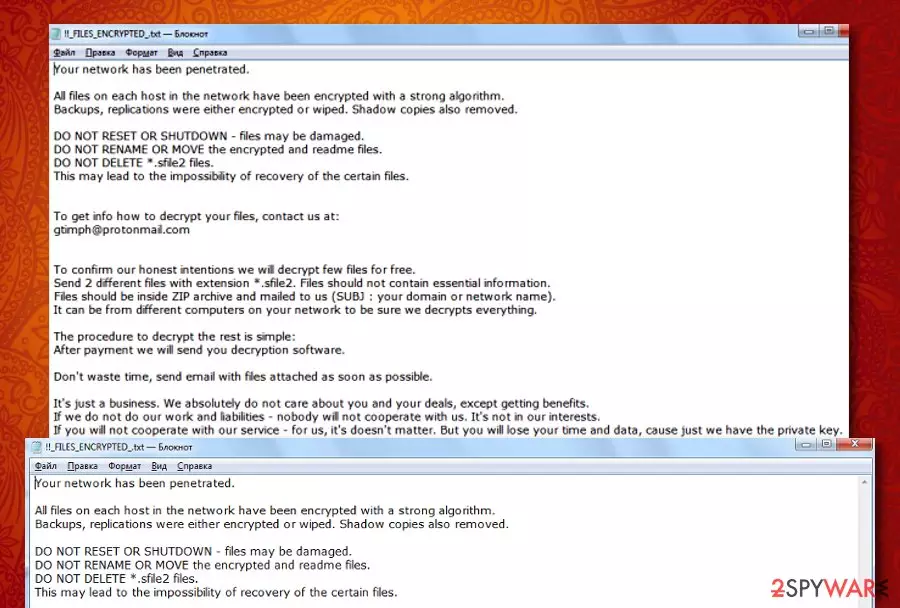
Then, Sfile2 ransomware deletes the Shadow Volume Copies of encrypted data by running specific PowerShell commands to prevent users from employing other types of recovery software. The elimination of Shadow Copies is even mentioned in the ransom note:
Your network has been penetrated.
All files on each host in the network have been encrypted with a strong algorithm.
Backups, replications were either encrypted or wiped. Shadow copies also removed.
DO NOT RESET OR SHUTDOWN – files may be damaged.
DO NOT RENAME OR MOVE the encrypted and readme files.
DO NOT DELETE *.sfile2 files.
This may lead to the impossibility of recovery of the certain files.
To get info how to decrypt your files, contact us at:
gtimph@protonmail.com
To confirm our honest intentions we will decrypt few files for free.
Send 2 different files with extension *.sfile2. Files should not contain essential information.
Files should be inside ZIP archive and mailed to us (SUBJ : your domain or network name).
It can be from different computers on your network to be sure we decrypts everything.
The procedure to decrypt the rest is simple:
After payment we will send you decryption software.
Don’t waste time, send email with files attached as soon as possible.
It’s just a business. We absolutely do not care about you and your deals, except getting benefits.
If we do not do our work and liabilities – nobody will not cooperate with us. It’s not in our interests.
If you will not cooperate with our service – for us, it’s doesn’t matter. But you will lose your time and data, cause just we have the private key.
Sfile2 ransomware provides a text message that is full of threatenings not to reset the computer system, not to rename, delete, or move the encrypted files as it might result in total data destruction. However, these are only sentences that are supposed to really scare people and rush them to make a decision towards purchasing the decrypter.
Sfile2 ransomware developers outline that it is just business for them and they only care about their own needs. However, these people still claim to provide the decryption tool to the victims as this is a way to cooperate. Of course, this can be a trick to hurry up the ransom transfer and you might be left with no recovery software at all.
The main reasons why you should not pay the hackers that are hiding behind Sfile2 ransomware is that these people might provide you with a fake tool, might give you no tool at all, or could urge for more money after you pay the starter price.
Even though Sfile2 ransomware does not provide any information about the ransom demands, all of the matters will likely be discussed via email. However, cybercriminals are likely to urge for a price anywhere between $100 and $2000 and, of course, ask for some type of digital currency transfer such as Bitcoin, Monero, or Ethereum.
Sfile2 ransomware is a cyber threat that brings unwanted modifications to the computer system some of which can be spotted in the Windows Registry section. If the malware modifies or deletes crucial keys in this directory, your computer and software might start slowing down, crashing, and facing various errors.

Another thing that Sfile2 ransomware can truly be capable of is downloading other malware forms to the device. Ransomware viruses are known for the infiltration of such parasites that have the mentioned capabilities:
- Trojan. Steals private information, banking data, overuses CPU power, damages software.
- Cryptocurrency miner. Mines cryptocurrency by overusing the computer's resources.
- Spyware. Spies on the user's private information, online activities, slows down your device.
The best way to avoid such type of malware installation is to remove Sfile2 ransomware from your Windows computer. This can be done by employing reliable antimalware software and loading the program for a full malware scan. Additionally, if any virus damage is found on your device, you can try fixing it with a tool such as FortectIntego.
If you are having trouble with Sfile2 ransomware removal and in case this parasite has removed all system restore points, the only option left for you is to boot your machine in Safe Mode with Networking. This function might allow you to deactivate the cyber threat and diminish the malicious changes that it has applied to your computer.
Also, if you are looking for ways to restore files that were encrypted by Sfile2 ransomware, paying the crooks is not necessary and is definitely not recommended. Instead of taking risks to get scammed, travel to the end of the article and pick out the most suitable data recovery technique that might work for your case.
Email spam, malicious files, and p2p sites are often full of ransomware
Security experts from LesVirus.fr[4] have found out that ransomware developers like to hide their malicious products in attachments that come together with email spam messages. Crooks pretend to be from reliable organizations such as FedEx or DHL to create a reliable look to the potential victims.
However, every time you receive an unexpected email, check the sender and better contact the company via mobile phone to figure out if they truly have sent you such a message. Furthermore, do not open any attached files before performing a full malware scan on them to make sure that they are not infected.
Additionally, the ransomware-related payload gets distributed through peer-to-peer networks that are filled with software cracks and malicious downloading links. Stop using these types of sources for getting your products and services, and change them into reliable and official ones.
Other sources where malware can be promoted are unsecured websites where you can find a lot of advertisements that come filled with malicious links. Avoid visiting any pages on the Internet that are marked as unsafe to proceed with and employ a reliable antimalware tool that will alert if something malicious is waiting for you.
Advanced removal guidelines for Sfile2 ransomware virus
.sfile2 files virus is a complex threat measuring to other possible infections such as browser hijackers or adware programs. Regarding this fact, you should not try to eliminate the virtual parasite by yourself as you will take risks of making mistakes.
As an alternative for Sfile2 ransomware removal, we recommend employing automatical antimalware software that is capable of dealing with such threats. Also, search the computer for possible damage with software such as SpyHunterCombo Cleaner or MalwarebytesMalwarebytes. If these programs find anything, you can try fixing the altered areas with the help of FortectIntego.
If you are having a difficult time to remove Sfile2 ransomware from Windows, the malware might be blocking your antimalware software or initiating other malicious changes to prevent its removal. Regarding this fact, try rebooting your computer in Safe Mode with Networking and diminishing all the suspicious modifications.
Did this guide help?
Be the first to comment