

Smart Fix It Registry Optimizer Pro – the system tool that should improve the performance of the machine but triggers pop-ups instead
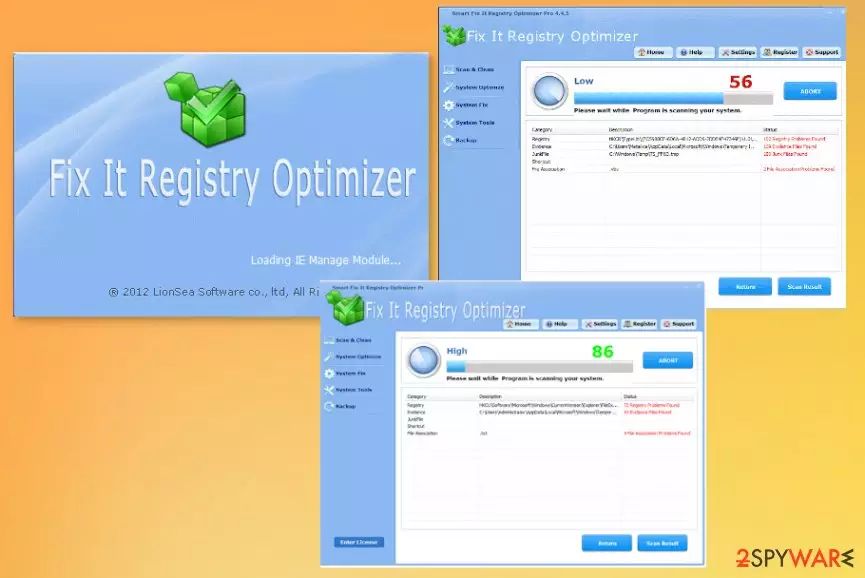
Smart Fix It Registry Optimizer Pro – the application that causes the AV tool detections with PUP alerts. This is the program that gets promoted online as a proper tool for the system. The optimizer should provide scans, cleaning functions, help with backup, system errors, and optimization. Unfortunately, the PUP is the category this tool falls into due to intrusive installations, promotional material on shady pages, and shady installation methods. Once the tool is willingly installed or manages to get on the machine during insecure freeware installations, you can see the icon added on the desktop, shortcuts, Task Bar entries, or even shady background processes.
Even though this is not a malicious tool or program users tend to use the term of Smart Fix It Registry Optimizer Pro virus to describe this optimization tool. Especially when AV tools report the program as PUP.Optional.SmartFixItRegistryCleaner The program uses false positives to trick people into thinking that their machines are affected by some system issues or even infections.
| Name | Smart Fix It Registry Optimizer Pro |
|---|---|
| Type | System tool/ Potentially unwanted program[1] |
| Issues | These fake optimizers use false positives to trick people into purchasing the full version of the tool, so the machine gets more affected. Also, advertisements can expose users to possibly malicious material, and trigger malware installs |
| Distribution | Freeware installations include such programs as an additional part of the download, so it manages to get installed automatically. Also, various pages with promotional material can trick people into installing the PUP with deals and discounts |
| Elimination | Smart Fix It Registry Optimizer Pro removal should include proper system check with anti-malware tools, so your device gets cleaned fully |
| Repair | You need to rely on proper system tools, so all the affected files, changed settings can be reversed back to normal |
Since the tool claims to scan your device and shows the list of issues found, you might believe that Smart Fix It Registry Optimizer Pro is valuable. In most cases, those problems are not related to your machine at all. So do not fall for any of these claims that suspicious programs display to you.
Smart Fix It Registry Optimizer Pro creates difficulties for users and problems with computers that it gets installed on. There are many problems that this shady tool can trigger itself because it is the program that can access various parts of the machine. Potentially unwanted programs trigger changes in the Windows Registry and other system folders.[2]
When your device gets affected by this PUP, you may also receive additional pop-ups, redirects, advertisements that keep you from visiting normal and safe content online. You should remove Smart Fix It Registry Optimizer Pro from the system as soon as possible because this tool does nothing valuable to your device.

Smart Fix It Registry Optimizer Pro is designed to show false results of the system scan, trigger pop-ups with material that is not associated with the machine you working on. There are many errors, system issues, and even malware detections that appear on the program window but are not associated with infected PC at all.
This is the technique used by many PUP developers who try to trick people into purchasing the licensed version of Smart Fix It Registry Optimizer Pro. Unfortunately, there is nothing about the program that could improve the performance for you. Nor the free version that you install yourself from shady pages or the paid tool can clear malware or fix errors. All these apps do rely on registry cleaning and junk file termination.
Make sure to react to the installation and pop-ups, redirects related to the program right away, and perform the Smart Fix It Registry Optimizer Pro removal, especially if you receive any pop-ups with PUP.Optional.SmartFixItRegistryCleaner results or alerts form the AV tool you use. rely on trustworthy anti-malware programs for that.

Fake discounts, offers, and promotional pages trigger unwanted installs
There are many sites that show promotional material on this PUP or any other programs. You may fall for the trick and install the application when you believe that this is the one that your machine needs. However, the download and installation process should indicate that the program is questionable.
When you see optional additions or receive pop-ups about changes in the system, you should immediately be suspicious. Go for official sites, providers, developers, and select Advanced, Custom options every time you install any programs. This is how you control all the installs yourself. Experts[3] always talk about unwanted installations, so stay away from deceptive sites.

Get rid of the Smart Fix It Registry Optimizer Pro PUP
You may have some trouble when trying to remove Smart Fix It Registry Optimizer Pro from the machine because it manages to affect some files and functions of the computer to ensure the persistence, keep the program running for a while. This is why you need to rely on proper tools for elimination.
Try to get a trustworthy anti-malware application and run the scan checking form dangerous tools with it. This could be the best option for the Smart Fix It Registry Optimizer Pro removal procedure because you can see all the associated files and programs too.
Smart Fix It Registry Optimizer Pro virus or any more crucial threats and unwanted applications can trigger changes in the background, system folders, and so on. So rely on PC repair tools to clean the system fully.
Uninstall from Windows
Uninstall from Windows 10/8:
- Type Control Panel into the Windows search box and open the result.
- Under Programs, select Uninstall a program.


Uninstall from Windows 7/XP:
- Click on Windows Start > Control Panel (Windows XP users should click on Add/Remove Programs).
- In Control Panel, select Programs > Uninstall a program.


Remove the unwanted program:
- In the Programs and Features window, look for any recently installed suspicious entries, select them, and click Uninstall.
- If User Account Control appears, click Yes to confirm, then complete the removal.


Did this guide help?
Be the first to comment