

Super Antivirus 2018 is fake security software for Android devices
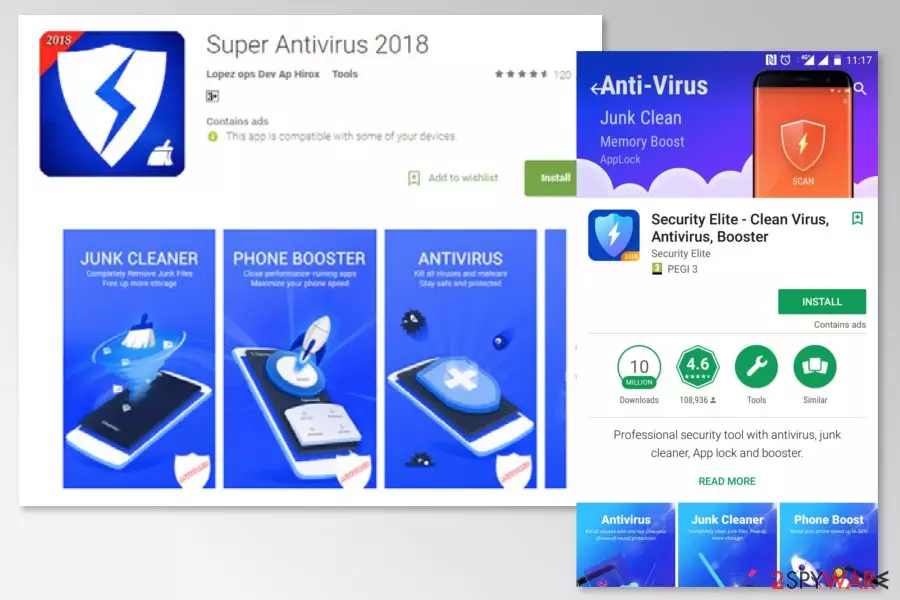
Super Antivirus 2018 is a rough security program that is promoted as a legitimate tool. However, it’s a potentially unwanted program (PUP) that was available on Google Play Store since October 2017. Fortunately, it was removed, but it might still be available on questionable third-party app stores.
According to the developers, Super Antivirus 2018 can “detect 100% of viruses and malware through personalized scanning.” However, it barely completes its primary function. It can only scan and detect about 500 apps, but some of them are safe to use, the Sophos[1] researchers say.
However, the Super Antivirus 2018 can initiate fake system scan and give misleading results. This rough antivirus makes people believe that their devices were infected with Android virus and need to be fixed. In order to do so, they are asked to install other software.
Super Antivirus 2018 malware was noticed promoting other questionable security software called Security Elite – Clean Virus, Antivirus, Booster. However, this program does not seem to be reliable too. Thus, users are advised to stay away from it and get rid of the fake antivirus.
Additionally, Super Antivirus 2018 virus might deliver ads promoting other apps, such as games or entertainment applications. However, their credibility is questionable too. To keep your device safe from unwanted apps, you should not install any of promoted applications.
According to the researchers, fake security software was installed about 50.000 times. Meanwhile, the Security Elite – Clean Virus, Antivirus, Booster application was downloaded more than 50 million times. Thus, users are advised to remove these apps immediately.
In order to remove Super Antivirus 2018, you should access your Android apps and uninstall it as a regular application. If you have installed other promoted apps, you should get rid of them too. You should not have any difficulties with the elimination of this PUP. However, if you keep receiving ads or cannot uninstall fake antivirus, you should opt for automatic deletion.
Automatic Super Antivirus 2018 removal requires scanning your Android device with mobile anti-malware. We suggest using FortectIntego. However, you can choose other preferred software to clean your smartphone from suspicious PUPs.

Malicious apps can end up on legit Google Play Store
Super Antivirus 2018 was uploaded to Google Play store, meaning that users have to be careful when downloading apps even from legitimate sources. The problem is that developers of malicious apps or PUPs find new ways how to trick Google’s security algorithms.[2]
For this reason, a mobile security team from semvirus.pt[3] remind the major tips that you must follow in order to avoid infiltration of Android malware or PUPs:
- Downloads apps only from Google Play store, but check information about the developers;
- Read user reviews and opinions outside the store before installing the app;
- Check app permission and do not install apps that ask more than they need.
Uninstall Super Antivirus 2018 from Android smartphone
You should be able to remove Super Antivirus 2018 easily as any other Android app. Thus, you have to:
- Access your device’s Settings app.
- Navigate to Apps & Notifications (Applications, Apps or similar – this location might be named differently based on your device’s model).
- In the list of appeared programs, find this fake antivirus and other questionable apps and tap it (if you do not see them, click See all apps or App info option).
- Choose Uninstall.
However, you can also go for automatic Super Antivirus 2018 removal and scan the system with FortectIntego or similar mobile-friendly and legitimate security software. Within a couple of minutes, this rough antivirus will be eliminated from your device.
Did this guide help?
Be the first to comment