

What is known about SurveyLocker ransomware?
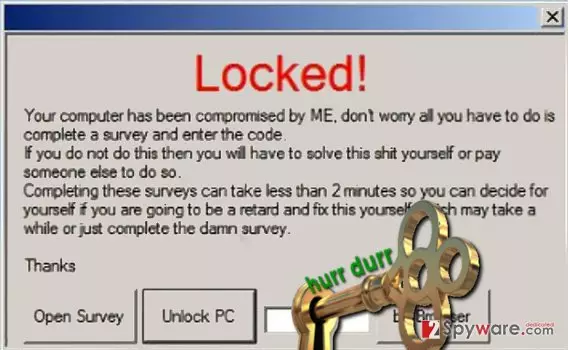
SurveyLocker virus is not a crypto-ransomware like the majority of ransom-demanding viruses nowadays. It is a screenlocker[1], which means it does not distort, encrypt, lock, or touch your personal files in any way. Instead, it just prevents the user from accessing the computer and instead of asking for a ransom, virus wants you to fill out a suspicious survey. Once installed, the virus displays a window on victim’s screen, which says:
Locked!
Your computer has been compromised by ME, don’t worry all you have to do is complete a survey and enter the code. If you do not do this then you will have to solve this s*it yourself or pay someone else to do so.
Completing these surveys can take less than two minutes so you can decide for yourself if you are going to be retard and it this yourself which may take a while or just complete the damn survey.
However, you do not have to comply with virus’ authors’ rules and do as they say. We already know the password that shuts down the SurveyLocker ransomware, but since the program is buggy, it might start displaying “not responding” messages and crash. To completely remove SurveyLocker malware, use anti-malware program like FortectIntego and clean the system professionally. The fact that you have allowed this virus slither into your computer shows that it lacks protection, and you should definitely take care of this matter. Please read instructions provided below the article to find out how to complete SurveyLocker removal.
When did SurveyLocker attack my PC?
SurveyLocker malware can be installed along with fake software updates, downloaded from malicious emails[2], corrupted websites, and so on. Typically, ransomware viruses are obfuscated and delivered in a form of a simple file that doesn’t arise suspicion. If the victim opens it, the ransomware gets activated and starts to carry out malicious procedures right away. In other words, ransomware, like any other malware, typically uses Trojan horse technique to get into target’s computer system. We suggest you not trust unknown websites or people who send you emails if you are unfamiliar with them and use your common sense to prevent malware attacks[3].
To protect your PC from malware attacks, setting up a shield with anti-malware software is always a good idea. If you do not have any security program, you can try the ones we recommend in Software section. You can try to remove the virus with the anti-malware you have, but you must update it before doing so!
How to remove SurveyLocker screen locker from my computer?
Just remove SurveyLocker virus without any hesitations because this virus is nothing but a piece of junk that pretends to be a fearsome virus. In reality, it is a low-level ransomware that you can easily defeat with anti-malware software. However, if you have been infected with a poorly programmed ransomware, it doesn’t mean that the rest of ransomware is the same. There are much more dangerous viruses that can steal personal data[4] or corrupt your personal files for good[5]. Therefore, we strongly recommend you start SurveyLocker removal right away and consider using anti-malware software so that it could defend your PC in the future.
Did this guide help?
3 comments
swing
The password is funny. It works, though.
Delight_V
Im laughing @ this ransomware. Its foolish
#ela
Why the hell the ransomware wants me to fill a survey? Kids these days... creating stupid ransomware and stuff