

Systheal Optimizer is a program that cannot be easily noticed on the computer
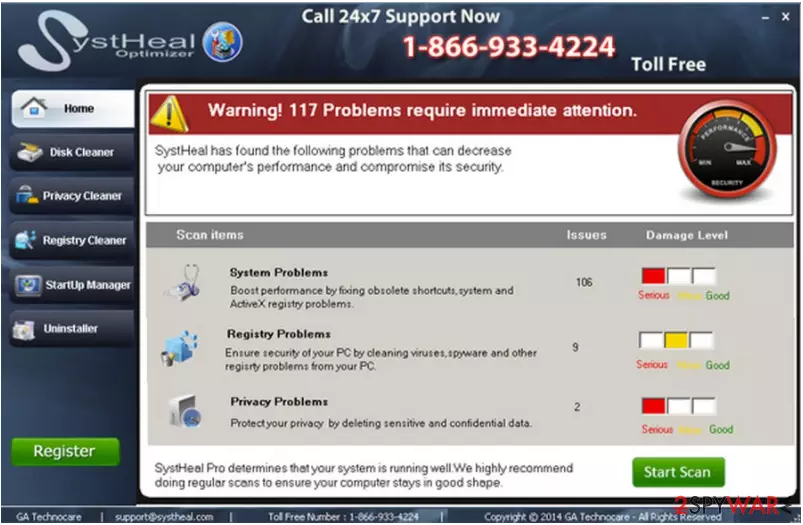
Systheal Optimizer is another application, which promises to help people speed up their computers. Unfortunately, after testing it on several of our computers, we think that it can hardly do that and that you shouldn't pay for its 'licensed' or 'full' version. It seems that this program acts as a typical scareware, which starts warning people about various system issues as soon as it enters the computer.
After doing so, it then offers to eliminate them and claims that this will help you to increase your PC's speed. Of course, you get the ability to do that only after purchasing its 'licensed' version. Unfortunately, the main thing that people who have already purchased Systheal Optimizer don't know is that it reports only about a small part of outdated registry entries and other issues.
| Name | Systheal Optimizer |
|---|---|
| Type | System tools |
| Symptoms | Users receive alerts about non-existent system problems and are encouraged to purchase the software license |
| Distribution |
|
| Removal | You can terminate Systheal Optimizer with anti-malware tools |
| Repair | You can get FortectIntego to check the real state of your PC |
If you remove any registry entries or files from the system, you won't increase your PC's speed, so there is no need for you to pay for Systheal Optimizer. By the way, you may notice its ads out of nowhere because this program is actively spread using freeware and shareware.
In this case, you should remove Systheal Optimizer from the system because you can never know what system changes this program may initiate on your PC. For that system damage, you can use FortectIntego and ensure that the damage gets fixed properly.
Systheal Optimizer is promoted on various download sites and its official website systheal.com that claims that this program is a totally valuable tool for those who seek to increase the speed of their computers.
Of course, as we have already said, you should think twice before installing Systheal Optimizer on your computer. But it happens and it happens commonly. You need to run AV tools more often, so you avoid these PUPs quicker.
PUP distribution methods include
No matter that it looks harmless, it's trial version doesn't have uninstalled, so you may have serious problems when trying to remove this program. Unfortunately, it seems that Systheal Optimizer's developers have also started using another method for spreading this optimization tool around.
It is called bundling and it can't be imagined without freeware and shareware. If you want to avoid infiltration of this or other questionable software, be very careful when downloading free programs on your computer. You should be especially careful when installing download managers, PDF creators, and similar programs.
If the Systheal Optimizer virus gets the ability to enter your PC unnoticed, you should start noticing its ads and notifications. Please, ignore them because you may lose your money. If you think that your computer is slower than ever, you should look for more reputable programs around.
Make sure to remove Systheal Optimizer using professional AV tools
For eliminating Systheal Optimizer from your computer, you have two options. You can uninstall this program from the system just like any other application or remove it with a help of our recommended programs.
If you want to avoid leaving questionable files on the system and other leftovers of Systheal Optimizer, you should choose automatic removal. For that we recommend using SpyHunterCombo Cleaner or MalwarebytesMalwarebytes.
For manual removal of Systheal Optimizer, we recommend you using these steps:
- Click Start → Control Panel → Programs and Features (if you are Windows XP user, click on Add/Remove Programs).
- Here, look for Systheal Optimizer.
- Uninstall it and other questionable programs.
- Click OK to save these changes.
You should also rely on tools like FortectIntego that can help with Systheal Optimizer virus damage and alterations that got triggered by infection.
Did this guide help?
2 comments
john
systheal is not listed in the control panel programs so how do I remove it?
six
I am having the same issue!