

The Brotherhood ransomware is a file-locking virus using .ransomcrypt file extension
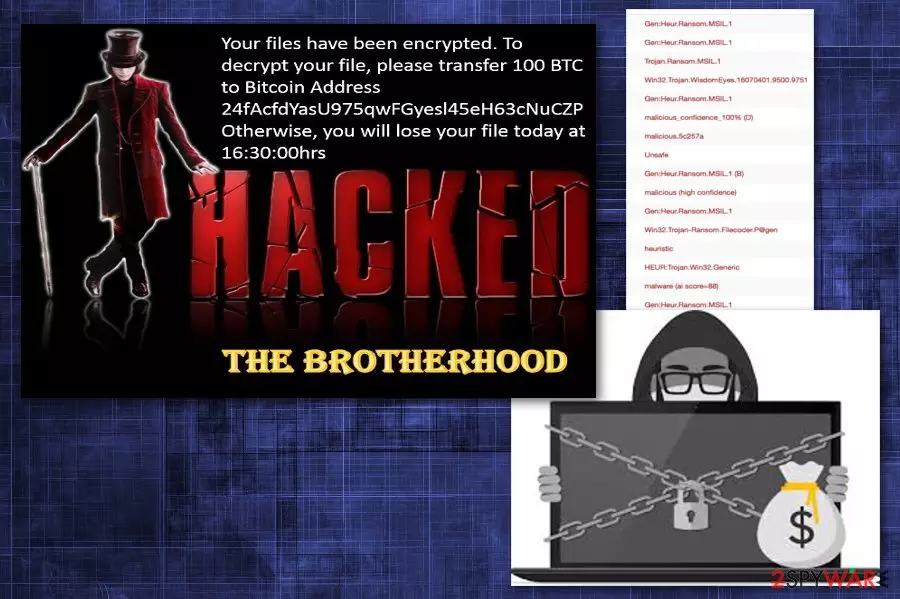
The Brotherhood ransomware — a dangerous virus that has been blackmailing victims into paying a ransom for several weeks now. This malicious program is capable of locking target files and appending the .ransomcrypt file extension right after this procedure is finished. For locking the data, the virus uses AES encryption[1] method. This modification makes it not accessible to the user and useless. However, at the moment, The Brotherhood ransomware is encrypting Documents folder only. After compromising files, virus drops the RansomNote.jpg file on victim's desktop and sets it as its background.
| Name | The Brotherhood |
|---|---|
| Type | Ransomware |
| Encryption method | AES |
| File extension | .ransomcrypt |
| Ransom file | RansomNote.jpg |
| Ransom amount | 100 BTC |
| Symptoms | Locked files, ransom note on a desktop, changed PC performance |
| Distribution | Spam email attachments |
| Elimination | Use FortectIntego for virus removal |
Nevertheless, the ransom note of this ransomware does not provide much information. There is no specific information about virus developers and no contact information that is usually provided in this type of message. There is only a mention that hackers are requesting 100 Bitcoin ransom. However, the provided wallet is invalid.
Researchers[2] and IT enthusiasts believe that this virus is still in a development phase or was launched as a joke. However, after scammers started spreading this program, it has been causing serious harm.
The ransom note of the The Brotherhood ransomware reads:
Your files is have Been encrypted. To decrypt your file, please transfer 100 The BTC
to the Bitcoin the Address
24fAcfdYasU975qwFGyesl45eH63cNuCZP
Otherwise, you will of Lose your file today has been AT 16: 30: 00hrs
HACKED THE BROTHERHOOD
It is discovered that The Brotherhood ransomware virus has hardcoded key. This fact could increase the possibility to recover encrypted files significantly. However, since decryption tool is not available, you should focus on virus removal first. Additionally, consider recovering your data from the backup or follow our data recovery tips given at the end of this post.
The ransomware might have additional pieces and make more harm that you can think of. Additional tools or programs can change your browser settings or secretly attract malware. Ransomware-type viruses can change your Windows registry key or access more prominent system settings. Virus existence on your system is damaging in time.
As you must have already understood, you have to remove The Brotherhood ransomware from your computer as soon as you can because it is not an ordinary threat. While this program might have entered your system as a joke, it should still be treated with caution.
We note that The Brotherhood removal takes time. To make this process as smooth as you can, pay enough attention to the removal software you use. Professional tools like FortectIntego will help you ensure that this infection is eliminated for good. Any infection that might try to infiltrate your system in the future will be eliminated as well.

To prevent ransomware, take emails with dubious content more seriously
Spam email box fills up fairly quickly, and you need to delete those letters immediately after getting them. However, people are not paying attention to these details. Those emails might contain various content. From malicious macro-viruses[3] to Trojan backdoors. This type of malware lets intruders in your system unknowingly.
Various advertisements and redirects might be frustrating but always remember that you need to think about possible threats behind every ad or suggested software purchase. Any purchase might add virus instead of a utility tool. Even those safe-looking Word files after you download them are not that safe. Often these files contain viruses and spread ransomware or other malware on your PC the minute you open them.
Get rid of The Brotherhood ransomware with the help of specific tools
If you are trying to delete this malware at once, you need to consider using anti-malware tools. The Brotherhood ransomware removal might be a complicated task for you, especially if you are not an experienced PC user. Otherwise, your system might become vulnerable to other infections that can easily initiate more system changes and similar problems.
To remove Brotherhood ransomware from the system (typically Windows OS), a full system scan is required. This is why we recommend FortectIntego, SpyHunterCombo Cleaner and MalwarebytesMalwarebytes for this procedure that are certified tools that will recover the safety of your system after the attack. If your scanner is blocked, we have a guide below that can help you disable the malware.
Did this guide help?
Be the first to comment