

TorLocker ransomware is a virus that locks files and demands money for the decryption key
TorLocker or CryptoLocker is officially listed as ransomware or a PC threat, which may encrypt files on people's computers and prevent them from opening them until they pay the ransom. Cybercriminals who have developed this ransomware have adapted it to all types of Windows OS, which means that it doesn't really matter if you are using Windows XP, Windows Vista, Windows 7, or Windows 8, etc. because this virus can easily land on your computer if you open an infected email attachment, fake software update alert or any other suspicious things.
The majority of ransomware is targeted at the users from a specific country (usually the USA, Canada, Italy, Russia, the UK, and so on). However, the TorLocker virus can affect random computers despite their location.
Once activated, TorLocker virus scans the computer and looks for predetermined types of files (.3gp, .avi, .doc, .docx, .jpg, .mov, .mp3, .mp4, .pdf, .png, .psd, .rar, .wma, .zip, etc.) in order to encrypt them. Once these files are selected, the ransomware adds an extension to each of them and starts showing its alerts urging you to transfer $300 ransom using BitCoins, UKash, or PaySafeCard within 72 hours.
In order to scare you into thinking that there is no other solution but to pay the ransom immediately, the TorLocker virus alert informs that after 72 hours the decryption code will be deleted and you will never get back files that have been stored on your PC. However, before you make the payment, you should think twice about whether paying the ransom will help you to get rid of TorLocker virus and get back the data. In fact, paying this ransom is equivalent to sending your money straight to cybercriminals, who may initiate further thefts from your bank account and may even cause identity theft.
If you want to protect your computer and yourself from such issues, you should install a powerful anti-spyware, such as SpyHunterCombo Cleaner or MalwarebytesMalwarebytes. A powerful program will not only protect your computer from infections in the future but will also help you successfully remove TorLocker ransomware from your device.
Unfortunately, if your PC has been infected with TorLocker ransomware, even after removing it the files will remain locked. But if you have backups of your files on another device, you can easily restore important data. Just remember that after removing the virus it is very important to fix any broken system files or other issues. FortectIntego or some other reliable tool will help you do it very quickly.
You can protect the computer from ransomware by acting more carefully
Ransomware is usually distributed via infected email messages (spam), exploit kits, botnets (usually Andromeda), and fake software update alerts. Be aware that other ransomware, such as CryptoWall, CryptoDefense, CryptorBit, and many others are distributed this way as well. Therefore, awareness of such computer threats should encourage you to make regular backups of your data.
If you want to keep your computer safe, you should always keep an updated anti-spyware installed on your computer and start verifying the content that is provided during your browsing. Security experts have noticed the tendency of this ransomware to be hidden under the email attachments, for example, 'UPS Exception Notification' or Java and Flash Player update alerts. Therefore, you should avoid opening suspicious-looking emails and other questionable content, which shows during your browsing.
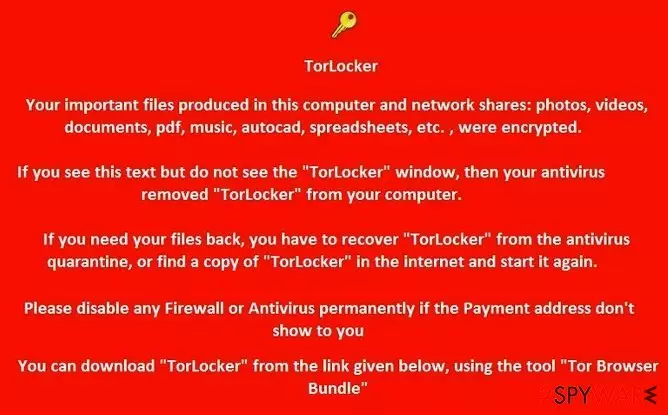
Once the TorLocker virus encrypts the data stored on your computer, you may receive such an alert:
TorLocker – Your important files produced in this computer and network shares: photos, videos, documents, pdf, music, auto cad, spreadsheets, etc., were encrypted. If you see this text but do not see the “TorLocker” window, then your antivirus removed “TorLocker” from your computer. If you need your files back, you have to recover “TorLocker” from the antivirus quarantine, or find a copy of “TorLocker” in the Internet and start it again. Please disable any Firewall or Antivirus permanently if the Payment address don’t show to you. You can download “TorLocker: from the link given below, using the tool “Tor Browser Bundle”.
We agree that the TorLocker notification really seems threatening; however, you should ignore it because it's just a deceptive way to make you give away your money. Hackers may not give a decryption key even after you pay the ransom.
You should remove TorLocker ransomware and only then try to restore files from the backups
If you want to remove TorLocker ransomware from the system, you can use the steps that are given below. We recommend removing the virus with a powerful antivirus program. SpyHunterCombo Cleaner or MalwarebytesMalwarebytes is perfect for this task.
By the way, after such an experience, you should start thinking in advance about the security of the data on your computer. The most reliable way to maintain your data safe is to make backups and keep them in a safer place than the same computer. For example, you can use:
- USB external hard drive,
- CDs,
- DVDs,
- Google Drive,
- Dropbox,
- Flickr and so on.
In addition, after a successful TorLocker virus removal, you need not only restore the data from backups but also to fix system files that may have been damaged by the virus. The easiest way to do this is to use a reliable fixing tool, such as FortectIntego.
Did this guide help?
Be the first to comment