

Trojan Woreflint – a security threat that might be marked by your anti-malware
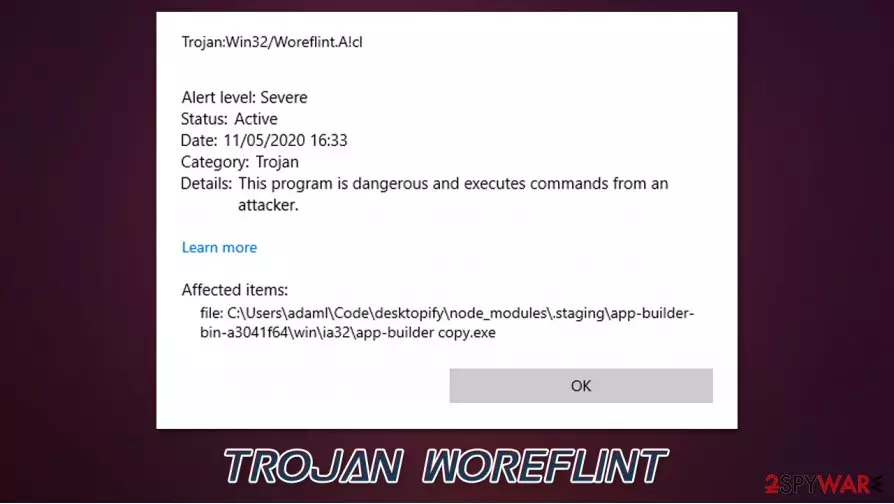
Trojan Woreflint is a malicious program that can be designed for numerous purposes. Some of its versions even represent threats such as Agent Tesla, while others can be related to browser contaminations. First spotted in early 2018, the Trojan has been detected under nine different names relating to the threat.
By definition, a Trojan is a type of threat installed on the machine by users who mistakenly believe that the executable file is safe to use, for example, after receiving a phishing email or when downloading an application from an insecure third-party website. Additionally, some of the Trojan versions were spotted in the web browser cache of Edge or another web browser, as users complained that Windows Defender flagged up Trojan:Script/Woreflint.A!cl there. It is also important to note that the detection name of generic, which means that some detections might be a false positive.
Regardless of which version you are dealing with – if it is not a false positive – Trojan Woreflint removal is a mandatory process to ensure that your personal information is secure and no further infections occur.
| Name | Trojan Woreflint |
|---|---|
| Type | Trojan |
| Distribution | Malicious spam emails, software cracks/keygens/loaders, pirated programs, fake updates, etc. |
| Symptoms | Anti-malware software detection popup is the only symptom you are are likely to notice |
| Dangers | Trojans can perform a variety of different functions on the system, including information theft, personal file encryption, traffic interception, proliferation of other malware, remote PC control, etc. |
| Malware removal | Perform a full system scan with powerful security software, such as SpyHunterCombo Cleaner |
| System fix | Malware can seriously tamper with Windows systems, causing errors, crashes, lag, and other stability issues after it is terminated. To remediate the OS and avoid its reinstallation, we recommend scanning it with the FortectIntego repair tool |
As mentioned in the introduction, Trojan Woreflint virus can represent a variety of different versions, the most commonly-encountered ones include:
- Trojan:Win32/Woreflint.A!cl
- Trojan:Script/Woreflint.A!cl
- Trojan:Win32/Woreflint.A
- Trojan:Script/Woreflint.A!rfn
- Trojan:Script/Woreflint.A!ctv
- Trojan:Win32/Woreflint!MTB
- Trojan:Win32/Woreflint.A!MTB
- Trojan:Script/Woreflint.A!MSR
- Trojan:Win32/Woreflint.AK!MTB
As evident, the main difference between these versions that a script is indicated – this is related to malicious scripts that can be encountered on various websites or after malicious executables are launched. Upon accessing a website, users might be subjected to JavaScript launched as soon as they enter. In some cases, when software vulnerabilities are not patched, Trojan Woreflint malware can be launched automatically. If you run anti-malware software, it will indicate that it stopped the threat.
The “Win32” indicates that the infection resides in a malicious program that is attempting to be launched on a Windows system. This typically occurs when users attempt to install, for example, a pirated program that has been injected with malicious code. Therefore, if such an event occurred to you, you should not hesitate and remove Trojan Woreflint virus using your security tool. In case Windows Defender is unable to delete the threat, you should employ alternative software, such as SpyHunterCombo Cleaner or MalwarebytesMalwarebytes.

Some users also complained that certain games, downloaded from official sources such as Steam, might be detected as Trojan:Win32/Woreflint.A!cl. It is very unlikely that a game downloaded from an official platform would contain malicious code, so, in this case, the detection is a false positive. If you are not completely sure, you should launch a scan with an alternative security software or contact game developers/anti-malware tech support to clarify things for you.
Note: if you encounter errors, lag, BSODs, crashes, and other issues, it is likely that malware managed to penetrate some system files. In order to repair this damage, we recommend using FortectIntego – it might help you to avoid the reinstallation of a damaged operating system.
Trojans can be distributed via various means: learn to reduce the risk of infection
As mentioned previously, Trojans are not defined by their functionality but rather by methods they are distributed through. Cybercriminals are sophisticated individuals who always come up with new ways to deliver malware to users, hence infections are so prevalent. Luckily, there are several ways to reduce the risk of the infection to a minimum – here are some tips by security experts:
- Equip your system with powerful anti-malware and keep it updated at all times;
- Install Windows and other program updates regularly;
- Never allow email attachments to run a macro function on your machine;
- Do not click on links within suspicious emails – hover your mouse over to see the real destination URL;
- Use strong passwords for all your accounts;
- Do not download software cracks, keygens, loaders, or pirated program installers from torrent sites;
- Install powerful ad-block that would stop malicious scripts from being executed upon website entry.
Delete Trojan Woreflint without hesitation if it is not a false positive
When dealing with detection and Trojan Woreflint removal, it is important to note what type of actions you were performing. If you were opening an email attachment or if you were attempting to download a software crack – there is almost no doubt that the threat should be quarantined and deleted immediately.

If the pop-up came seemingly out of nowhere or during the installation of an app you know is secure, it definitively requires more investigation before you remove Trojan Woreflint. As mentioned above, you should immediately perform a full system scan with SpyHunterCombo Cleaner, MalwarebytesMalwarebytes, or other alternative security tools. This should give a good idea of whether the installer is actually something you should be concerned about.
Once you remove Trojan Woreflint virus with Windows Defender or another security tool, you should also perform additional checks with the Windows repair tool FortectIntego – it should fix all the damaged Windows system files, such as registry errors.
Did this guide help?
Be the first to comment