

Things you should know about Windows PC Backup Wizard
Windows PC Backup Wizard may not be a virus, but it is definitely a potentially unwanted program (PUP). Promoted as a backup software, it is usually installed along with some other freeware programs downloaded from the Internet sources. PC Backup Wizard may be a completely legitimate and handy program. However, the constant pushing to use this program can be rather annoying. Once it is installed, this program will send you notifications, labeled as critical alert every 10 minutes, encouraging you to “Activate Windows Backup Now!”. Clicking on the OK button will lead you to a registration screen which pops up in front of other programs which might be running at the same time. This registration screen cannot be closed unless you register or terminate the process via task manager. It seems that the critical alert notification and inability to easily close the registration screen forces the user to sign up. Some of the less experienced users may sign up merely because they want to stop the registration screen from interrupting their work. Others, because they are concerned about their system’s safety considering this critical alert. These are the key reasons why you should remove Windows PC Backup Wizard from your computer without hesitation.
In fact, there are other programs working on a similar principle. For instance, a program called PC Mechanic 2015 is also portrayed as a useful tool for the computer’s system management but, in fact, is a fraudulent application too. It scans the user’s computer for possible issues, and after it is done, it displays a number of problems, including, numerous junk files, bad registry entries and other. Then the user is offered to buy a full PC Mechanic 2015 version to fix these issues.
As you can see, such programs only manipulate the information to get users into downloading or purchasing their products. So if you are encountering similar issues on your computer, always make sure the alerts proposed by some suspicious programs are true. You can use some alternative anti-malware tools to shed some light on the legitimacy of these applications, such as FortectIntego.
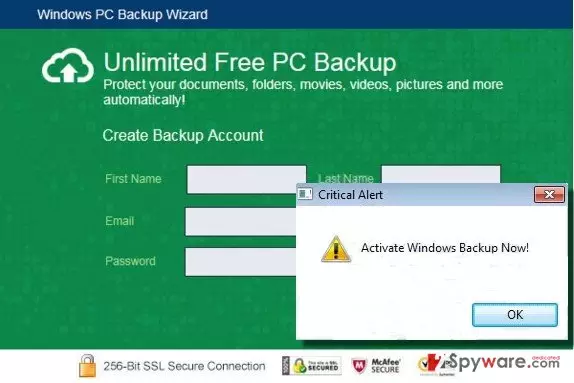
How is PC Backup Wizard distributed?
As already mentioned before, PC Backup Wizard, like any other potentially unwanted software is distributed using a deceptive marketing method called “bundling.” This means that the PUP programs are attached to some other software. Usually, PUPs attach to popular file sharing applications, PDF creators, video and music players. When the user installs these applications into his/her computer system, the additional programs also install simultaneously. The problem is that these processes in most cases happen without the user’s knowledge or permission. Therefore, it is essential to be very careful when downloading and installing new software. Since no one has time to worry about PUP’s like Windows PC Backup Wizard removal, it is better to protect yourself from letting them enter your system beforehand. Always make sure to use either “Custom” or “Advanced” installation settings. This will help you disclose any additional unwanted programs waiting to be installed.
Can I delete Windows PC Backup Wizard from my computer?
The answer is YES; you can. It is not a system file or anything as important. Windows PC Backup Wizard virus is just another unnecessary application in your computer which takes up space and annoys you with unwanted alerts. If you want to remove Windows PC Backup Wizard from your computer, you can do that by simply uninstalling the software since this option is available. And do not forget to scan your system with some antivirus tool like FortectIntego or MalwarebytesMalwarebytes to make sure all the Windows PC Backup Wizard components are eliminated.
Follow the steps below to remove Windows PC Backup Wizard from your computer:
- Click ‘Start’ and select ‘Control Panel’.
- Click ‘Uninstall a Program’ under ‘Programs’.
- Choose ‘Windows PC Backup Wizard’ and similar components, and select the ‘Uninstall/Change’ option.
- Click ‘Yes’ and ‘OK’ to save the changes.
Did this guide help?
8 comments
abdul
thank u sir this advice helped me clean pc from virus. u very good
Gösta R.
This Windows PC Backup Wizard tool looks legit, going to remove it anyway. Just in case
Cajsa11
I had Windows PC Backup Wizard in my computer not while ago. Good thing i deleted it!
elsa
Please need to removed "Windows PCBackup Wizard
Block the pc can,t do anything..
Bill
had my laptop serviced online by Yippee included in the programs was PC Backup wizard, when you try to uninstall it, when you should see a yes button, the green label of the wizard covers it preventing removal, been on the phone for ages with Yippee but they appear beaten.
Bill
in same boat,even tried Yippee who serviced my laptop on line and then it appeared, been on phone for ages with them but no joy.
Jeff
Before you do the uninstall, go into task manger (ctrl-alt-del) and search for the process (not application) "pcbw..." and end that process. That should close the program so you can do the uninstall the right way.
AJ
You the man