

YOLO ransomware is cryptovirus that was developed by Jigsaw creators who call themselves Red Team
| Name | YOLO ransomware |
|---|---|
| Type | Cryptovirus |
| Family | Jigsaw ransomware |
| File extension | .YOLO |
| Main executable | Isass.exe |
| Contact email | redteam@yolosecfamework.com |
| Distribution | Spam email attachments |
| Elimination | Use MalwarebytesMalwarebytes to remove YOLO ransomware and clean the system further using FortectIntego |
When the main YOLO ransomware virus payload was analyzed, a malware scan revealed various detection names.[1] Based on them, the Jigsaw ransomware connection was revealed. Also, other researchers indicated that this is a serious threat that has been attacking users recently.
The main working principle of YOLO ransomware and other crypto malware is to lock users' files and demand payment for the decryption key. The file-locking process is based on army-grade encryption algorithms that help to change the original file code.
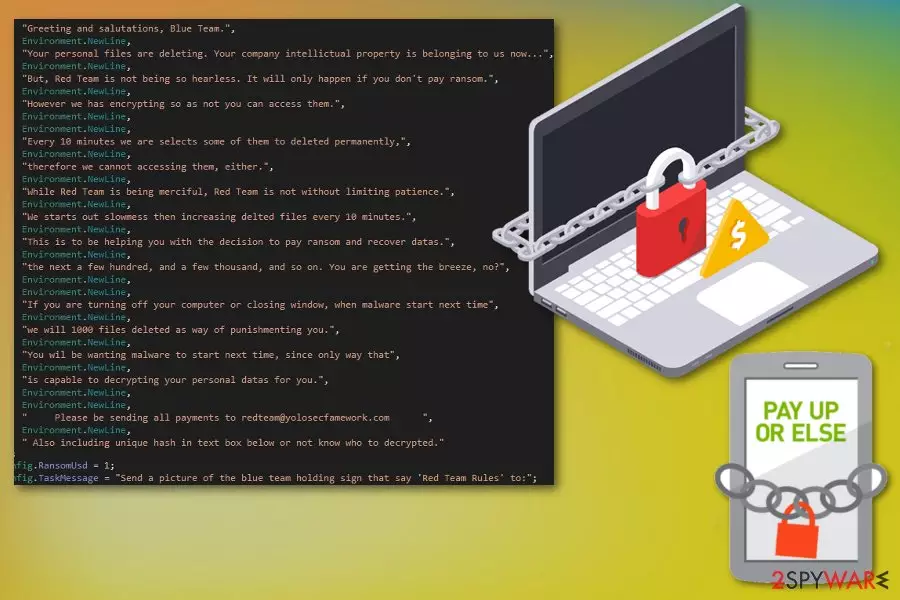
Usually, when the encryption is done, virus developers display the ransom note with payment instructions, ransom amount or more specific details about the attack. At the time of writing, we have no information about the particular file YOLO ransomware displays as a ransom message. However, the researcher that exposed this activity revealed virus developers' note to the victims.
YOLO ransomware virus creators call victims Blue Team while they are the Red Team. The name is also indicated in the contact email redteam@yolosecfamework.com that is revealed. Other facts stated in this release:
- Every ten minutes new data gets deleted;
- Up to 100 or 1000 files could get deleted permanently if you do not pay in time;
- The malware can reappear when you reboot your device;
- Virus developers ask to send them a photo of yourself holding a sign with “Red Team Rules.”
Although ransomware creators state they can decrypt your files, you shouldn't trust these people. Often, victims pay, and their data is not recovered.[2] You should avoid contacting criminals and focus on malware termination. You can remove YOLO ransomware using MalwarebytesMalwarebytes or similar anti-malware.
The best solution is automatic YOLO ransomware removal because you need to delete all files and programs added by the malware itself. Also, malware like this leaves a lot of damage to the system that can affect the device further. For this, use FortectIntego and scan the system again to fix all issues.

Macro-filled file attachments distribute malicious programs
Commonly found file formats like Microsoft Word, Excel or PDF often conceal malicious content in the file itself. Spam emails have file attachments in these formats and users tend to open them without paying attention. Unfortunately, when you are suggested to enable contents, you can launch malicious process or automatic installation of direct malware.
Look for red flags on emails before trusting the content. If you are not expecting to get an email, delete the received one. Especially when the email:
- Appears like sent from the legitimate company you are not using;
- Includes little to no information and file attachment;
- Subject line says “Invoice” or “order information.”
Researchers[3] note that you can also try scanning the file attachment before downloading and opening that on the device directly. This way you can see the purpose of the document and avoid severe malware infection.
Terminate YOLO ransomware and improve the security of your machine
When you deal with YOLO ransomware virus, remember that crypto malware affects more significant parts of the system because of changes Windows Registry entries, alters or adds files in the system folders and disables some functions or programs.
However, you can remove YOLO ransomware and all malicious files, programs at the same time if you use FortectIntego, FortectIntego or MalwarebytesMalwarebytes for the process. These tools perform a full system scan and indicate all possible threats. You need to follow the suggested steps to clean the machine entirely.
When the YOLO ransomware removal is done, double-check by performing a system scan again. If you are not sure that the device is malware-free, you may damage your files. When ransomware is not deleted entirely, it encrypts your files again.
Did this guide help?
Be the first to comment