

“Your computer is locked” virus is a scam-based threat that aims to get users' money
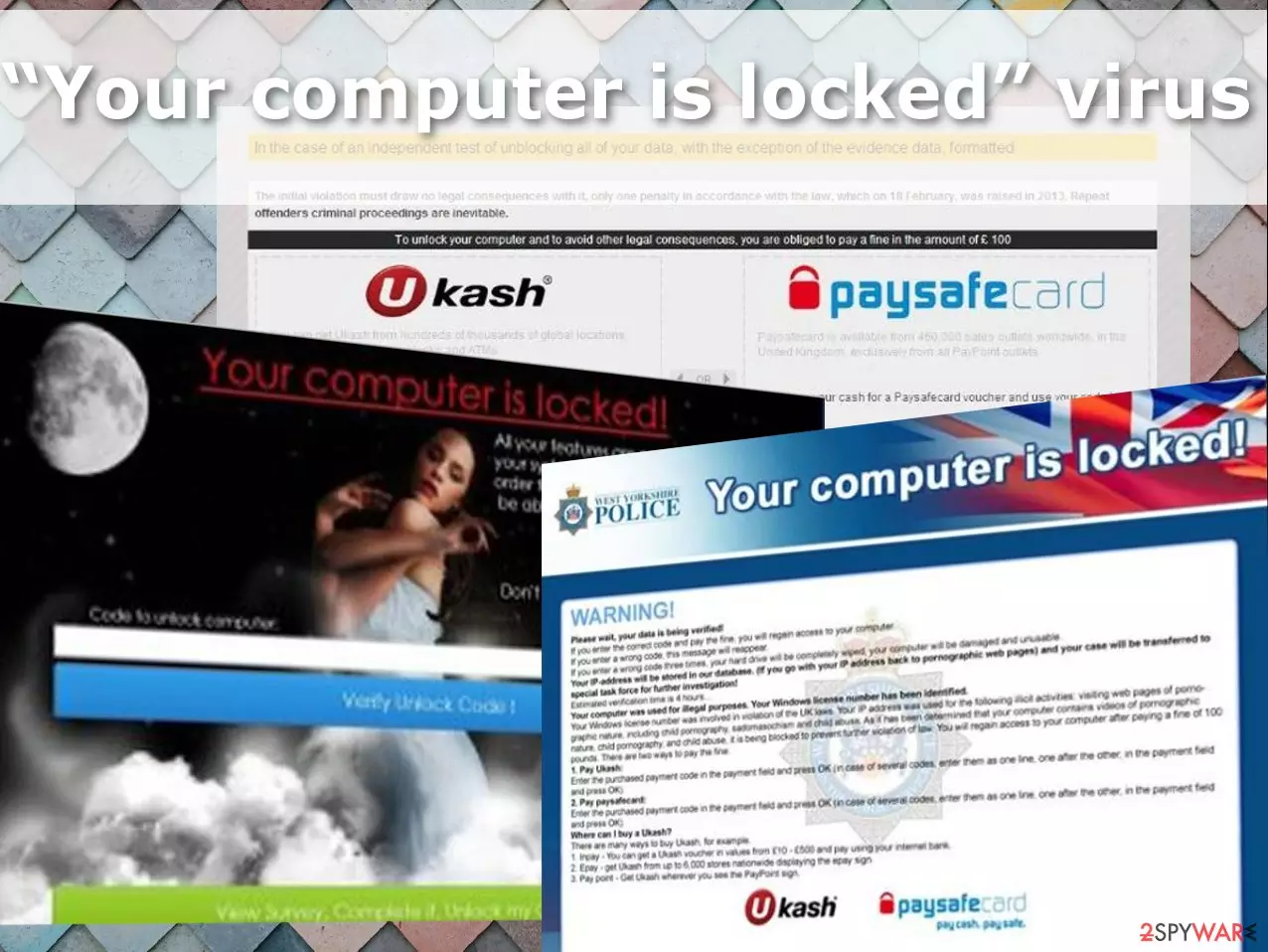
“Your computer is locked” virus is ransomware which can also be called a “screenlocker” because it rather locks your computer screen rather than encodes files. Though it imitates ransomware and appends a certain extension, however, specialists do not regard it as a highly serious threat in comparison to a notorious cryptovirus [1].
In any case, initiate the malware removal. What is more, this infection generates fake pop-up notifications warning about illegal activities that were supposedly noticed on the victim’s PC. This relatively old cyber infection has recently “reborn” as a “Your computer is locked !” virus and lets us focus on its predecessor and where it all started first.
The malware was created to attack poorly protected systems and generate alert notifications deceiving the infected users into thinking that they are breaking some laws. Since the virus creators choose to deliver these messages under the name of Great Britain’s police, it is likely that the infection is primarily targeted towards computer users in the United Kingdom. Generally, UK citizens remain to be a popular target for gearheads[2].
Here is how an extract from this fake alert looks like:
Your computer is locked
Your actions over the computer are recorded. If you have used a camera, videos and photos were seized as evidence
Your IP address: XXXXX
Your identity will be established by IP-address and the appropirate domain.
If you use an IP-camera photos and videos saved to establish your identity.
The Police of Great Britain have found out that you visited the site with child pornography. In this regard temparary files on your PC contaning pornographic material have been found. These actions are illegal.
(…)
The messages are usually displayed on a lock screen which obstructs the user from accessing his/her desktop, running any applications, or browsing the web. Besides, the scammers demand 50 pounds for the computer’s “unlocking” which sounds very familiar to the blackmailing strategies that the ransomware developers use for money extortion [3].
| Name | Your computer is locked virus |
|---|---|
| Type | Locker, ransomware |
| File extension | .encrypted |
| Transfer system used | Ukash |
| Distribution | Files from malicious emails or links, other malware |
| Removal | Running the anti-malware tool can find all pieces of the virus and remove them fully |
| Repair | You should also rely on FortectIntego that can find and fix corrupted files and functions |
In reality, police and other governmental organizations have never been using such online methods when approaching potential criminals or trying to get them to respond to their actions, especially by transferring fines through anonymous platforms such as Ukash.
The new “Your computer is locked !” version has apparently undergone some alterations, though the system hijack starts the same — the virus locks the computer screen and displays a notification informing about what happened to the device. Nevertheless, the scammers now drop the Great Britain police aside and pretend to be the Microsoft technicians who are ready to help fix your badly infected PC.
The computer “Unlock” code submission box at the bottom of the lock screen again points out similarities between this malware and ransomware infections which use similar methods to provide the user with a data decryption key [4]. The difference is that to obtain the computer unlocking key, the victim has to contact the “support technicians” and purchase this key by phone.
Fortunately, the experts have found that the lock screen can be disabled by typing 01548764GHEZG784 into the computer unlock code box. It is interesting that after you submit this code another screen will pop up, in which the scammers themselves will continue to provide “Your computer is locked” removal instructions.
Nevertheless, you never know if the hackers are not just playing with you and trying to make you mess up your computer even more. Thus, you should always trust malware removal tasks to antivirus software, SpyHunterCombo Cleaner or MalwarebytesMalwarebytes for instance, instead of trying to solve them yourself.
Update: the cyber threat imitates ransomware
The ransomware business has attracted many brilliant minds. Easy money, even though acquired in an illegal way, did not ward off some users from indulging in these activities. Likewise, after Your computer is locked hijack is complete, it attempts to persuade users that their personal data has been encrypted and the only way to decrypt them is to pay the ransom in bitcoins.
Originally, the variation was designed as a crypto-malware that encodes to encode files, this virus contains significant flaws which prevent the infection from completing its misdeed. The virus was designed to encrypt the files and then append .encrypted extension. Luckily, the infection does not encode any files.
Nonetheless, it does not mean that you should ignore this cyber infection. Eliminate Your computer is locked screenlocker. In addition, you should follow some precautions as well. Carefully reviewing spam emails or avoiding suspicious domains is not enough to escape malware. Safe access to the Internet is of key importance as well [5].
The system gets infected with this malware silently
As the expert investigation shows, the malware seems to be distributed with the help of a Trojan horse. This malware distributor can easily attack poorly protected systems and then download malicious files without any user's knowledge. As a result, it blocks the system down and lets the locker virus in.
As soon as it gets inside, the virus may begin preparing for the system take-over which usually happens during the next system reboot. In order to prevent such viruses, you should avoid illegal websites and fake notifications offering to update some software for free. Typically, they are hacked by cybercriminals and used to spread such screen-locking viruses like this one. If you want to fix your PC, you have to unblock the system first and then remove the virus from it.
Efficient “Your computer is locked” elimination
When trying to get rid of the “Your computer is locked” virus, the biggest problem is unblocking the system. Fortunately, our experts provide a couple of useful screen lock removal tips next to the virus removal instructions below. We also recommend SpyHunterCombo Cleaner or MalwarebytesMalwarebytes for the thorough system scan.
After you regain access to your home screen, run the system scan with antivirus software immediately. If you do not own a utility like this, make sure you obtain it, be it free or paid. It is your only option to remove “Your computer is locked” from your computer safely and entirely. Do not forget about virus damage that FortectIntego can find and fix.
Did this guide help?
3 comments
martyDR
Those "your computer is locked"-themed viruses are on the wave, arent they?
Moon.walker17
I wonder why they rampage unstoppable...
Felicity.G@g
The code helped! Thanks a lot!