

Zeoticus ransomware – a malware form that targets English speakers and uses an extension that is the name of a Japanese manga character
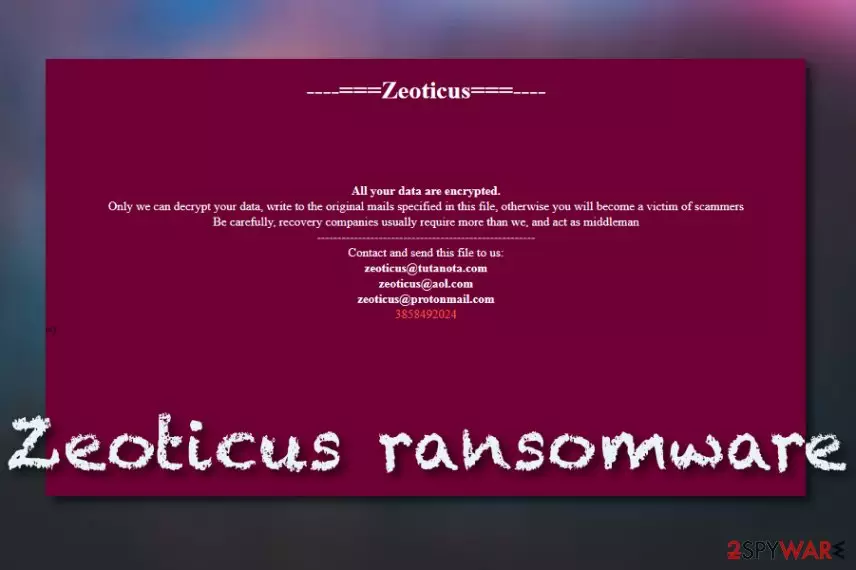
Zeoticus ransomware is a file-encrypting cyber threat that holds the name of a character from anime School DxD High. This malware has emerged at the end of December 2019 and has been first investigated and reported by S!Ri on Twitter.[1] By using the advanced encryption standard,[2] the ransomware virus locks all types of files and documents that are found on the infected Windows computer system. All of the affected components, appear with the .zeoticus appendix next to their filenames. Afterward, Zeoticus ransomware drops the READ_ME.html message as the desktop's new wallpaper that carries the ransom demands and is written in the English language as this allows to target a big variety of users worldwide.
Zeoticus ransomware states in the ransom note that the hackers are the only people who can help with data recovery measures and insists on contacting them via zeoticus@tutanota.com, zeoticurs@aol.com, or zeoticus@protonmail.com email addresses for further instructions. Even though the criminals do not provide any clear information about the ransom price, be aware that it can vary anywhere from $50 to $2000 in Bitcoin and even more.
| Name | Zeoticus ransomware |
|---|---|
| Category | Ransomware virus/malware |
| Appearance | This notorious cyber threat has first been spotted at the end of December 2019 and announced by a cybersecurity researcher named S!Ri on the Twitter social platform |
| Target | According to the language in which the ransom message is written, this malicious string targets English-speaking users |
| Appendix | When the ransomware runs its encryption module and uses the advanced encryption standard to lock up all the files found, the .zeoticus appendix is attached to each filename |
| Ransom note | All demands and contacts are provided in the READ_ME.html ransom message that is placed as the wallpaper of the infected computer desktop |
| Crooks' emails | The criminals urge to make contact via these email addresses: zeoticus@tutanota.com, zeoticurs@aol.com, or zeoticus@protonmail.com |
| Distribution | The ransomware virus can be distributed by using deceptive techniques such as phishing email messages and their infectious attachments, cracked software that is found on p2p networks, malvertising, unsecured RDP configuration, exploit kits, potentially unwanted programs, infectious hyperlinks, etc. |
| Removal | You can get rid of the ransomware virus by employing automatical software. Antimalware tools are the best help in this situation as they allow to complete the entire elimination process effectively and safely |
| Data recovery | Take notice that you are at a big risk of getting scammed if you decide to meet the ransom demands that are provided by the cybercriminals. Instead, you can go to the end of this page and take a look at the data recovery techniques that are provided there |
| Repair | If you have found some damaged software or other components on your Windows computer system, you can try repairing those objects with system repair software such as FortectIntego |
Zeoticus ransomware is a dangerous cyber threat that can travel by using different deceptive techniques such as phishing email messages, cracked software, unsecured RDP, and other sources. The infection process first takes place in the Windows Task Manager and Registry sections where the malware drops various malicious processes and entries. Afterward, the ransomware runs an encryption module that allows it to lock all files and documents that are found on the system.
Continuously, when all filenames are added with the .zeoticus extension, Zeoticus ransomware delivers the READM_ME.html ransom message that is displayed as the computer screen's background. The message tries to threaten and scare users that the only way to recover data is to contact the cybercriminals directly by writing to one of the three provided email addresses:
Zeoticus
All your data are encrypted.
Only we can decrypt your data, write to the original mails specified in this file, otherwise you will become a victims of scammers
Be carefully, recovery companies usually require more than we, and act as middleman
——————————————-
Contact and send this file to us:
zeoticus@tutanota.com
zeoticus@aol.com
zeoticus@protonmail.com
[User ID]
We recommend not trusting Zeoticus ransomware developers as these people only seek to get monetary benefits from you and you will likely be the one left scammed by them at the end. Rather than paying inadequate amounts of money and emptying your bank account for nothing, you should try using alternative techniques for recovering your data. Of course, first, you need to remove Zeoticus ransomware with antimalware software to be able to unlock your files.
Once the Zeoticus ransomware removal is done, you should continue with searching for damaged objects. If you find any components that need fixing, you can try repairing them with software such as FortectIntego. When you are finished, you are free to try any data recovery solutions that do not require investing big sums of money. What you have to do is travel to the end of this page where our cybersecurity experts have provided three possible data recovery techniques.

Zeoticus virus is a sneaky cyber threat and the sooner you remove it the better it will be to your computer system. Besides encrypting all of your files and demanded a ransom for their unlocking, the malware might be a delivery source of other virtual parasites such as trojans, spyware software, worms, and other threats. The appearance of these viruses can relate to a severe system and software damage, computer crashes, lost private information, money, and valuable files.
Zeoticus ransomware might also come with a complex module that is responsible for various functions. First of all, the ransomware virus is likely to ensure that it starts itself automatically every time when the computer is booted and scan the system for encryptable files repeatedly. This way the crooks will be sure that they have not missed any files. Regarding this fact, you should always disable malicious processes and remove the malware before unlocking your data.
Additionally, Zeoticus ransomware can try to harden the decryption process for its victims by eliminating the Shadow Volume Copies of all encrypted data via PowerShell commands. Also, the ransomware virus might be able to damage the Windows hosts file to prevent access to security-related websites and forums where the users could get valuable information on data recovery and malware removal techniques. Remember, when eliminating the virus, you should also delete the hosts file.
If you do not remove the damaged Windows hosts file from your computer system, the access to security websites will remain blocked. If you are having some trouble with finding Zeoticus ransomware on your computer system automatically, this might be because the malware is blocking your antimalware from detecting it. If this is the purpose, you can boot your machine in Safe Mode with Networking or activate System Restore to diminish the malicious activities.

Ransomware distribution tactics and tips on how to avoid these threats
Virusai.lt experts[3] claim that ransomware infections are often distributed through multiple different sources in order to reach success. You can easily catch a virus by opening a malicious attachment that comes clipped to a phishing email. Our point is that you should ALWAYS be careful while sorting out your email. First of all, identify the sender, then check the message's content for grammar mistakes, and do not click on any suspicious hyperlinks or attached files.
Another way to spread malware such as ransomware is by using software cracks. Cracked products are often provided on peer-to-peer sources[4] such as The Pirate Bay, eMule, and BitTorrent. A piece of advice would be to avoid third-party websites while downloading products and services. You should get all of your wanted equipment, software, and services only from reliable sources and the original product developers, otherwise, you might easily end up with malware.
Continuously, ransomware viruses are spread through unprotected RDP. This happens when the hackers find RDP configuration that includes weak passwords or none security codes at all. The crooks are able to hack the ports by forcibly entering the stolen password or just connecting to the Windows computer system remotely. Remember, always secure your RDP with a strong and complex password that includes some symbols, letters, and numbers.
In addition, there are also some other ways which are used for ransomware distribution. The cybercriminals might deliver the malicious product via malvertising, exploit kits, and malicious links. Note that you always have to be careful while browsing the Internet sphere, do not click on any unknown locations and close all bogus pages entered. Besides, you should always have a working antivirus enabled on your computer system for automatical protection and threat detection.
Zeoticus ransomware removal technique
Zeoticus ransomware removal is a process that should be carried out automatically by employing reliable antimalware software. These tools will ensure that the entire task will be carried out safely and effectively. You should not try to eliminate the cyber threat on your own as you might make damaging mistakes or miss some crucial components. If you have trouble with detecting the malware, you should boot your machine in Safe Mode with Networking or System Restore.
When you remove Zeoticus ransomware from your Windows computer system, it is time to search for damage that might have been done to some of your machine's components. If you do not know where to start from, you can employ software such as SpyHunterCombo Cleaner and MalwarebytesMalwarebytes and try looking for possible damage with these types of programs. If any harm is found, we recommend trying to fix your computer system with repair software such as FortectIntego.
Did this guide help?
Be the first to comment