

Zlocker ransomware threatens Russian-speaking people
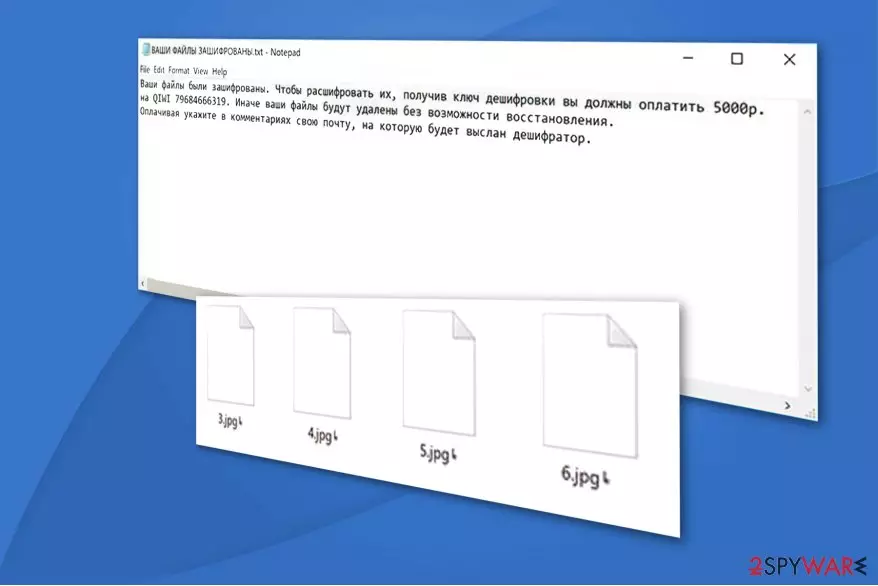
Zlocker is a file-encrypting virus which aims to encode data on the victim's computer. Following the encryption, it appends╘ symbol as a file extension and drops ВАШИ ФАЙЛЫ ЗАШИФРОВАНЫ.txt ransom note which is written in Russian. The filename means YOUR FILES ARE STRIKED.txt in English and demands the victim to pay 5000₽ (approximately $85) as a ransom.
The translation of Zlocker's ransom note:
Your files have been encrypted. To decrypt them, having received the decryption key you must pay 5000r. on QIWI 79684666319. Otherwise, your files will be deleted without the possibility of recovery. When paying, indicate in your comments your mail, to which the decoder will be sent.
The crooks do not provide an email address for contact purposes like most of the ransomware authors do. Instead, they encourage the victims to transfer the funds to a specific QIWI account and indicate their emails to receive Zlocker decoder. However, note that you have no guarantees that the criminals will keep their promises.
Currently, experts do not know which algorithms Zlocker virus uses. Since encryption is a highly sophisticated technique which requires a unique decryption key, even IT professionals might struggle to recover compromised data. Although, paying the ransom is not the solution.

Ransomware developers might trick you to pay the ransom and ask for more money after you make the transaction. Thus, we do not recommend following the rules of the criminals. Instead, you are advised to remove Zlocker and try to retrieve your data from backup copies which a stored in the cloud[1].
You can complete Zlocker removal with the help of FortectIntego or another reliable antivirus system. It will quickly eliminate the malicious program and allow you to proceed to the file recovery. If you do not have backups, make sure to check the guide below. We have suggestions how you can alternatively regain access to your data.
Ways how ransomware reaches your system
While most of you might think that hackers remotely infuse the file-encrypting virus into your computer, in most cases the user infiltrates it manually. Ransomware spreads as an imitation of legitimate software updates or corrupted email letters[2]. Both ways, the user clicks on a bogus file and unconsciously installs the malware.
Ransomware and other high-risk computer infections successfully reach the targeted systems since they are designed to look deceptive. Typically, hackers create malicious files which look exactly or only slightly different from legitimate computer programs. For example, VLC or Adobe Flash player updates.
Also, they tend to send spam emails and impersonate well-known companies insisting on opening documents of “high importance.” Note that usually the letters are named as Invoices or shopping receipts to trick you into opening them. However, as soon as you click on the attachment, the executable of the ransomware is dropped on your system.
Therefore, you should be cautious and never be lured to open or download deceptive files. Search for slight differences which might indicate that the file is malicious like spelling mistakes, etc. Or you could simply use a security software which would scan the files before download and protect your system.
Zlocker ransomware removal guide
Since Zlocker virus is a dangerous computer threat, you should not try to delete it manually. This can lead to either computer damage or an unsuccessful ransomware elimination which might permanently corrupt your files. Thus, get help from a certified IT expert or choose automatic termination method.
You should install FortectIntego, SpyHunterCombo Cleaner, or MalwarebytesMalwarebytes to remove Zlocker automatically. They are reliable and time-tested antivirus tools which will help you to clean your system from ransomware and other bogus programs which might be present on your system. Do not worry, it will only take several minutes to finish the procedure.
After Zlocker removal, check the instructions below to learn how to recover your files without backups. There are several alternative ways which might help you to regain access to your data. However, NoVirus.uk[3] team warns that the guide should be followed strictly, to avoid any further damage.
Did this guide help?
Be the first to comment