

Antivirus Soft – a fake security tool that tries to trick you into spending money
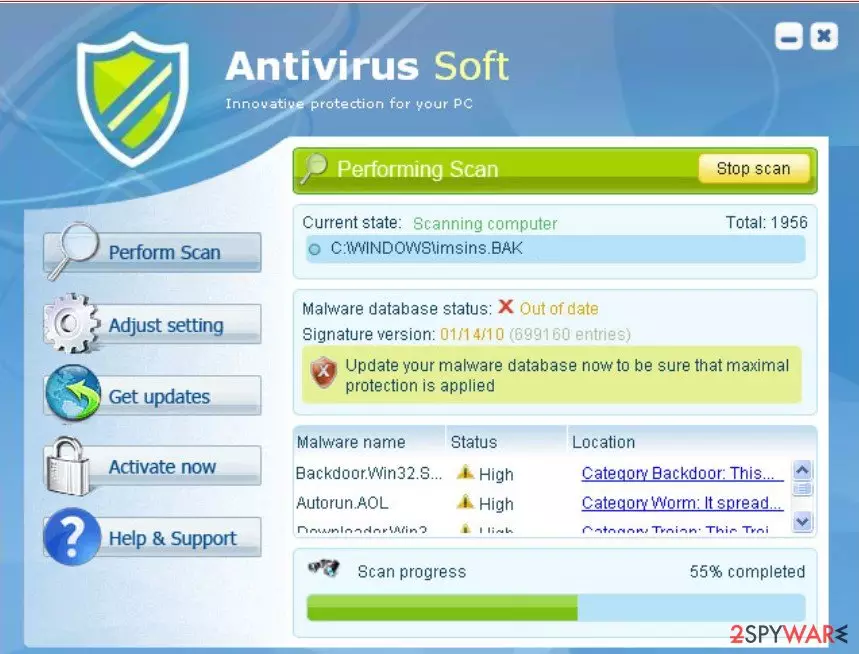
Antivirus Soft is a rogue anti-virus program that gives false reports of threats and displays bogus pop-ups to make you think that your computer is infected with malware. This fake program is a clone of Antivirus Live, Antispyware Soft, and Antivirus System PRO malware.
Usually, such rogue programs come from various misleading websites, fake online scanners, but they can also be promoted on Facebook, MySpace, and similar websites. Once installed, it will ostensibly scan your computer for malware and display a variety of infections that can only be removed with a full version of the program.
Please don't get tricked by this and don't purchase it. Keep in mind that the scan results are absolutely false. This is nothing more but a scam. Please remove Antivirus Soft from your computer as soon as possible. Removal techniques and recovery methods are displayed at the bottom of the article.
| name | Antivirus Soft |
|---|---|
| Type | Rogue antispyware tool, PUP |
| Purpose | Push users to buy the licensed program version |
| Risks | PUP installation, malware infections, financial losses |
| Distribution | Trojans, freeware, software bundling, fake Flash Player updates, file-sharing platforms |
| Elimination | Perform a full system scan with dependable, time-proven anti-malware software to remove this fake tool along with any other unwelcomed guests |
| System repair | Repair any damage the infection caused to your system by running system diagnostics with the FortectIntego tune-up tool |
Since Antivirus Soft is a fake security tool, the main risk that it induces is leaving your device unprotected, exposed to all kinds of malware, including worms, ransomware, keyloggers, etc. It wasn't created to fight malware, only to imitate that and push you into purchasing its paid version.
When running, Anti-virus Soft will also display many fake security alerts and notifications. For example, you may see fake pop-ups with the following message:
Windows reports that computer is infected. Antivirus software
helps to protect your computer against viruses and other
security threats. Click here for the scan your computer. Your
system might be at risk now.
And there is also an error message that states, “Application can not be executed”. This one will be displayed every time you try to launch an anti-spyware or anti-virus software. What is more, Antivirus Soft will change Internet Explorer's settings.
A proxy server will be added under the LAN settings so that you cannot browse to any website other than the site for Antivirus Soft. As you can see, this virus is quite irritating. Unfortunately, you can't remove it like a regular program. It won't let you delete its files manually either.
To remove it once and for all, you have to reboot your device in Safe Mode with Networking and download and install MalwarebytesMalwarebytes or SpyHunterCombo Cleaner. Either of these free but trustworthy anti-malware tools will remove the fake tool automatically and provide you with proper protection against malware.
The article's culprit is able to prevent you from opening AV tools by making various changes to your system settings and files. If these changes are left unattended, your device will exhibit all kinds of abnormal behavior. To avoid that, perform system diagnostics with the FortectIntego system tune-up software.
Please don't click on pop-ups stating that your Flash Player is outdated
Adobe is no longer supporting their Flash Player and urges all users to remove this software from all of their devices for security purposes. Cybercriminals are exploiting the lack of knowledge by distributing potentially unwanted programs or malware camouflaged as Flash player updates.
These fake updates usually contain adware, browser hijackers, Trojans, ransomware, and similar cyber threats. Thus if you ever see a pop-up suggesting that you need to update or install Flash Player, please don't click on it, leave the site, and never go back to it.
Simple instructions to remove Antivirus Soft virus from infected computers
The removal process for this fake anti-malware software is a bit difficult, but with our guidelines, you'll be finished in no time. First, reboot your Windows PC in Safe Mode with Networking and download a trustworthy security tool. After installing it, run a full system scan.
A proper anti-malware tool will automatically identify all threats, including Antivirus Soft, and remove them. Once that's done, perform system diagnostics with compatible computer tune-up software to ensure that your device runs without any hiccups.
Uninstall from Windows
Uninstall from Windows 10/8:
- Type Control Panel into the Windows search box and open the result.
- Under Programs, select Uninstall a program.


Uninstall from Windows 7/XP:
- Click on Windows Start > Control Panel (Windows XP users should click on Add/Remove Programs).
- In Control Panel, select Programs > Uninstall a program.


Remove the unwanted program:
- In the Programs and Features window, look for any recently installed suspicious entries, select them, and click Uninstall.
- If User Account Control appears, click Yes to confirm, then complete the removal.


Did this guide help?
Be the first to comment