

Personal Guard 2009 is a malicious program that claims to be an effective anti-malware

Personal Guard 2009 is a misleading security application that reports false or exaggerated system security threats and displays fake security alerts to make you think your computer is infected with spyware, Trojans, adware, and other malicious software. The bogus program can be manually installed or enter the system secretly with the help of Trojan viruses.
When active, the deceptive application will prompt you to pay for a full version of the program to remove computer threats that do not even exist. Do not waste your money or time with this proposition, as it is merely a scam. Please uninstall this malicious app from your PC upon detection.
| Name | Personal Guard 2009 |
| Type | Malware, rogue antispyware, scam |
| Infiltration | Already installed trojans, fake online scanners that report about virus infections, fake updates, etc. |
| Operation | Shows fake virus notifications and disables normal Windows functions; asks to buy a full license in order to get rid of the allegedly installed malware; malware itself |
| Dangers | Installation of other malware, personal information disclosure, monetary losses |
| Removal | If you can't uninstall the program in a regular way through the Control Panel, access Safe Mode and perform a full system scan with SpyHunterCombo Cleaner anti-malware |
| System fix | Rogue antispyware can alter Windows operation and damage its functions or files; to remediate your PC and fix virus damage automatically, use FortectIntego |
Most of the time, PersonalGuard2009 is installed via Trojans that are already present on the host machine or fake online anti-malware scanners. However, it can be downloaded and manually installed via software bundle packages or similar methods, where users believe that the program is genuine and will protect them from various security threats.
However, you should not install this program, as it's nothing more but a scam. Once installed, this malicious program will be automatically configured to scan your computer each time you log on into Windows. It will then display a list of computer threats and infections.
However, the scan results are false (they either take innocent system/application files and flag them as malicious or come up with fictitious threats that do not exist at all), so you can easily ignore them. Furthermore, this parasite will constantly display fake security alerts and notifications from the Windows taskbar. Here is one of the messages that you could expect to see when infected with the virus:
Warning!
Your web-surfing is now in unprotected mode, so you cannot browse the Web safely. Save your PC from unwanted threats. Let Personal Guard 2009 help you. Enable protection immediately.
The program will also impersonate Windows Security Center and state that your antivirus software is disabled. These are all mere tricks that are used by many programs of similar kinds, such as WiniFixer, My Security Shield, or Antivirus 2009.
What is more, the bogus program will block antivirus software and certain security websites. If you find that your computer is infected with this parasite, please use the removal guide below to eliminate all the annoying notifications. You can use SpyHunterCombo Cleaner for a quick solution.
Besides, the malware might disable some of the Windows features or prevent you from visiting certain websites, so cleaning browsers is also very important. For that, use the instructions provided below or employ FortectIntego to do it for you.
Do not get tricked by fake security programs
In the 2000s, malware was almost everywhere, since security solutions and IT infrastructure was not as developed as today. As a result, malware business was booming. Third-party security programs weren't usually free, and Windows Defender (previously known as Microsoft Security Essentials) was almost useless when it came to protection from various online threats.
That is when rogue anti-spyware programs were extremely prevalent, as users would install them believing that they are free tools that could protect them from intrusions. Unfortunately, many of such programs were malicious themselves, causing all the havoc on the PC that they deemed to protect.
Thus, be vigilant and choose your software carefully. By using a modern security solution, you are almost certainly going to be warned about a rogue, generic malware or a potentially unwanted program. Also, don't ignore warnings from your security tool and avoid visiting high-risk websites altogether.
Delete Personal Guard 2009
Many rogue antispyware programs act exceptionally aggressively to avoid being removed. For example, some of such viruses disable the Windows registry editor or the task manager. Some of them actively detect and prevent the execution of genuine anti-malware tools. Hence, removing such programs can be quite difficult, especially if you are not proficient in the IT field.
We recommend you try to uninstall Personal Guard via the Control Panel first – follow the steps below if you are unsure how to do that. If the entry is completely missing or you receive an error, we strongly advise you to perform a scan with a security application. Cleaning your web browsers is also advisable as their settings could have been changed by the virus.
Uninstall from Windows
Uninstall from Windows 10/8:
- Type Control Panel into the Windows search box and open the result.
- Under Programs, select Uninstall a program.


Uninstall from Windows 7/XP:
- Click on Windows Start > Control Panel (Windows XP users should click on Add/Remove Programs).
- In Control Panel, select Programs > Uninstall a program.


Remove the unwanted program:
- In the Programs and Features window, look for any recently installed suspicious entries, select them, and click Uninstall.
- If User Account Control appears, click Yes to confirm, then complete the removal.


Delete from macOS
Remove the unwanted application:
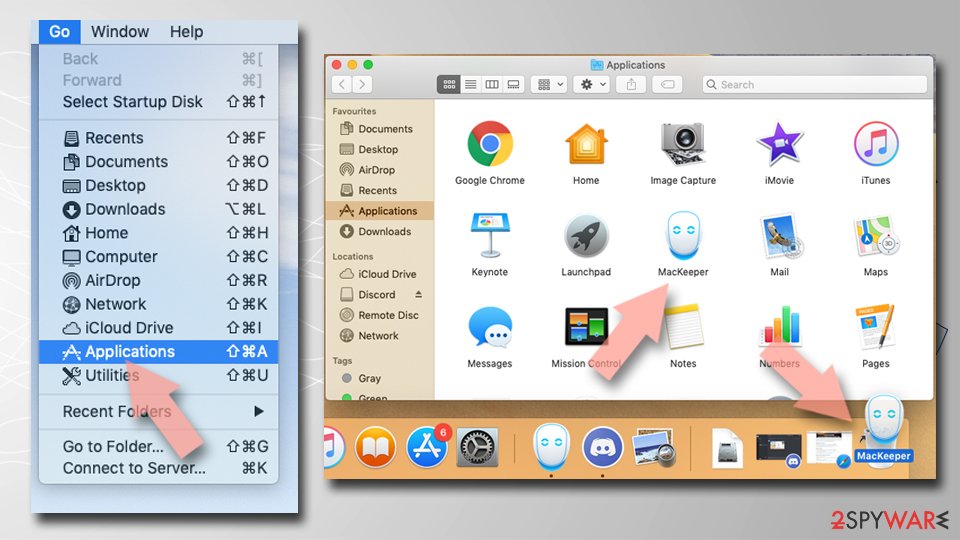
- From the menu bar, select Go > Applications.
- In the Applications folder, look for any suspicious entries, then drag them to Trash (or right-click and pick Move to Trash).

Delete leftover files and folders:
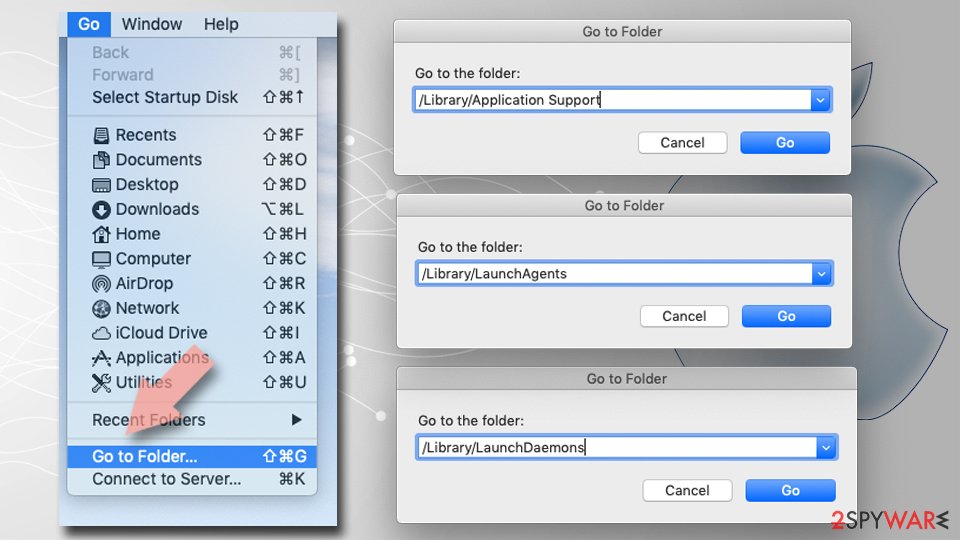
- Select Go > Go to Folder.
- Enter /Library/Application Support and remove any suspicious folders related to the unwanted program.
- Repeat the same check in the /Library/LaunchAgents and /Library/LaunchDaemons folders, deleting any suspicious entries.
- Finally, empty the Trash to permanently remove the leftovers.

Remove from Microsoft Edge
Delete unwanted extensions from MS Edge:
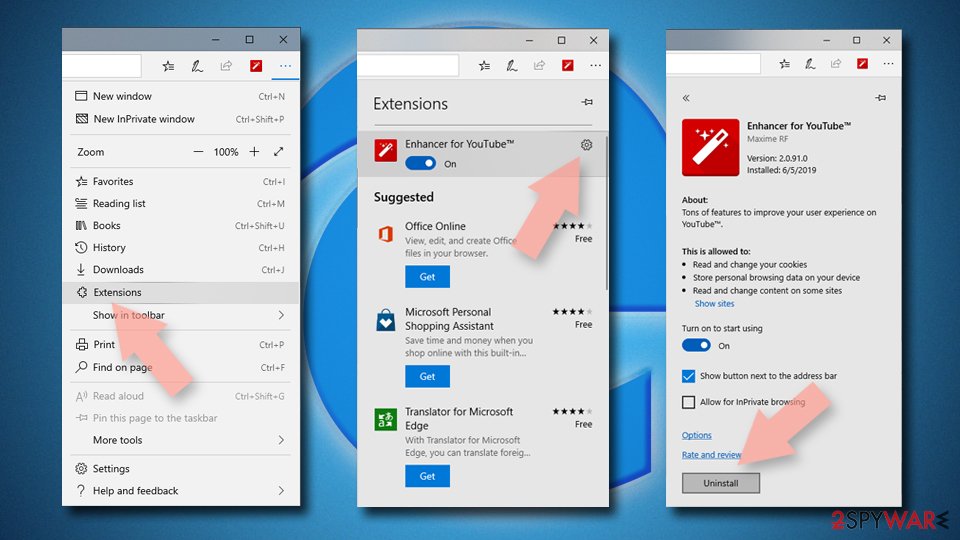
- Select Menu (three horizontal dots at the top-right of the browser window) and pick Extensions.
- From the list, pick the extension and click on the Gear icon.
- Click Remove.

Clear cookies and other browser data:
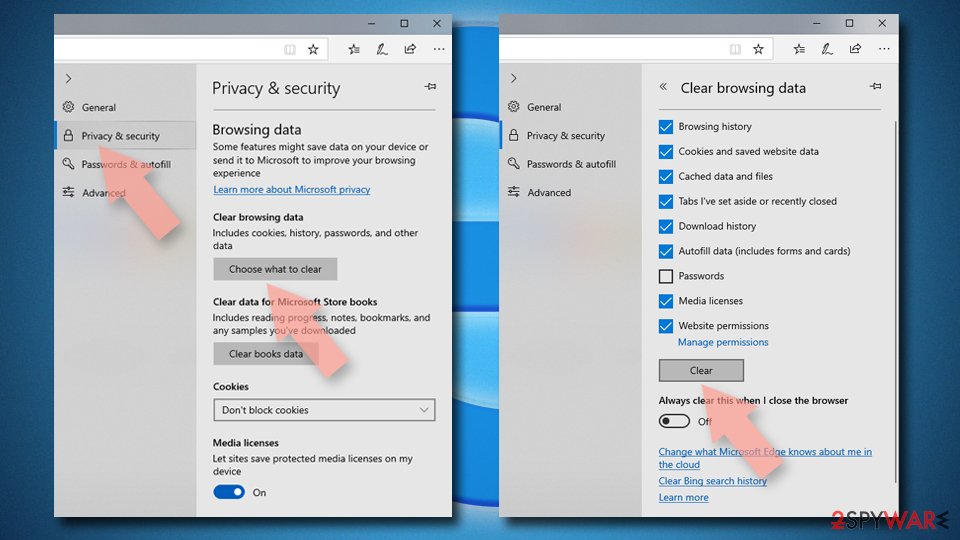
- Click on the Menu (three horizontal dots at the top-right of the browser window) and select Settings > Privacy, search, and services..
- Under Clear browsing data, pick Choose what to clear.
- Select Cookies and other site data and Cached images and files. (apart from passwords, although you might want to include Media licenses as well, if applicable) and click on Clear.

Restore new tab and homepage settings:
- Click the menu icon and choose Settings.
- Then find On startup section.
- Click Remove next to any suspicious startup page.
Reset MS Edge if the above steps did not work:
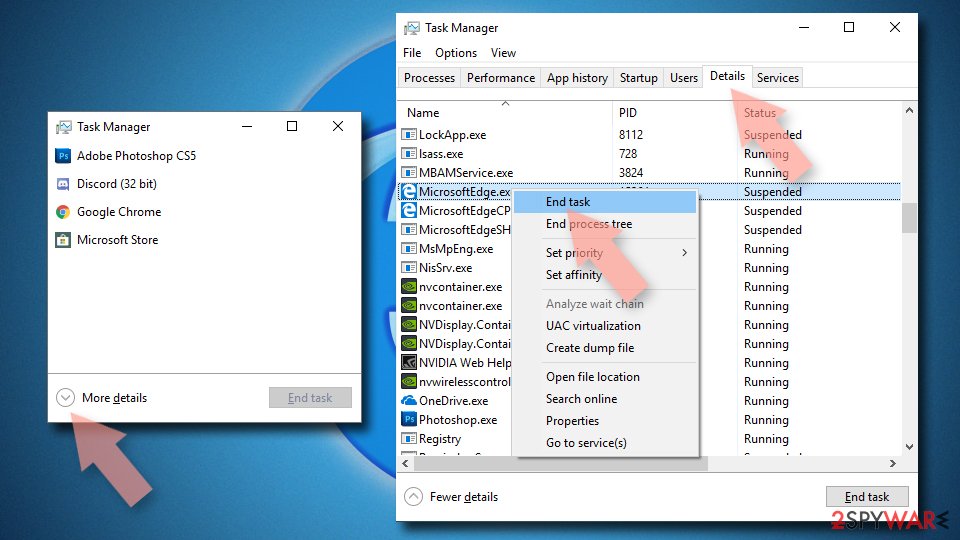
- Press on Ctrl + Shift + Esc to open Task Manager.
- Click on More details arrow at the bottom of the window.
- Select Details tab.
- Now scroll down and locate every entry with Microsoft Edge name in it. Right-click on each of them and select End Task to stop MS Edge from running.

Instructions for Chromium-based Edge
Delete extensions from MS Edge (Chromium):
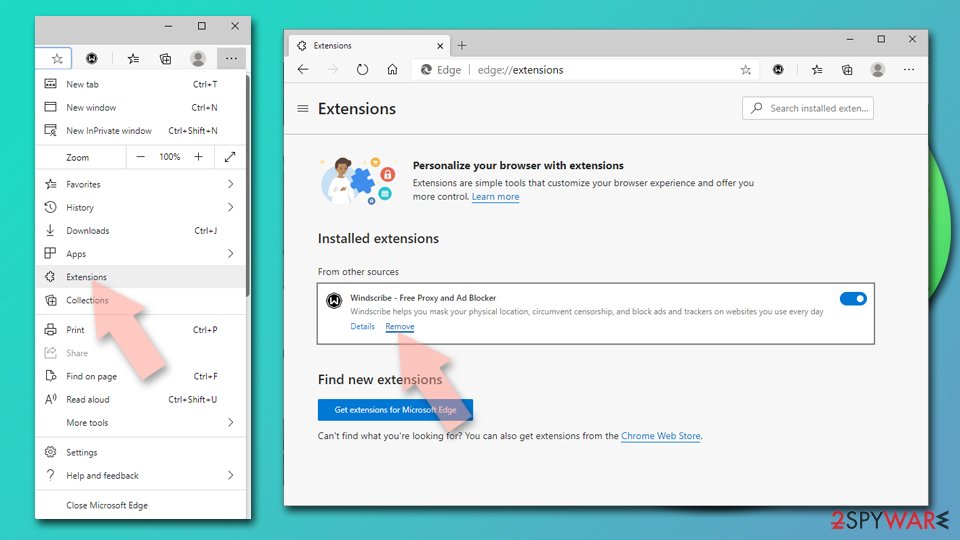
- Open Edge and click select Settings > Extensions.
- Delete unwanted extensions by clicking Remove.

Clear cache and site data:
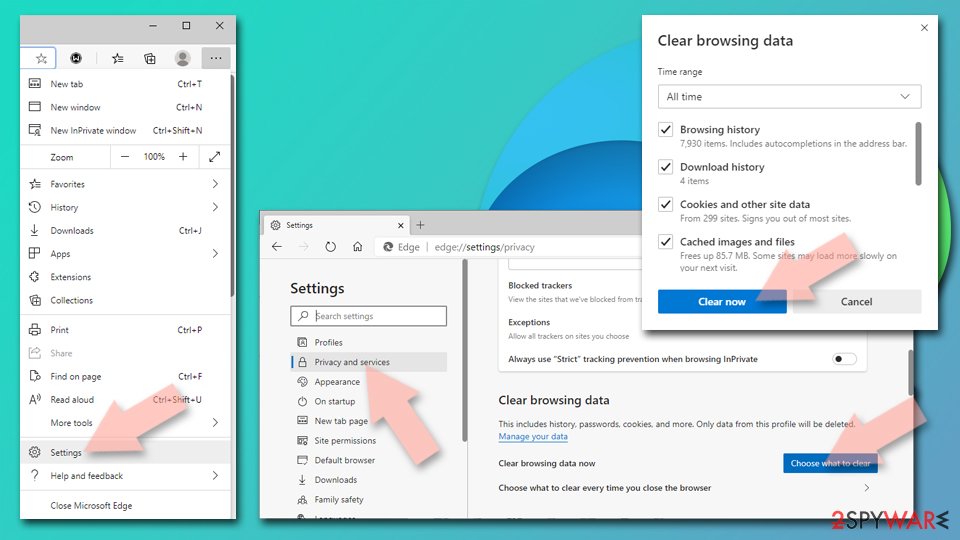
- Click on Menu and go to Settings.
- Select Privacy, search and services.
- Under Clear browsing data, pick Choose what to clear.
- Under Time range, pick All time.
- Select Clear now.

Reset Chromium-based MS Edge:
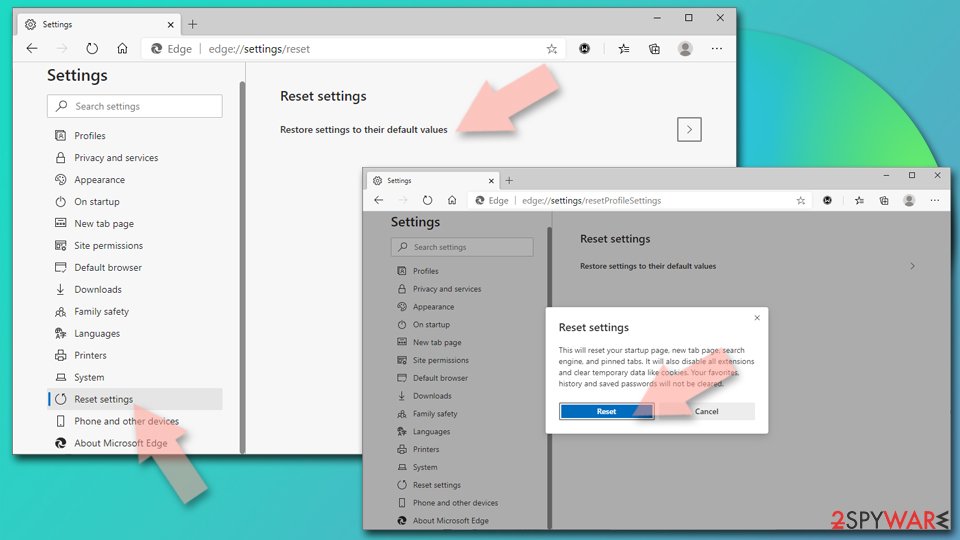
- Click on Menu and select Settings.
- On the left side, pick Reset settings.
- Select Restore settings to their default values.
- Confirm with Reset.
- This will disable extensions and reset startup pages but will not delete bookmarks, saved passwords, or browsing history.

Remove from Mozilla Firefox (FF)
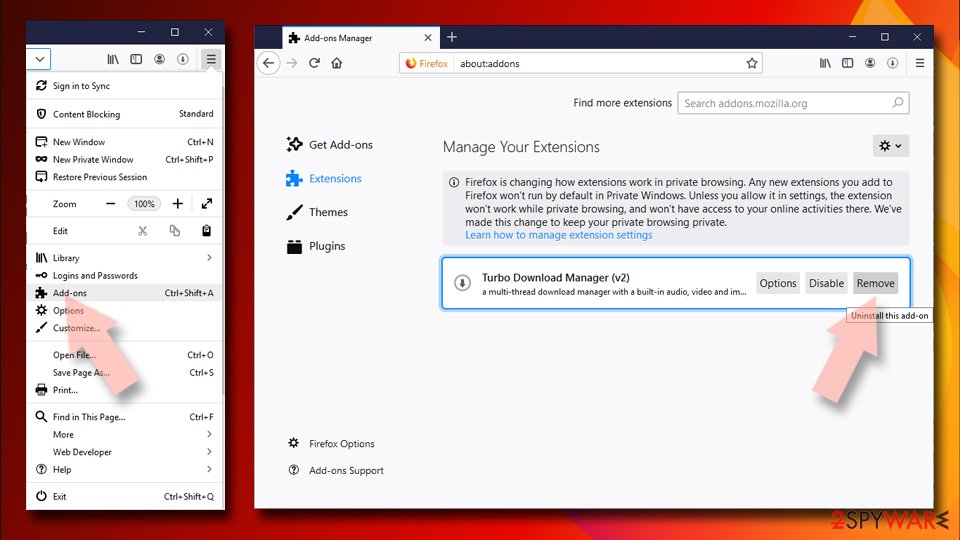
Remove dangerous extensions:
- Open Mozilla Firefox browser and click on the Menu (three horizontal lines at the top-right of the window).
- Select Add-ons.
- In here, select the unwanted extension and click Remove.

Reset the homepage:
- Click three horizontal lines at the top right corner to open the menu.
- Choose Settings.
- Under Home, set your preferred homepage and new tab settings.
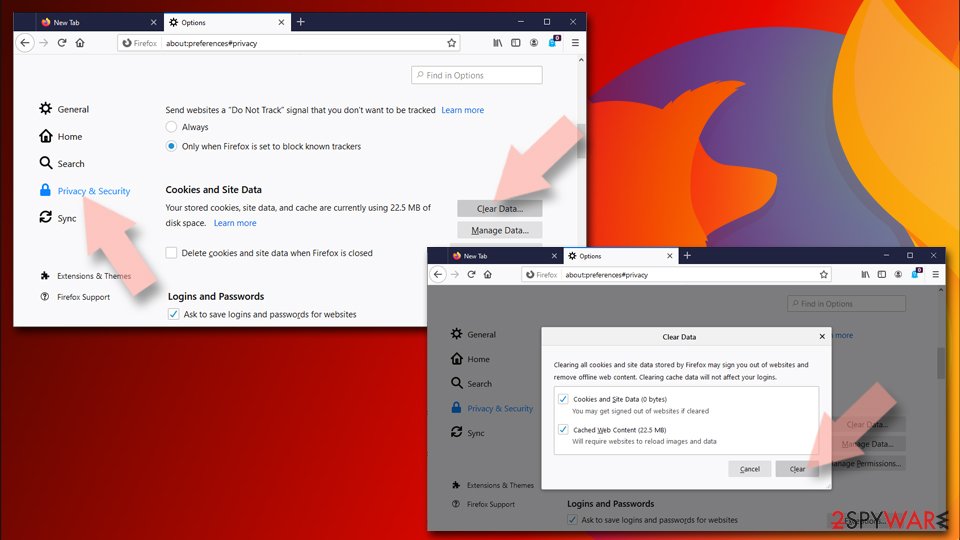
Clear cookies and site data:
- Click Menu and pick Settings.
- Go to Privacy & Security section.
- Scroll down to locate Cookies and Site Data.
- Click on Clear Data...
- Select Cookies and Site Data and Temporary cached files and pages, then click Clear.

Reset Mozilla Firefox
If clearing the browser as explained above did not help, reset Mozilla Firefox:
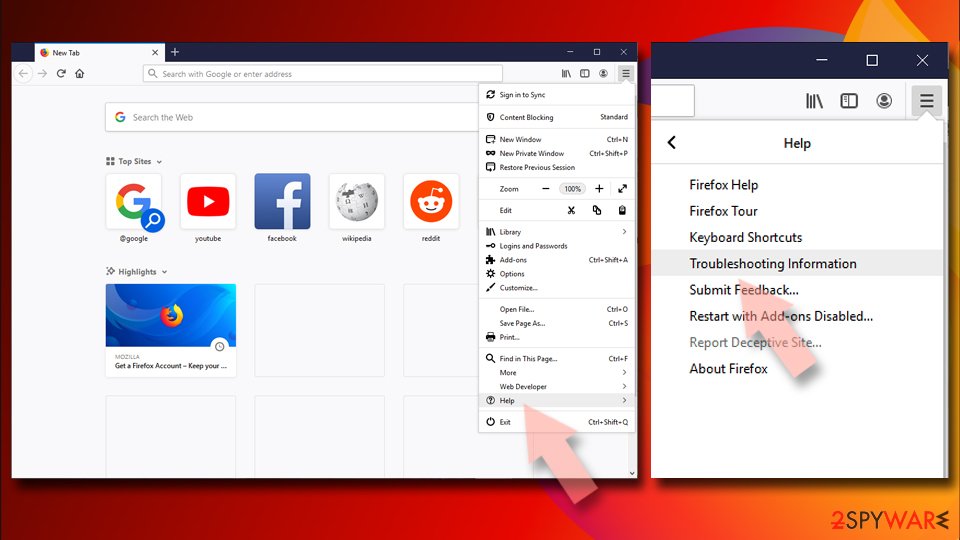
- Open Mozilla Firefox browser and click the Menu.
- Go to Help and then choose Troubleshooting Information.
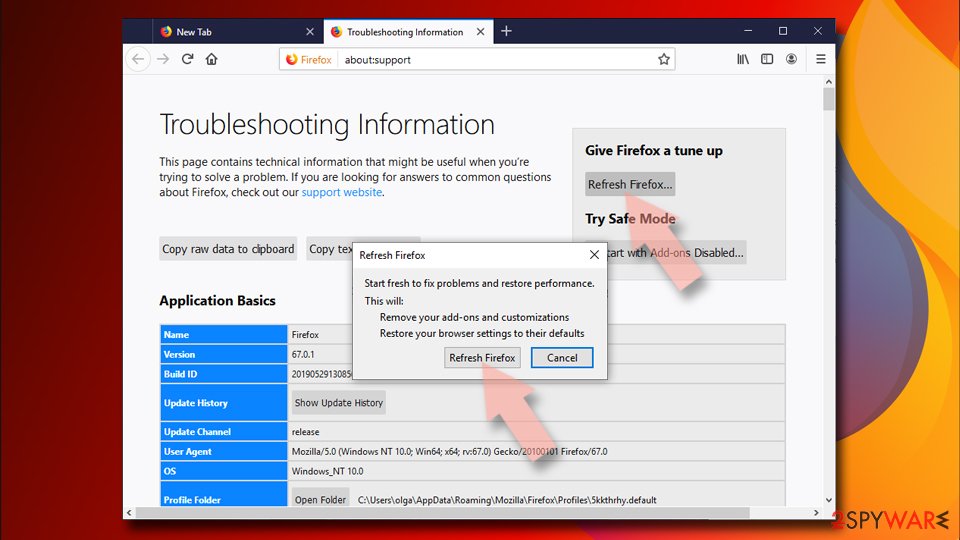
- Under Give Firefox a tune up section, click on Refresh Firefox...
- Once the pop-up shows up, confirm the action by pressing on Refresh Firefox.


Remove from Google Chrome
Delete malicious extensions from Google Chrome:
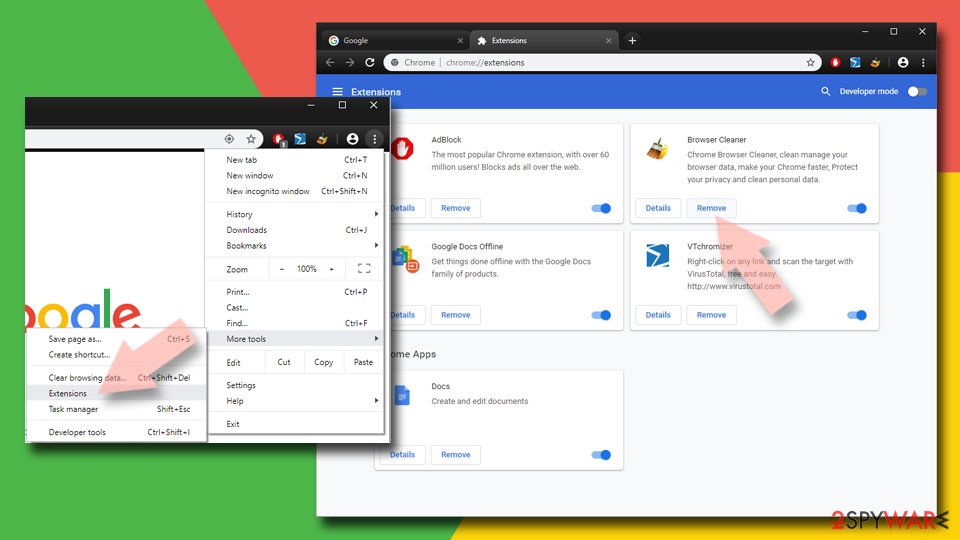
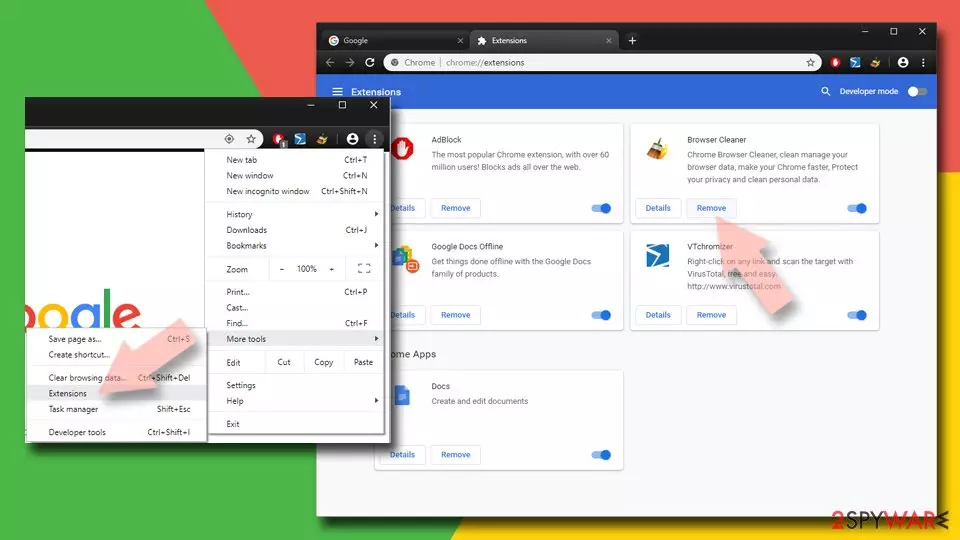
- Open Google Chrome, click on the Menu (three vertical dots at the top-right corner) and select More tools > Extensions.
- In the newly opened window, you will see all the installed extensions. Uninstall all suspicious extensions related to the unwanted program by clicking Remove.
Clear cache and web data from Chrome:
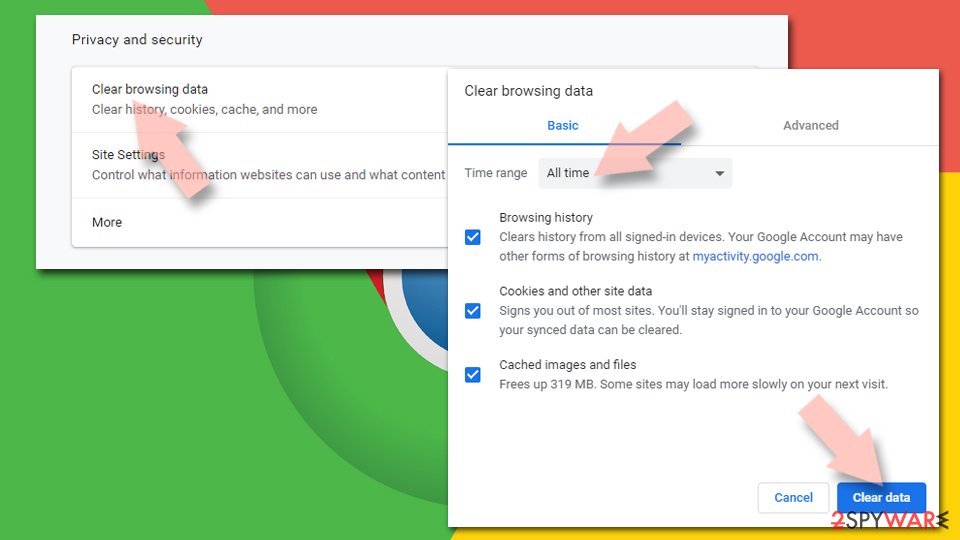
- Click on Menu and pick Settings.
- Under Privacy and security, select Clear browsing data.
- Select Browsing history, Cookies and other site data, as well as Cached images and files.
- Click Clear data.

Change your homepage:
- Click menu and choose Settings.
- Look for a suspicious site in the On startup section.
- Click on Open a specific or set of pages and click on three dots to find the Remove option.
Reset Google Chrome:
If the previous methods did not help you, reset Google Chrome to eliminate all the unwanted components:
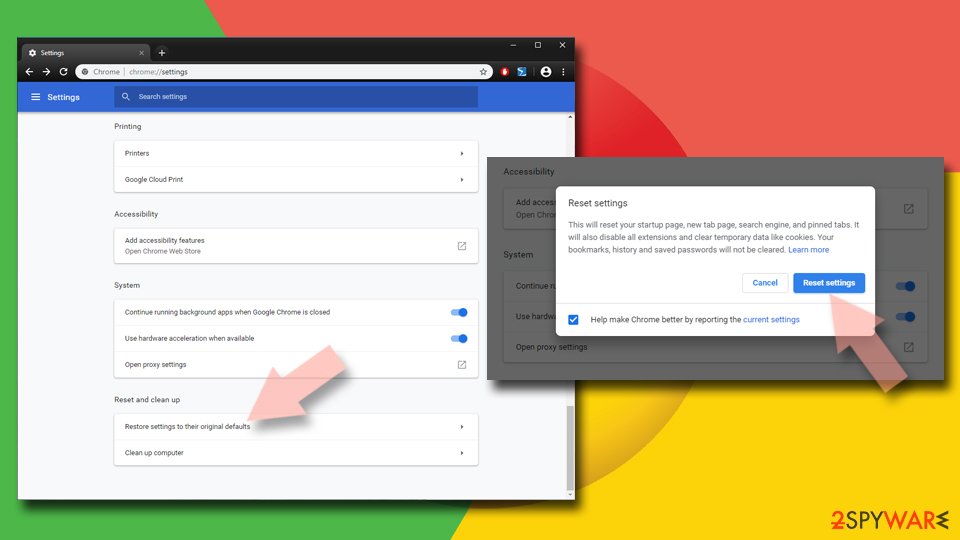
- Click on Menu and select Settings.
- In the Settings, scroll down and click Advanced.
- Scroll down and locate Reset and clean up section.
- Now click Restore settings to their original defaults.
- Confirm with Reset settings.

Delete from Safari
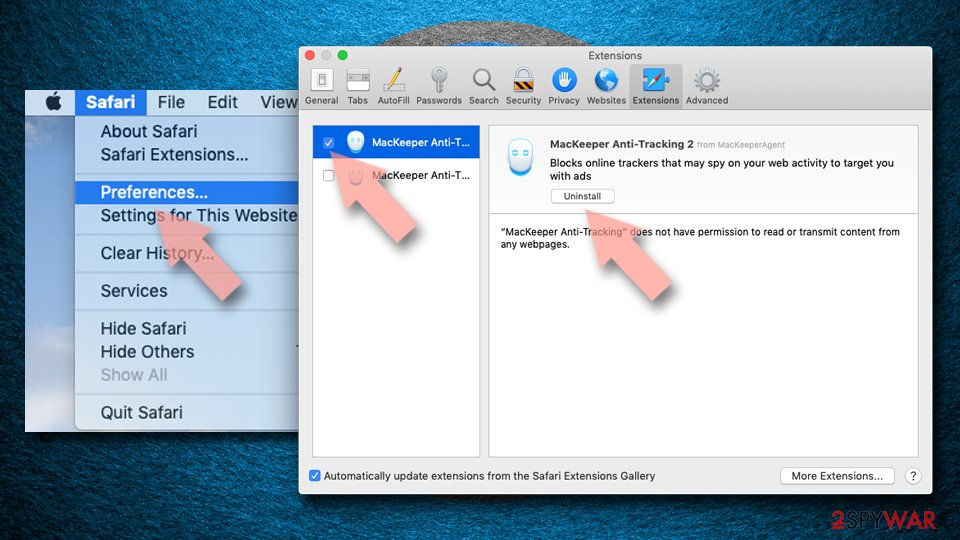
Remove dangerous extensions:
- Open Safari, click Safari in the menu at the top-left of the screen, and select Preferences.
- Go to the Extensions tab, look for any suspicious entries, and click Uninstall to remove them.

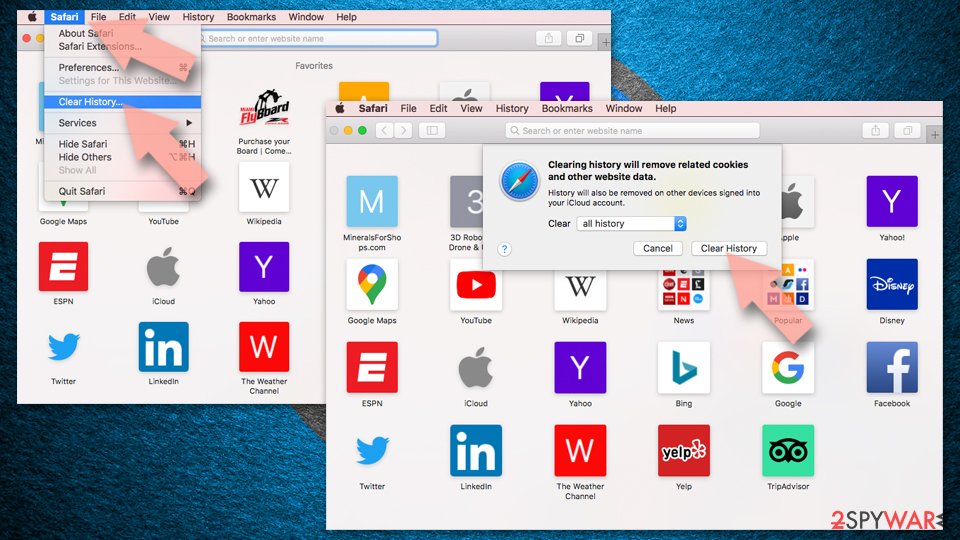
Clear history and website data:
- Click Safari in the menu and pick Clear History.
- Set Clear to all history and confirm with Clear History.

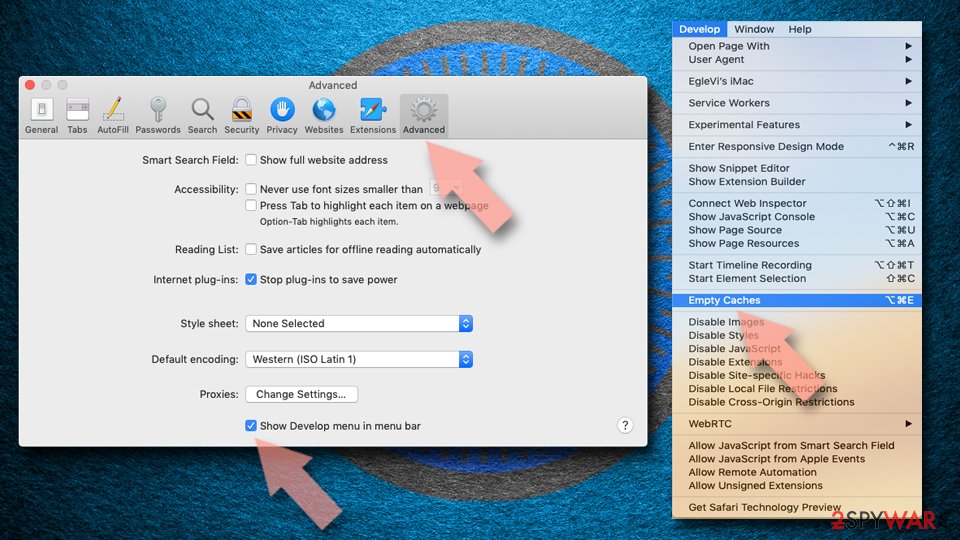
Reset Safari:
- Click Safari in the menu and select Preferences > Advanced.
- Enable Show Develop menu in menu bar.
- From the menu bar, click Develop and select Empty Caches.

Did this guide help?
Be the first to comment