

Unlock92 – ransomware virus that encrypts files using RSA-2048 cipher and zips them into
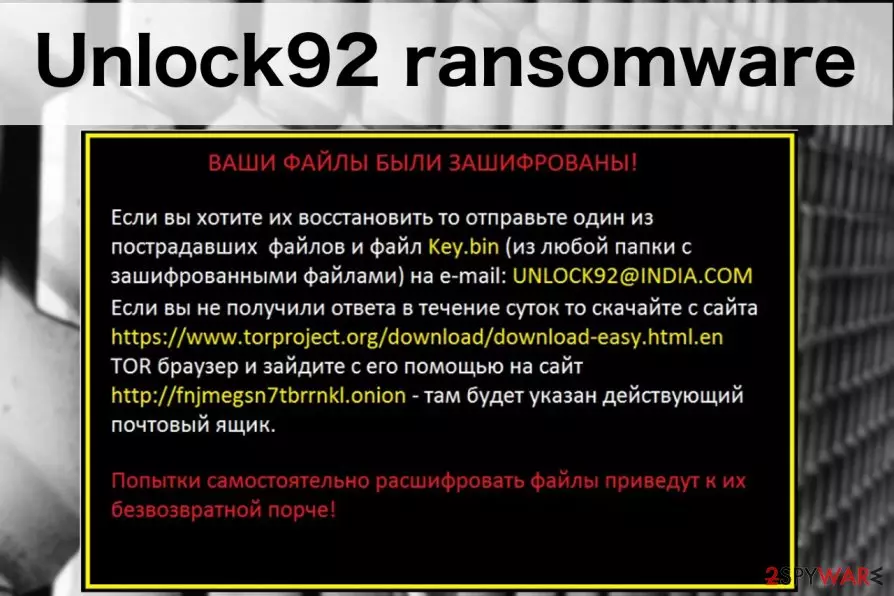
Unlock92 is a file-encrypting virus that applies RSA-2048[1] algorithm and appends .CRRRT, .blocked, .block, .CCCRRRPPP, .kukuracha or _<8-rand-chars>. extension. After the file encryption, the virus displays a ransom note which is written in the Russian language. The aim of such a message is to announce about corrupted files and demand a ransom to receive a decryption key for important data. Cybercriminals urge to contact them via unlock92@india.com email address and transfer money which usually needs to be in Bitcoin or another cryptocurrency. The original version of the Unlock92 ransomware was detected on June 2016; however, new versions keep emerging up to 2018. The latest virus version is called Unlock92 Zipper. This ransomware corrupts files by gathering them in a folder and zips them with a password. Additionally, it marks this folder by appending the .random.zip extension.
| Summary | |
|---|---|
| Name | Unlock92 |
| Type | Ransomware |
| Release date | June 2016, new versions such as Unlock 92 Zipper are spreading in 2018 |
| Danger level | High. Encrypts files and makes system changes |
| Appended file extensions | Unlock92 can be recognized from the .CRRRT, .blocked, .block, .CCCRRRPPP, .kukuracha or _<8-rand-chars> extensions. The new version zips files into one folder and marks them with foldername.random.zip extension |
| Encryption algorithm | RSA-2048 |
| To uninstall Unlock92, install FortectIntego and run a full system scan | |
Previous, it was thought that Unlock92 virus is one of the versions of Kozy.Jozy ransomware. Just like any other ransomware, it mostly spreads via malicious spam emails as a useful attachment, such as “invoice”, “payment report” or similar. Soon after infiltration, the virus starts scanning the device for data to encrypt. The main files that the virus is trying to encrypt are the so-called working files, i.e., the ones that users frequently use, including .docx, .rar, .jpg or .xls.
As we have mentioned at the beginning, different versions of Unlock92 ransomware append different file extensions. However, the first and original variant adds .CRRRT suffix.

It seems that the virus is designed to hijack Russian operating systems or its developers are hailing from this country. The ransom note that the virus drops after encrypting the files is written in Russian[2] (it also shows up as a desktop picture), yet it is interesting that the address the criminals provide links to India.
Если вы хотите их восстановить то отправьте один из пострадавших файлов и файл Кеу.Ып (из любой папки с зашифрованными файлами) на е-mai1: UNLOCK92@INDIA.COM Если вы не получили ответа в течение суток то скачайте с сайта https://www.torproject[.]org/download/download-easy.html.en ТОВ браузер и зайдите с его помощью на сайт http://fnjmegsn7tbrrnkl.onion – там будет указан действующий почтовый ящик.
The victim is encouraged to contact the hackers via UNLOCK92(@)INDIA.COM or unlckr@protonmail.com to retrieve their files. To do that, the victim has to send a single encrypted document together with a key.bin file which can be found in every infected folder of the computer.
However, in July 2016, a free Unlock92 decrypter was released. Hence, there’s no need to pay the ransom and lose the money. Unfortunately, this software might not work with the latest variants of the cyber threat, but you should still not consider paying the ransom.
For further protection, you should consider restoring copies of important documents on an external device such as a USB drive or iCloud. Such remote servers keep your data safe and protected from various cybercriminals as the only one who has access to such files is you. Such action will let you prevent data corrupting in the future.

Before data recovery, you have to remove Unlock92 from the machine. For that, you need to obtain a reputable malware elimination software and run a full system scan with updated software. We suggest using FortectIntego which is capable not only cleaning the computer but fixing the damage done by malware too.
Of course, you can use SpyHunterCombo Cleaner, MalwarebytesMalwarebytes or any other preferred anti-malware software for Unlock92 removal. We want to remind that security software does not decrypt files. It only deletes malicious components from the device. Detail removal and recovery solutions are presented at the end of the article.

Variants of Unlock92 ransomware virus
Unlock92 2.0 ransomware virus. A new version was released in July 2016 and now appends .CCCRRRPPP file extension to the targeted data. Crypto-virus presents data recovery instructions in the ORIG.jpg file which is set as the infected computer's desktop background.
.blocked file extension virus. In August 2016, researchers reported another undecryptable variant of the virus. It uses RSA-2048 cryptography and appends .blocked file extension. Then malware drops a ransom note called “!!!!!!!!Как восстановить файлы!!!!!!!”

Cyber criminals still talk with the victims in Russian language and ask to contact them. Victims are supposed to send an email to unlock92@india.com to learn how much they have to pay for data recovery procedure.
Kukuracha ransomware virus. This version of Unlcok92 ransomware emerged at the end of 2016. Just like the name suggests, it appends .kukuracha file extensions to encrypted records.
This new version is coded in C# programming language and uses Dotfuscator to hinder reverse engineering. We assume that malware creators have employed this tool to prevent malware analysts from analyzing its code because recent and less complex versions of Unlock92 ransomware proved to be easily decryptable.
Nevertheless, Kukaracha Unlock92 is not decryptable; users are not advised to contact cyber criminals and pay the ransom. It’s better to remove the virus and try to recover some of the files using alternative methods or third-party software.
.block file extension virus. In 2017, it was reported that Unlock92 also uses .block file extension to make files on the targeted computer unusable. However, any other significant changes in malware’s code or distribution were discovered.
Update: October 2017. Researchers detected a new variant of ransomware that appends a random string of letters and numbers as an unreadable file extension to the encrypted files. Victims are still asked to contact crooks via unlckr@protonmail.com.

Gedantar ransomware. The virus emerged at the end of March 2018. It still uses RSA-2048 cryptography to corrupt files on the affected machines. The virus encrypts and renames targeted files by following this pattern: _<8-rand-chars>..
It also drops a ransom note called <20-rand-chars>.jpg (becomes a desktop picture) where cybercriminals in the Russian language asks to send an email to the same email address unlckr@protonmail.com or use TOR network[3] if they don’t get an answer in 24 hours time.
Nevertheless, the virus is not decryptable yet; victims are advised to remove Gedantar Unlock92 immediately in order to avoid damage and make the system safe again.
Unlock92 Zipper ransomware. This virus was discovered by the Malware Hunter Team in July 2018. The ransomware corrupts files by zipping all of them in a folder. Data is renamed like this – foldername.random.zip.
It displays a ransom message which is written in the Russian language and provides a un92@protonmail.com email address. Users are urged to contact the cybercriminals by the given email and pay the demanded ransom which needs to be transferred in order to receive a decryption key for locked files.
The good news is that the Unlock92 Zipper ransomware can be decrypted. If you ever encounter such a damaging program, be quick to eliminate it from your computer system.
Ransomware distribution methods and precaution tips
Typically, ransomware gets into the machine when users open a malicious email attachment. Usually, these letters inform about some important issue and ask to open an attached Word, PDF or similar file. As soon as it’s done, malware payload is downloaded and executed on the device.
Therefore, the most important security tip is to stay away from spam emails and avoid opening attached files. Additionally, you should watch out for links that may lead to phishing or infected sites too.
However, malware might also get into the system by:
- malware-laden ads;[4]
- fake software updates;
- bogus software downloads;
- illegal downloads;
- exploit kits.[5]
Therefore, users have to be careful with the content they click or download on the internet. Using legitimate download sources and staying away from too good to be true shopping offers decreases chances to encounter file-encrypting virus a lot.
Additionally, it is recommended to keep software and OS updated, and install security software for maximum protection. However, some sophisticated cyber threats can still bypass protection and trick you into opening infected attachment. In this case, backups are very important. Hence, create copies of the important data and save them to the external drive.
The guidelines on how to delete Unlock92 ransomware
It doesn’t matter which version of malware got into your PC; you still need to use professional security software for its elimination. For Unlock92 removal, we highly recommend using FortectIntego, MalwarebytesMalwarebytes or SpyHunterCombo Cleaner, but many other tools can help you as well.
In some cases, malware blocks attempt to install, update or run security software, so you need to disable the virus first. The guidelines below will explain how to boot into Safe Mode with Networking which helps to remove Unlock92 using anti-malware tools.
Once the virus is gone, you will be able to restore files from backups, use Unlock92 decryptor or try alternative methods that might help to get back at least some of the data. You can find all needed information below.
Did this guide help?
4 comments
safe
Thanks for the decryptor!!!
Brava
My files have .blocked file extensions. Hope this decryptor works
Lupus
I have been infected with kukuracha version, seems no way to recover files... hopefully somebody releases a decryption tool soon
jared
cant unlock my files!! ah! im infected with some new version I guess..