

Wana Decrypt0r ransomware is affecting computers worldwide in tremendous speed
Wana Decrypt0r is a dangerous crypto-malware that encrypts files using AES and RSA algorithms, and appends .wcry, .wcryt, .wncry or .wncrrytt file extensions to each of these files. Malware is distributed using NSA's ETERNALBLUE exploit and drops NSA's DOUBLEPULSAR malware[1] on the affected device.The latter cyber infection is known as a loader for other malware. This feature makes this ransomware extremely dangerous. This cyber infection is also known under such names as WCry, WNCry, WannaCry, WanaCrypt0r and WannaCryptor. Wana Decrypt0r 2.0 has been spotted on May 12, 2017, attacking Spanish Telefonica, Portugal Telecom, and NHS Hospitals in England.[2] However, after these successful attacks, cyber criminals aimed at Russian, Ukrainian and Taiwanese[3] computer users. More than 200 000 users [4] in 150 countries [5] have already suffered from this cyber infection and were asked to $300 for data recovery. According to unconfirmed data, authors of the malware might have received $38,000 during the first three days of the distribution. Sadly, the number of attacks is expected to increase. However, if you have already encountered this cyber pest, you should not follow hackers’ orders! The most important task after the attack is Wana Decrypt0r removal. Scan the affected device with FortectIntego or other reputable malware removal program. This step is crucial to protect the computer from system damage or installation of other malware.
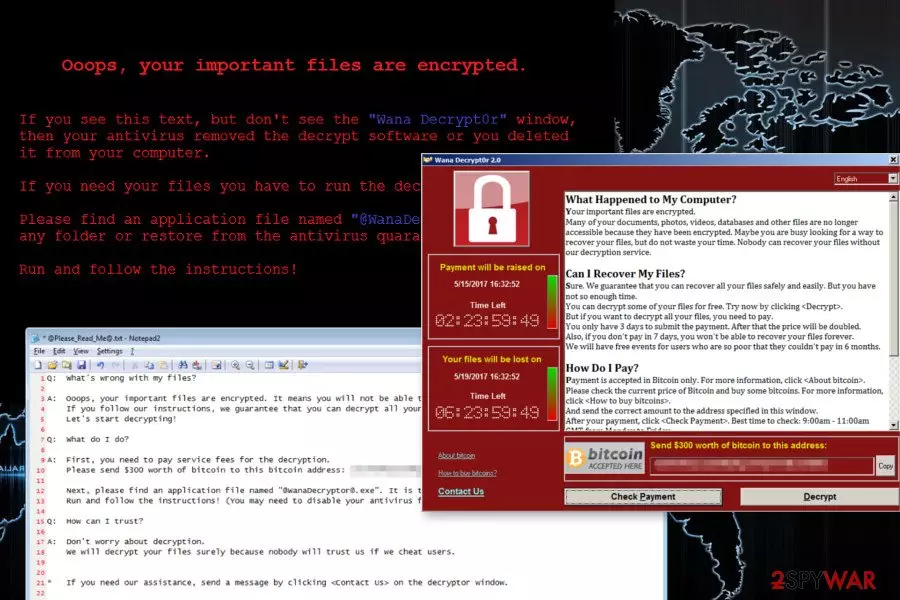
Wana Decrypt0r 2.0 ransomware aims at the most popular file types. Thus, after the attack, all pictures, audio, video, text and other files are locked. Once ransomware completes this task, it replaces affected computer’s desktop and drops two files in each folder that has corrupted files – @Please Read Me@.txt and @WanaDecryptor@.exe in each folder that has encrypted files. These files are nothing else but ransom notes. The .exe file runs a terrifying message in a lock screen window that includes two timers that shows how much time left to pay the ransom. Cyber criminals inform that victims can recover it only using specific decryption software provided by the authors of ransomware. As we already mentioned, the price of data recovery is $300. Victims are allowed to test this software and decrypt few files free. Once they check the liability of the software, they need to transfer the ransom to the provided Bitcoin address. Developers of Wana Decrypt0r gives 3 days to make the payment. If victims won’t meet the deadline, the size of the ransom increase. However, if they won’t make the payment within 7 days time, according to cyber criminals, they will never be able to restore their files. Though, cyber criminals might make one exception. They might negotiate with “poor” victims and extend ransom payment deadline to 6 months. However, such generosity should not be greeted positively. No matter what authors of the ransomware promise, you should not rely on them. It’s better to remove Wana Decrypt0r 2.0 from the device and look up for alternative data recovery methods rather than risking to lose the money. Even if you transfer the ransom in time, cyber criminals may not allow you to restore your data because they are only interested in swindling the money.
On the affected device Wana Decrypt0r makes modifications in /Windows and /windows/system32 directories. These changes allow to affected all devices connected to the same network. Thus, after the attack is important to disconnect infected computer from the network. What is more, ransomware also deletes Shadow Volume Copies that are crucial in data recovery, disables Windows startup recovery and clears Windows Server Backup history. Thus, using alternative recovery methods is nearly impossible. At the moment the only possible way to decrypt data is to use data backups. If you do not have them, please be patient. Security experts are working on decryption tool. Meanwhile, you need to remove Wana Decrypt0r and wait for the reliable decryptor.

Malware spreads using exploit kit
Wana Decryptor ransomware was distributed among Windows-based machines only. It cannot affect Mac OS X. You can get infected with the ransomware thru the EternalBlue vulnerability[6] found in Windows Vista, 7, 8, 10 and Windows Server versions. No matter that Microsoft patched this vulnerability back in March, it is obvious that not each of PC users and trusts have fixed it. If you didn't get Microsoft patches indexed as MS17-010, CVE-2017-0146, and CVE-2017-0147, hackers could use the EternalBlue exploit to infiltrate your computer and infect it with WannaCry. It is still unknown whether hackers are still using spam to spread this malware. However, take into account that you can get infected with a ransomware virus after clicking an infected email attachment presenting itself as a message from a bank or similar authority. Meanwhile, Windows OS users are suggested to update operating system along with all the software installed on the device. It might help to avoid ransomware attack.
Instructions for Decrypt0r 2.0 removal
To remove Wana Decrypt0r, you need to get rid of each of its files. We highly recommend using updated anti-spyware for this task because you need to be a professional to find these files manually. If you got infected, use FortectIntego, SpyHunterCombo Cleaner or MalwarebytesMalwarebytes to fix your computer after Wana Decryptor virus attack. Of course, when dealing with ransomware, you always think about the recovery of your files. For that, you should use data backups that you should save in separate locations (external hard drives, clouds, etc.), not on your computer. However, if you need another solution because you don't have backup files, you can try using data recovery solutions provided below.
Did this guide help?
Be the first to comment