

Coba ransomware is a malicious Windows program that locks personal files to acquire money from victims

Coba is a malicious ransomware that has been causing havoc in the cybersecurity world. This malware is notorious for encrypting all personal files, including documents, photos, videos, and databases, using advanced encryption algorithms, rendering them inaccessible to the victims. When files are encrypted, they are appended with the .coba extension, and their icons disappear, making it impossible for users to open them.
Cybercriminals behind the Coba attack often demand a ransom payment in bitcoin, claiming that only they can provide a unique key to decrypt the files. In the ransom note, which is usually named _readme.txt, victims are instructed to pay a specific amount of money, $490 or $980, to retrieve their data. The cybercriminals behind the attack provide communication channels such as support@freshmail.top and datarestorehelp@airmail.cc for the victims to contact them.
Coba is part of a larger family of ransomware known as the Djvu malware, which has had over 600 variants since its release. Some of the most recent variants include Goba, Gosw, and Qoqa, among others. In this article, we will discuss how to protect yourself from a Coba ransomware attack, how to deal with the aftermath of an attack and the steps you can take to attempt to restore your encrypted files without paying the ransom.
| Name | Coba virus |
|---|---|
| Type | Ransomware, file-locking malware |
| File extension | Malware appends .coba extension to all affected files |
| Family | Djvu |
| Ransom note | _readme.txt dropped at every location where encrypted files are located |
| Contact | support@freshmail.top and datarestorehelp@airmail |
| File Recovery | There is no guaranteed way to recover locked files without backups. Other options include paying cybercriminals (not recommended, might also lose the paid money), using Emisoft's decryptor (works for a limited number of victims), or using third-party recovery software |
| Malware removal | After disconnecting the computer from the network and the internet, do a complete system scan using the SpyHunterCombo Cleaner security program |
| System fix | As soon as it is installed, malware has the potential to severely harm some system files, causing instability problems, including crashes and errors. Any such damage can be automatically repaired by using FortectIntego PC repair |
Ransom note
When a Coba ransomware attack occurs, one of the most common ways cybercriminals communicate with their victims is through a ransom note. This message is designed to instruct the victim on how to pay the ransom to the attackers in exchange for the decryption of their encrypted data.
The ransom note usually contains instructions on how to pay and how much is needed in bitcoin. Unlike some other ransomware, the attackers behind this one rely on a professional demeanor, making their ransom notes appear more convincing.
This message is displayed on the victim's device as soon as the Coba virus finishes encrypting the files. It can take the form of a text file, an image, or a webpage and typically contains clear instructions on how to make the ransom payment and regain access to the encrypted data.
ATTENTION!
Don't worry, you can return all your files!
All your files like pictures, databases, documents and other important are encrypted with strongest encryption and unique key.
The only method of recovering files is to purchase decrypt tool and unique key for you.
This software will decrypt all your encrypted files.
What guarantees you have?
You can send one of your encrypted file from your PC and we decrypt it for free.
But we can decrypt only 1 file for free. File must not contain valuable information.
You can get and look video overview decrypt tool:
https://we.tl/t-hhA4nKfJBj
Price of private key and decrypt software is $980.
Discount 50% available if you contact us first 72 hours, that's price for you is $490.
Please note that you'll never restore your data without payment.
Check your e-mail “Spam” or “Junk” folder if you don't get answer more than 6 hours.To get this software you need write on our e-mail:
support@freshmail.topReserve e-mail address to contact us:
datarestorehelp@airmail.ccYour personal ID:
Perpetrators of ransomware attacks often use psychological tactics to convince victims to pay the ransom quickly. One of the most common tactics is offering a 50% “discount” if payment is made within a certain timeframe, and sometimes even providing a free test decryption service to prove that the files can be recovered.

Despite these seemingly compelling offers, cybersecurity experts and law enforcement strongly advise against paying the ransom. By doing so, victims are essentially supporting criminal operations and funding future attacks. Additionally, there is no guarantee that the promised decryption key will work or even be delivered, as criminals cannot be trusted to uphold their end of the bargain.
Remove malware correctly
Experiencing a sense of panic is a common reaction when ransomware locks up personal files, but it is important to understand that reacting in this way will not solve the problem. In fact, panic can lead to further mistakes and data loss, making the situation worse. The best course of action is to remain calm and take the appropriate recovery steps in a methodical manner.
One of the first and most crucial steps in the recovery process is to prevent the infected computer from communicating with the remote server used by the hackers to store the decryption tool and issue commands. To accomplish this, it is essential to sever the internet connection before beginning any recovery procedures. This will prevent the ransomware from spreading and causing additional damage to the system.
- Type in Control Panel in Windows search and press Enter.
- Go to Network and Internet.
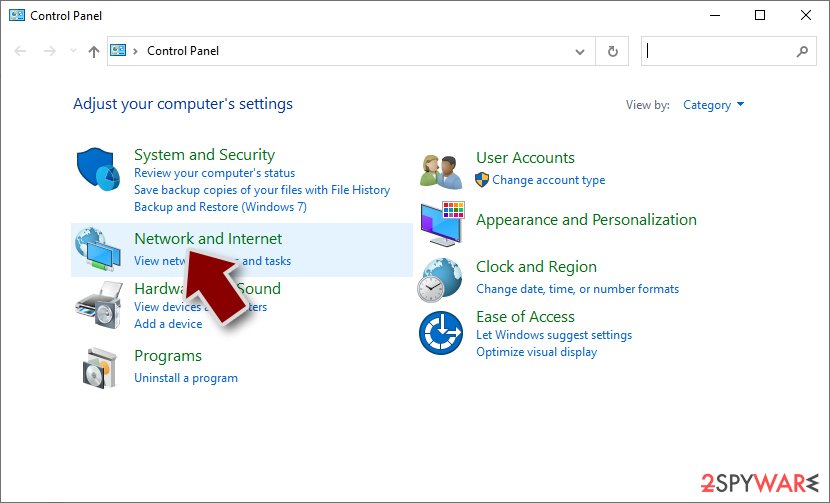
- Click Network and Sharing Center.
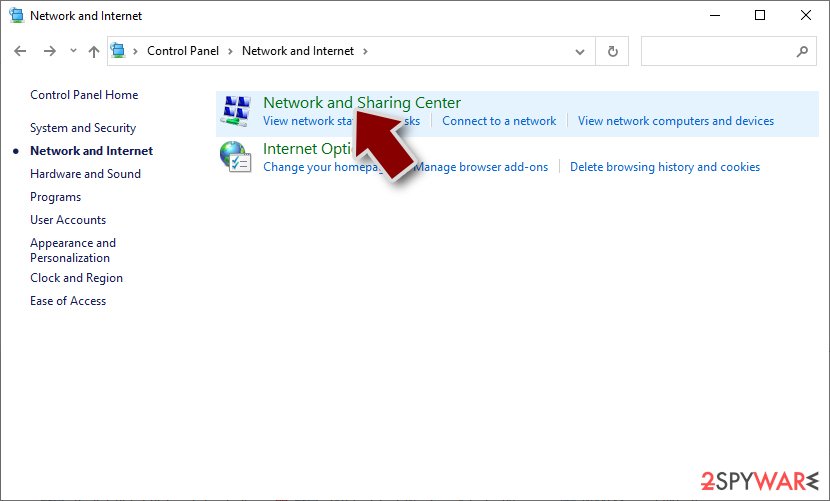
- On the left, pick Change adapter settings.
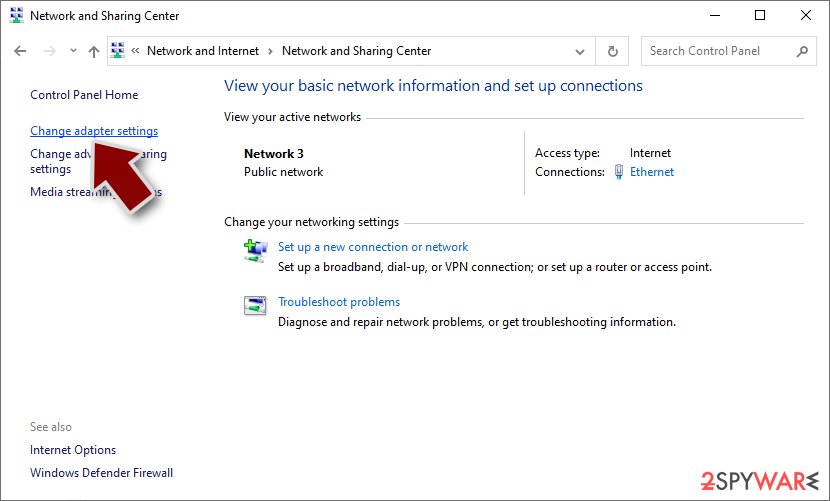
- Right-click on your connection (for example, Ethernet), and select Disable.
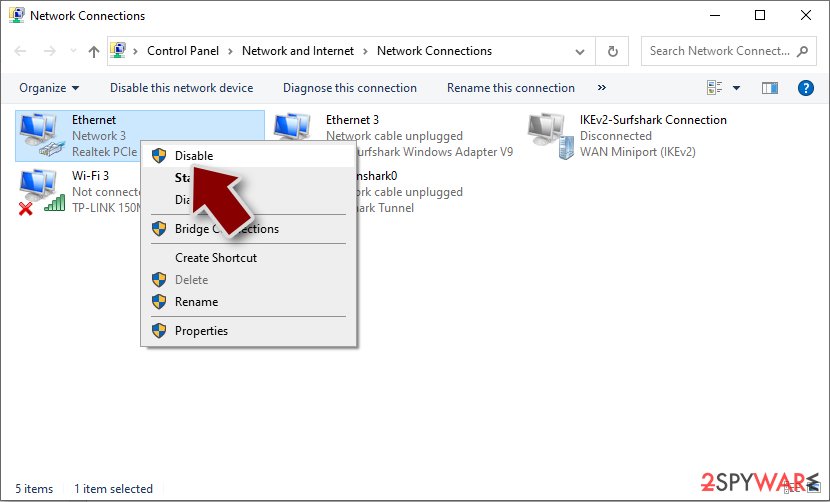
- Confirm with Yes.


While ransomware may sometimes remove itself after encrypting files, this does not mean the threat has been completely eliminated. It is possible that other harmful components remain on the device, such as data-stealing modules or other malware that can work in conjunction with the initial attack.
Fortunately, security software such as SpyHunterCombo Cleaner or MalwarebytesMalwarebytes can effectively locate and remove all Coba ransomware-related files, as well as any additional modules and malware that may be present on the system. The software is designed to be user-friendly and does not require any specific IT experience, making it an accessible solution for individuals who have been impacted by ransomware attacks.
Once the infected files and malware have been removed from the system using security software, it is crucial to ensure that the system functions correctly and without any issues. This is where a reliable recovery tool like FortectIntego comes into play.
Recovery tools like FortectIntego are designed to address any system issues that may have arisen due to the ransomware attack, such as crashes or errors that can occur during the malware removal process. These issues can impact the system's overall performance and hinder its functionality. However, with the assistance of a recovery tool, users can fix these problems and restore their system to its optimal state.
Data recovery possibilities
There are a lot of misunderstandings surrounding ransomware attacks, particularly when it comes to the data encryption process and how malware works. Many victims of ransomware believe that a full system scan with security software will be enough to recover their files. They may also try to rename files and add the original extension, hoping to restore their lost data. Unfortunately, it's not as simple as that.
Ransomware uses complex encryption algorithms to lock every file with an alphanumeric sequence that is nearly impossible to guess or crack. This means that users cannot cheat the Coba ransomware and easily recover their files. Even if the malware is removed, the encrypted files remain inaccessible without the decryption key, which only the cybercriminals possess.
Once ransomware takes hold of a system, it begins encrypting files and creating a unique identifier along with a complex encryption key. This information is then transmitted to the attackers, who can use it to create a decryption key that allows them to access the victim's data. However, the cybercriminals behind the attack won't provide the decryption key for free, as they aim to profit from the extortion. This is the primary reason why ransomware attacks are so lucrative for hackers.
To avoid paying the ransom, we suggest exploring the alternative solutions we have compiled below. However, before attempting any of these methods, it is crucial to create a backup copy of the encrypted data to avoid any potential corruption during the recovery process.
We recommend starting with the Emsisoft decryption tool, but please note that its effectiveness may vary depending on the specific ransomware variant used in the attack and other factors.
- Download the app from the official Emsisoft website.
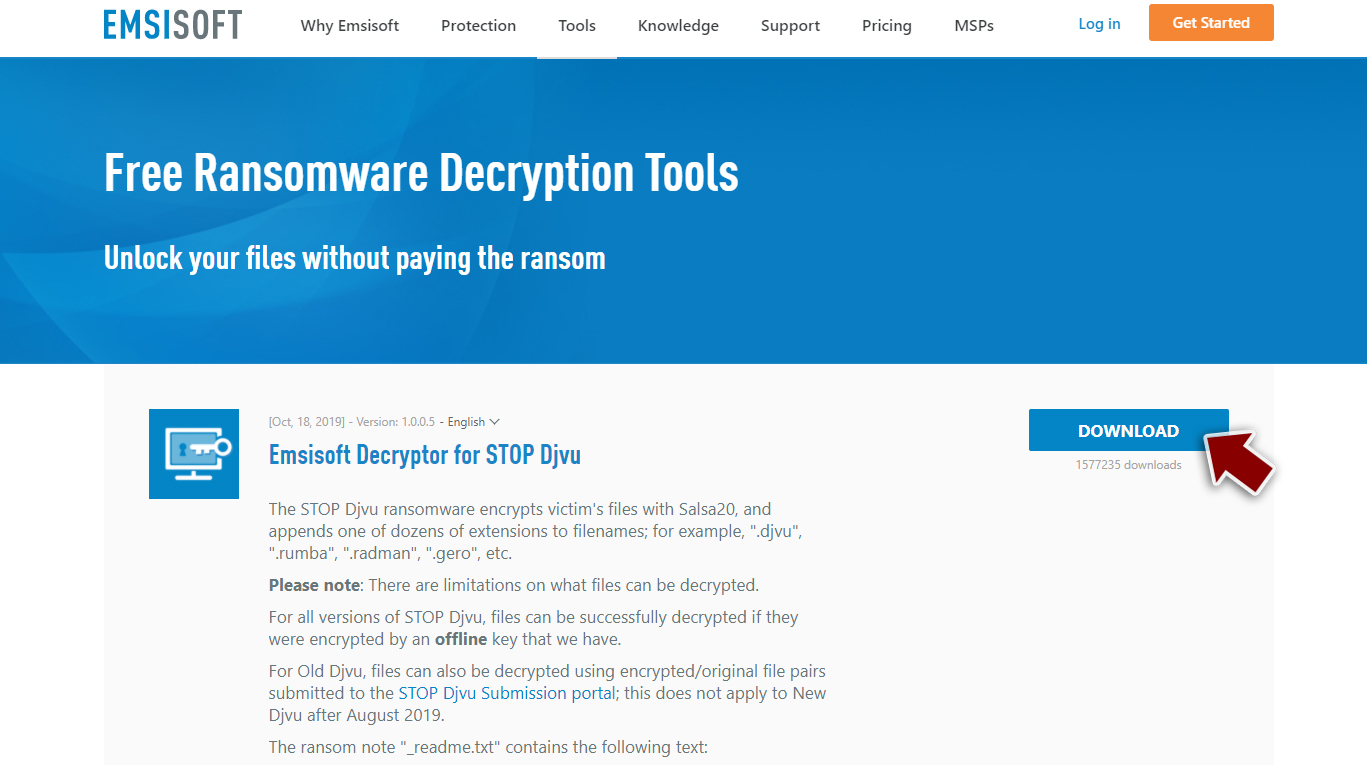
- After pressing Download button, a small pop-up at the bottom, titled decrypt_STOPDjvu.exe should show up – click it.

- If User Account Control (UAC) message shows up, press Yes.
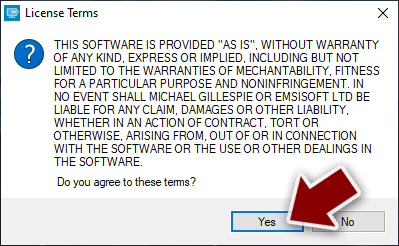
- Agree to License Terms by pressing Yes.
- After Disclaimer shows up, press OK.
- The tool should automatically populate the affected folders, although you can also do it by pressing Add folder at the bottom.

- Press Decrypt.



From here, there are three available outcomes:
- “Decrypted!” will be shown under files that were decrypted successfully – they are now usable again.
- “Error: Unable to decrypt file with ID:” means that the keys for this version of the virus have not yet been retrieved, so you should try later.
- “This ID appears to be an online ID, decryption is impossible” – you are unable to decrypt files with this tool.
If your data was encrypted with an online ID, Emsisoft's tool won't work. In such a case, we recommend trying a specialized data recovery software instead.
- Download Data Recovery Pro.
- Double-click the installer to launch it.

- Follow on-screen instructions to install the software.
- As soon as you press Finish, you can use the app.
- Select Everything or pick individual folders which you want the files to be recovered from.

- Press Next.
- At the bottom, enable Deep scan and pick which Disks you want to be scanned.

- Press Scan and wait till it is complete.
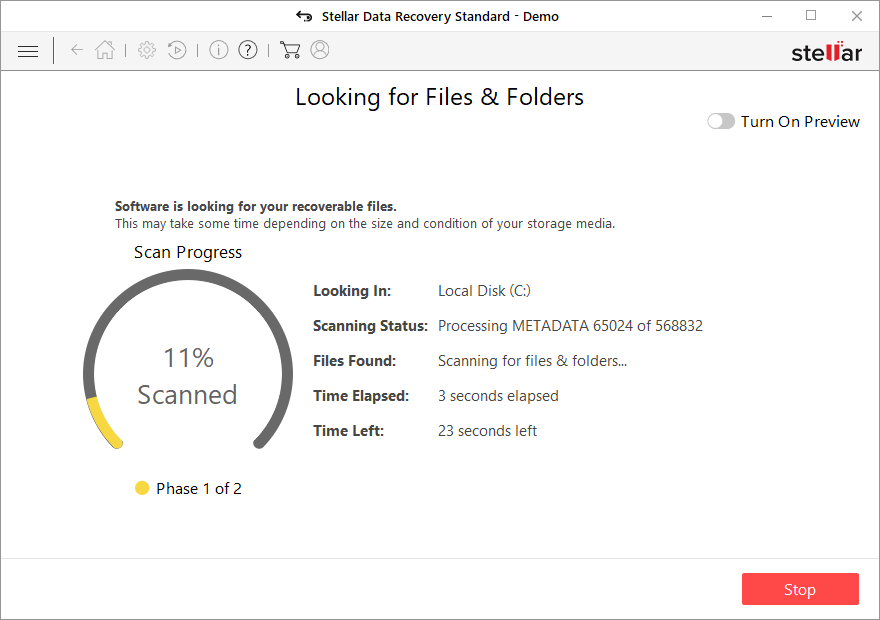
- You can now pick which folders/files to recover – don't forget you also have the option to search by the file name!
- Press Recover to retrieve your files.


Check out the instructions below for more tips and troubleshooting.
Did this guide help?
Be the first to comment