

How harmful can DirtyDecrypt be?
DirtyDecrypt (also known as Revoyem or dirtydecrypt.exe) is a very malicious computer infection, which may cause data and money loss. It belongs to the “ransomware” category which also includes such well-known threats as Coin Locker, CTB Locker and Cryptolocker. The latest of them is CTB-Faker ransomware, which showed up just in the beginning of July 2016. The emergence of DrityDecrypt virus was recorded in the beginning of 2013; however, it has been updated for several times since then. The latest version of this ransomware encrypts files with these extensions: 7z, avi, doc, docm, docx, jpeg, jpg, mpeg, mpg, pdf, png, rar, rtf, wmv, xls, xlsm, xlsx, zip. Besides, it can infect explorer.exe, svchost.exe and winlogon.exe processes that are launched each time the computer starts. Because of this feature, manual DirtyDecrypt removal process becomes impossible.
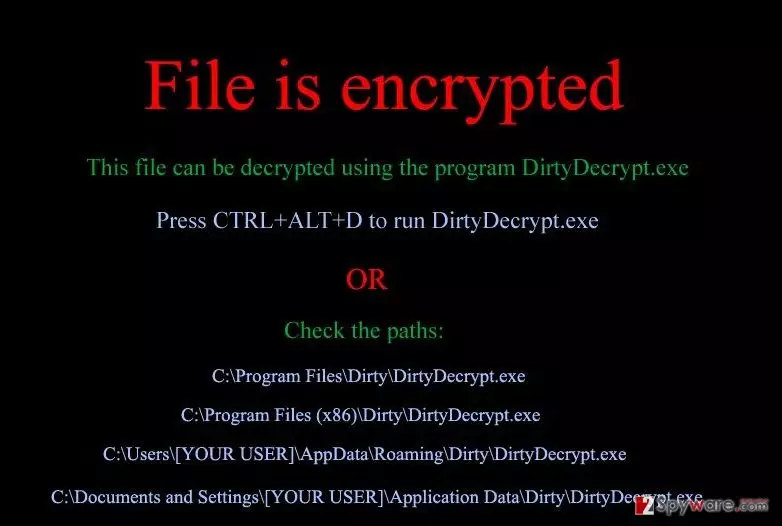
Just like the other ransomware infections, DirtyDecrypt spreads via exploit kits, spam email attachments, trojans, and so on. Once installed, it roots deep into the system and start causing redirects to the websites containing underage pornography. Most probably you already known that visiting such websites is treated as a severe crime commitment of which usually results in huge penalties. That’s a catch! After several redirects to illegal pornographic websites, DirtyDecrypt ransomware locks user’s computer claiming that the crime has been committed and that he/she has to pay the ransom. In fact, the functions of a damaged computer are not corrupted; however, the virus encrypts victim’s files that have recently created or modified by the user and displays such notification:
File is encrypted
This file can be decrypted using the program DirtyDecrypt.exe
Press CTRL+ALT+D to run DirtyDecrypt.exe
If DirtyDecrypt.exe not opened сheck the paths:
C:\Program Files\Dirty\DirtyDecrypt.exe
C:\Documents and Settings\[USERNAME]\Local Settings\Application Data\Dirty\DirtyDecrypt.exe
C:\Program Files (x86)\Dirty\DirtyDecrypt.exe
C:\Users\[USERNAME]\AppData\Roaming\Dirty\DirtyDecrypt.exe
C:\Documents and Settings\[USERNAME]\Application Data\Dirty\DirtyDecrypt.exe
Indeed, DirtyDecrypt virus is very convincing since people are blamed for real things; however, keep in mind that it’s just a trick that scammers use to make inexperienced and gullible people give their money away. If you decide to pay then ransom, you will risk loosing money for nothing because there is no guarantee that the data stored on your machine will be decrypted. Moreover, you may unconsciously disclose credit card details to cyber criminals and experience further thefts from your bank account. Therefore, remove DirtyDecrypt ransomware infection from the system using FortectIntego and leave file recovery for the special software, such as R-studio and Photorec.
How can DirtyDecrypt hijack my computer?
According to the recent research, DirtyDecrypt virus targets mainly computer users in the United States, Canada, and Europe. Once it gets into the target computer system, important data is encrypted and you may be tricked into giving away your hard earned money for getting back your photos and important documents. Thus, if you do not want this scenario to happen, you should always keep a reputable anti-spyware installed and avoid visiting illegal websites since DirtyDecrypt virus is usually spread via JavaScrip redirect Trojan that is found on illegal websites that contain adult content.
After the Trojan gets installed, the Styx Exploit Kit installs a ransomware and starts initiating all other activities that we have indicated in the previous section. By the way, ransomware infections are also commonly spread via spam email attachments. Therefore, if you receive an email from an unknown sender, it contains grammar or typo mistakes, the overall design seems strange or some other features cause your doubts, don’t open it and report about spam. In case DirtyDecrypt virus has already decrypted personal data on your computer, don’t wait long and fix this issue.
How to remove DirtyDecrypt virus?
If you have regularly done backups of your files, then DirtyDecrypt or another ransomware attack nothing special. You should restore photos, documents, music and other files that this virus has decrypted using the copies from a USB external drive, CD, DVD, or cloud storage. In case you have never thought about the immunity of your data, then we recommend using data recovery tools, such as R-studio and Photorec. In order to perform a full DirtyDecrypt removal from the system, we recommend running a full system scan with FortectIntego, MalwarebytesMalwarebytes or another reputable anti-spyware. If the virus blocks these programs and disables them when trying to launch them, follow this guide:
Did this guide help?
Be the first to comment