

CryPy ransomware takes its time while encrypting files on the system
CryPy virus is one of a few ransomware examples that are created using Python programming language. Once installed, it begins to lock data with AES-256 cipher on Windows, although it applies a different key for each of the files (and sends it off to Command & Control server – only accessible to the attackers), which makes the process so much longer.
While encrypting victims' files, it renames every single one of them by adding CRY prefix, scrambling the file name, and finally adding the .cry extension. The encryption is initiated with the help of encryptor.py file, and the tracking of Windows errors is enabled by using boot_common.py. These files are compromised right after the installer enters the target computer system.
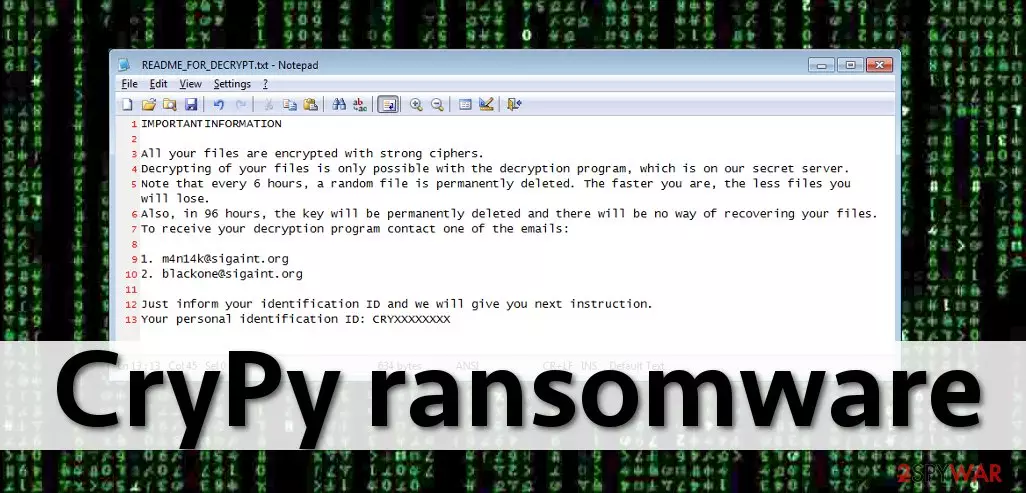
Once the encryption procedure is finished, the virus leaves a ransom note called README_FOR_DECRYPT.txt. In there, hackers provide insight on what happened to users' files and also claim that the only way to restore files is by communicating with them via m4n14k@sigaint.org or blackone@sigaint.org emails and paying a ransom.
| Name | CryPy ransomware |
| Type | File-locking virus, crypto-malware |
| Encryption method | AES-256 – applies a different key for each of the files |
| File modification | Uses “CRY” prefix, replaces the name with random characters and appends .cry extension |
| Ransom note | README_FOR_DECRYPT.txt |
| Contact | m4n14k@sigaint.org and blackone@sigaint.org |
| Removal | Perform a full system scan with SpyHunterCombo Cleaner antivirus software |
| System fix | Once malware is eliminated, you might experience system crashes or errors due to damage done by malware; in such a case, use FortectIntego to fix damaged files automatically |
Python-based ransomware has already been named as “Pysomware”. However, this group includes only several members – Fsociety virus and Fs0ci3ty ransomware.
The ransom note files contains instructions on how to contact ransomware authors and decrypt data. The note of CryPy ransomware states:
IMPORTAN INFORMATION
All your files are encrypted with strong chiphers.
Decrypting of your files is only possible with the decryption program, which is on our secret server.
Note that every 6 hours, a random file is permanently deleted. The faster you are, the less files you will lose.
Also, in 96 hours, the key will be permanently deleted and there will be no way of recovering your files.
To receive your decryption program contact one of the emails:
1. m4n14k@sigaint.org
2. blackone@sigaint.org
Just inform your identification ID and we will give you next instruction.
Your personal identification ID:
The rest of the ransom note explains that the virus will delete a random file every 6 hours, and, in 96 hours, it will damage the decryption key. It is believed that these claims should encourage victims not to take too long while trying to decide either to pay the ransom or not. The virus does not include a payment address in the message but provides two e-mail addresses.
The victim is asked to write an email to either one or another e-mail address and receive the identification code. If you are looking for a solution to recover your files without paying, sadly, we cannot say that there is a free CryPy decrypter available. However, that does not mean that victims should pay the ransom.
They can recover their files from backup or rely on special programs that are supposed to help people with files' recovery. However, before you try any of these options, make sure you remove the malware first. For that, we strongly suggest using the SpyHunterCombo Cleaner software.
Ransomware distribution methods explained
This ransomware spreads via malware-laden ads, malicious email campaigns, and also exploit kits. There are only three actually useful pieces of advice we want to share with our readers. First of all, back up your files. Backups help to restore data in case you accidentally install malware on your computer. Backups should be kept on external devices stored separately from the PC.
Second, use a trustworthy anti-virus solution. Install a program with real-time protection features and, if possible, use it together with anti-malware software. This will help you prevent viruses from attacking your PC. Lastly, keep all your software up-to-date. Criminals can easily hack your PC if you keep vulnerable old programs (without installing their security updates) on the system.
Besides, avoid clicking on suspicious and aggressive ads, links, and do not open emails sent by unknown people. If you do not follow these tips, then there is no surprise why you have to deal with malware removal now. Please, be more careful and protect your computer – speaking of ransomware, all security experts agree that prevention is better than the cure!
Remove CryPy ransomware and regain access to your files
CryPy virus is malicious software that should be eliminated from the system as soon as possible. If you notice this malware encrypting your files, you might be able to stop it and save part of your data, as it works quite slow, so you see that your PC starts lagging out of nowhere, you should shut it download immediately. Starting Windows in Safe Mode then could help you deal with the infection so it wouldn't continue its job (you can find how to access this mode at the bottom of this post).
You should backup your encrypted files before you do anything – this is especially true for those who do not have backups they can recover their data from. Paying cybercriminals is not a wise idea, as they might never provide you with a decryptor or send you one that does not work. Finally, to restore your data, you can try using the alternative methods we provide below.
Did this guide help?
4 comments
James
It seems that ransomware authors never run out of ideas...
geneva
impossible to recover files!
victimized
CryPy ransomware authors wont get a single penny from me. I aint payin the ransom!
JohnMandes
Thanks for telling how to remove, but please inform us when the decryption tool shows up. We need to recover our files...