

No_more_ransom file virus is ransomware related to Shade and, most recently, Rapid cryptovirus
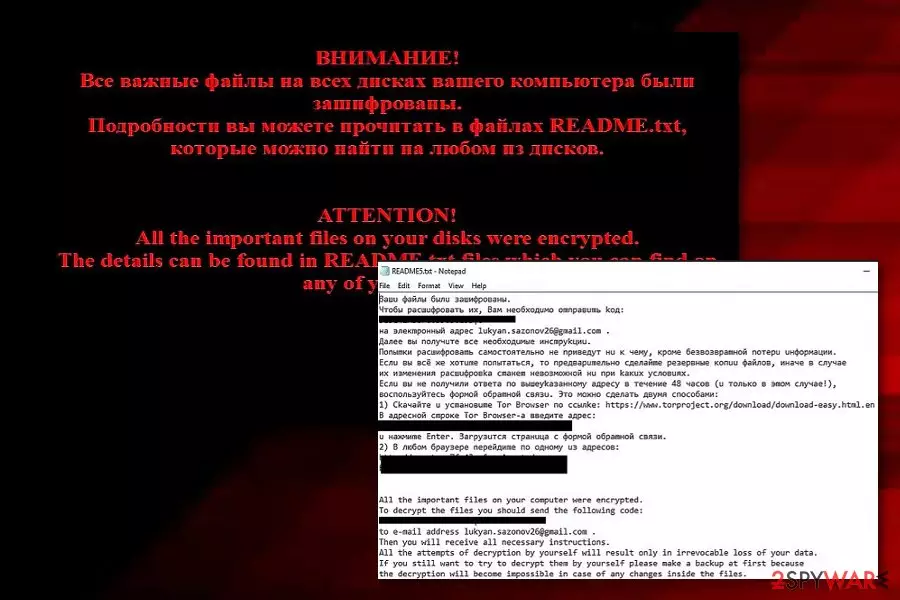
No_more_ransom ransomware is a dangerous cyber threat which belongs to virus category which can encrypt users' files and make them unusable.[1] While previously, the .no_more_ransom file extension was used by the notorious Shade ransomware, the recent examples have been found to relate to the Rapid ransomware. Besides other major improvements, the virus changed the file extension and now is appending .no_more_ransom file extension to the encrypted data which seems to be an evil joke related to the NoMoreRansom project which has been helping users to avoid paying ransoms. All files found are locked by using unique AES-CBC 256 and RSA-2048 encryption algorithms[2] which are safely stored on unreachable remote servers. After having their files encrypted, all victims also receive the ransom note named as README.txt which is used to urge the infected users to contact cyber criminals by using the given email address.
| Name | No_more_ransom |
|---|---|
| Type | Ransomware |
| Relations | Shade ransomware/Rapid ransomware |
| Ransom message | README.txt |
| Appendix | .no_more_ransom |
| Algorithm | AES 256 and RSA-2048 |
| lukyan.sazonov26@gmail.com | |
| Other viruses | Another virus behind this name might be related to Rapid ransomware |
| Detection possibilities | Use FortectIntego to detect the cyber threat |
The .no_more_ransom extension showed up when Shade virus decided to come up with its revival. Shade has been exceptionally targeting users from Russia and has been compared to previously-known Locky and Cerber 4.1.6. However, in 2019 all these viruses seem to be still.
Shade ransomware has been using numerous extensions such as .7h9r, .xtbl, .ytbl, .da_vinci_code, and the .no_more_ransom extension is considered to be the latest one. The hackers made the current version more damaging as it was set to use a RAT tool[3] which, on its behalf, helps to install Teamspy spying trojan.
With its help, the crooks were able to access users' device remotely and identify how much money they can pay for the encrypted data. Likewise, .no_more_ransom ransomware was mostly been used to infect governmental agencies and corporations. The recent versions continued employing RSA-2048 and AES-CBC 256 algorithm to encode the data. After the infiltration process was completed, the ransom README.txt message emerged.
It stated that all your files have been encrypted and that any attempt to recover the files other than remitting the payment may lead to the loss of files. It is not surprising as such threatening messages have been often seen in the ransom text file. Later on, the victim was asked to send his/her unique code to lukyan.sazonov26@gmail.com. According to the instructions, you should follow access Tor network only in the case if the crooks fail to respond to you within 48 hours.

The recent turn of No_more_ransomware
Recently, .no_more_ransom extension has started appearing in the activity of other well-known cyber threat – Rapid ransomware. As a result, sometimes you might run into difficulty while trying to identify which virus occupied your system. However, Rapid virus mostly uses different ransom notes named as How Decrypt Files.txt, Of Recovery files.txt, and others. Additionally, you can always use a strong antivirus program to detect the malware which is responsible for damaging activities on your PC.
In short, remove .no_more_ransom virus right away. There is no time for hesitation in this situation as you need to take actions immediately. You might find ransomware very dangerous cyber threats not only because of permanent data loss but also because some of their kind are possible of making the system vulnerable to other infections and injecting other serious and damaging malware.
For the .no_more_ransom removal, you should choose only reliable anti-malware programs as this is the only way to safely succeed in the elimination process. Additionally, we suggest detecting all malware-laden components in the system in order to get rid of the cyber threat for good. Try using a tool such as FortectIntego to complete this process. Talking about data recovery purposes, you can find some detailed instructions for some file restoring techniques below this article.

The distribution peculiarities of the ransomware
We have already warned in the several posts that the crooks use persuasive techniques to encourage victims to open certain attachments. One of the infected emails may contain a .doc or .dll file. Fortunately, in the later versions of Windows OS, the macros settings are disabled by default. As a result, the file asks you to enable them.
When you notice any suspicious emails in your Inbox folder, do not open any attachments and scan your device with powerful security applications. They are the main tools guarding your operating system in case the ransomware tries to infect the operating system via exploit kits.
Additionally, crooks plant ransomware-related components in vulnerable websites. Peer-to-peer networks[4] are known for their lack of security. This is the main factor which allows various cybercriminals to inject hazardous payload in third-party websites, their hyperlinks, advertising posts, and similar locations.
According to cybersecurity experts from SemVirus.pt,[5] once entering a website, always make sure that it is safe to browse on. If you doubt the security of a particular page – better eliminate it the same minute and never return again. Additionally, you can get antivirus software on your computer for automatical protection. This tool will allow you to perform regular system scans and prevent possible malware infections.
.no_more_ransom extension virus detailed elimination steps
Obviously, the crooks used this ransomware as the mocking response to the joint cyber campaign launched against Shade virus by Europol, Kaspersky Lab, et al. The very campaign was called “No More Ransom.” In this intense cyber battle between the virus researchers and cybercriminals, users have to find a way how to remove .no_more_ransom virus on time.
Security tools such as FortectIntego or MalwarebytesMalwarebytes will help you with the detection of all malware-related content and help you eliminate the cyber threat completely. After the .no_more_ransom removal, you might consider file recovery options. If you encounter any types of difficulties in the cyber threat elimination process, use the below-displayed guidelines to regain the full control of your computer.
Did this guide help?
3 comments
moodyEye
Still not losing hope, eh?
mystiquefog
Ive got enough of their bullying already!
ChJrStevenson
Anyone heard news about the decrypter?