

What is “Notice from Microsoft Corporation”?
MSSecTeam virus operates like a scam oriented at Windows users. The crooks strike with a commonly used technique by pretending to be the tech support specialists from the Microsoft Corporation. They accuse victims of using an illegal copy of Windows and, as a result, all the files and the system are locked. Racketeers try to coax out money and terrify users. Numbers of articles from the US criminal code are mentioned in order to alarm them even more. Before you go panicking, take a look at the key features of this scam. Microsoft does not bother with sending such terrifying messages even if they detect an illegal copy. What is more, even in the case of copyright violation, no money is required to some unknown email address which is not an official MS address. Make MSSecTeam removal your top priority.
Such tech support scam[1] is another sample of hundreds of scams of this type[2]. However, Windows related deceptions prove to be most profitable. Users who might be using an illegal copy, however, are less likely to fall for this scam. There are obvious tips which reveal that the notification or message is counterfeited. First of all, the scam always includes a fake tech support number, an unusual email address or a remote access application in the forged message, e.g. Admin user is disabled. Though the latter deception manifest felons‘ mastery in devising advanced hacking techniques, it is not difficult to look through such hoax. Once you glance at the left top corner of the message, you see a strange email mssecteam@sigaint.org.
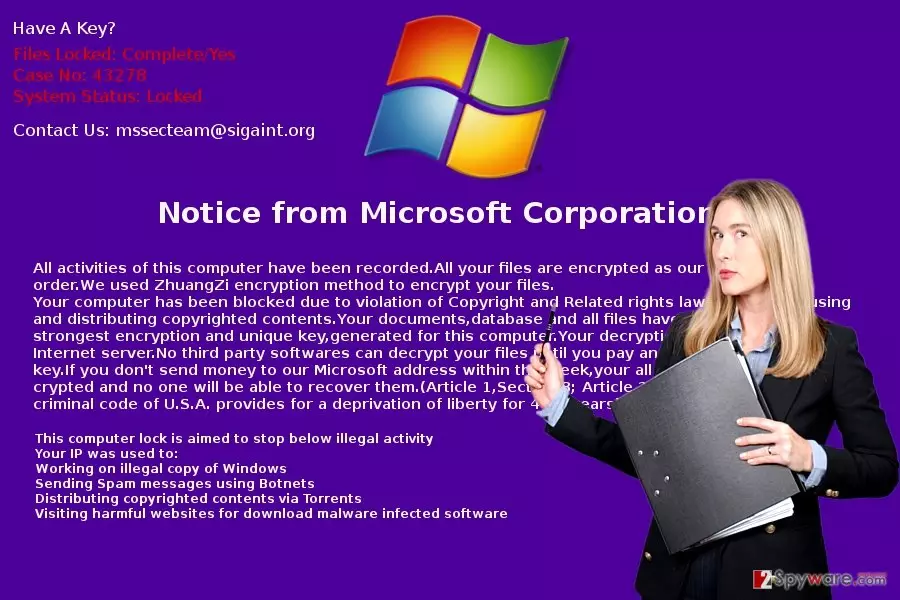
This domain suggests that crooks also engage in ransomware creation activities[3]. A couple of similar crypto-malware such as ihurricane@sigaint.org, were released into the cyber space last year. Furthermore, MSSecTeam felons scare users with a non-existent ZhuangZi encryption. On top of that, it even refers to the laws regulating copyright violation cases. However, crooks raised too much the benchmark of the penalty by frightening with 4-17 years of imprisonment punishment. In order to escape this punishment, the message instructs you to download Tor network, which is mainly used by hackers and other criminals of all sorts, and transfer 5 bitcoins (507 USD)[4]. Lastly, the last message indicates an email address in case you encounter any difficulties.
Is there any way to prevent this scam?
One of the most irritating features of tech support scams[5] is that they disperse through quite delicate ways. While, in a case of ransomware, you might decrease the risk of the encounter if you do not open attachments sent from unknown senders. However, in the case of MSSecTeam hijack, it is likely that the virus invaded your system after visiting a corrupted domain. Usually, exploit kits serve for delivering more elaborate threats. Additionally, your PC might have been victimized if you installed a new application from unknown sources. As a result, within a minute as message titled as “Notice from Microsoft Corporation” appeared on your screen. Once you see it, remove MSSecTeam at once.
Effective MSSecTeam termination
Tech support scams usually lock users’ screen. Thus, difficulties concerning MSSecTeam removal might arise. Fortunately, you can find the access recovery instructions below. They will help you regain control of the device so you can remove MSSecTeam virus. For that purpose, we suggest installing FortectIntego or MalwarebytesMalwarebytes for complete eradication of the threat. On the final note, update your security applications daily and avoid enabling unknown content before verifying their origin.
Did this guide help?
Be the first to comment