

Peculiarities of RoshaLock 2.00 ransomware virus uncovered
RoshaLock 2.00 virus is a severe computer threat[1]. It falls into ransomware category and appears to be the second version of RoshaLock ransomware, which is also known as All_Your_Documents ransomware. Following a successful infiltration of the target computer system, it scans the system and grabs every file that has an extension included in RoshaLock’s target list (which contains more than 2634 different file extensions!), and compresses it alongside all other victimized files to an archive called All_Your_Documents.rar, which is saved into [partition letter]/All_Your_Documents folder. The WinRAR archive[2] is password-protected, and the password works as a data-unlocking key. Speaking of ransomware viruses, we have to say that RoshaLock 2.00 ransomware uses an interesting technique, considering that traditional ransomware viruses like Cerber[3] or Spora use advanced encryption[4] techniques to encrypt files, but not to archive them. The password to the archive created by RoshaLock 2.00 malware is performing series of complex operations, and there is no way to guess it or brute-force it.
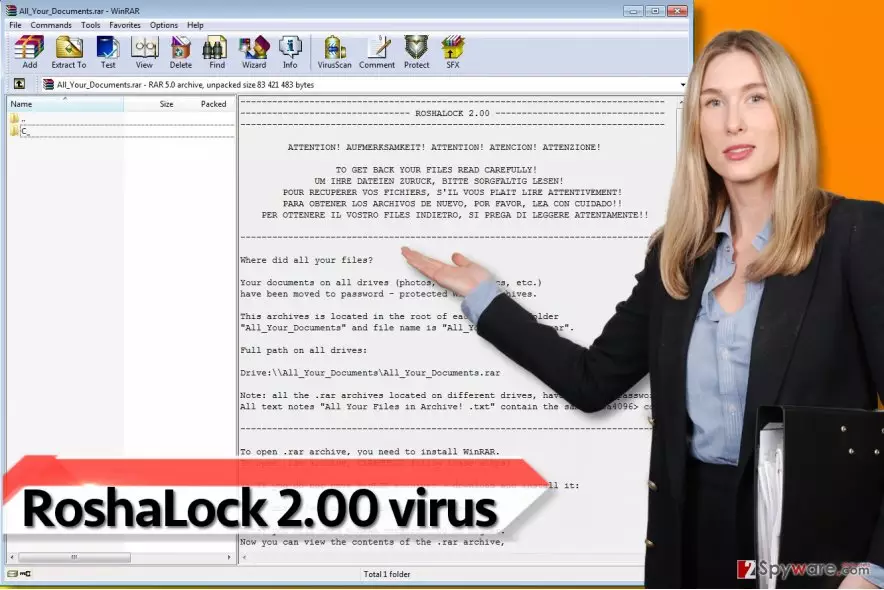
Following a successful data corruption, RoshaLock 2.00 creates a ransom note. This message from cyber criminals is called All Your Files in Archive!.txt, and it starts with a warning provided in English, German, French, Spanish and Italian languages. The rest of the message is provided in English, and it informs the victim that files have been moved to password-protected WinRAR archives. The virus reveals a link to a personal .onion website created for the victim, which can be opened via Tor browser. The .onion website contains the Bitcoin wallet address that the ransom needs to be transferred to. It appears that cybercriminals ask for 1.10 Bitcoins (more or less 1100 US Dollars) in exchange for the password for the RAR archive. It is unknown whether cyber criminals actually provide the key after receiving the money from the victim, but it seems that they tend to rush the victim to pay. The message in the .onion site advises paying the ransom within five days starting from the moment the victim first enters the payment website. Otherwise, the price will begin to increase by 0.05 BTC each day. However, we do not recommend you to pay the ransom. You can remove RoshaLock 2.0 virus using FortectIntego or similar programs – definitely leave RoshaLock 2.00 removal task for an automatic and professional malware removal program instead of trying to delete the virus manually.
How does RoshaLock virus spread?
RoshaLock 2.0 ransomware seems to be distributed via mail spam[5], fake software updates, compromised websites and deceptive programs. In other words, it spreads in the form of a Trojan horse, and most of the victims install it inadvertently. If you care about your computer’s security, protect it by installing good anti-malware program alongside antivirus, create a data backup and avoid suspicious websites when browsing the Internet. To avoid ransomware that is distributed via exploit kits, keep all your programs up-to-date. Moreover, never install programs or updates from web pages that urgently require you to do so. Finally, never open attachments that come with unexpected emails, especially those sent by strangers or companies that you had no business with lately. The last malware distribution technique that we described appears to be the most efficient one, so keep that in mind and explore your email Inbox cautiously!
How can I remove RoshaLock 2.00 ransomware virus?
In closing, we have to say that RoshaLock 2.00 is a highly sophisticated piece of malware and it seems that there are no ways to crack this virus; besides, it is unlikely that it contains any flaws that would allow researchers to create a free decryption tool. At present, you need to remove RoshaLock 2.00 ransomware virus using powerful malware removal tools – please do not trust suspicious programs and use only those programs that are recommended by reliable sources. Our team has listed software recommended for RoshaLock 2.00 removal down below. Here, you can also find a tutorial on how to remove the virus safely.
Did this guide help?
4 comments
2-Spyware team
Dear visitor,
Anti-spyware or anti-malware tools are meant to eliminate the virus, but they are not meant to reverse the damage that it has done to the system or your files. You can restore your files from a backup; you also have the option to pay cyber criminals, but we strictly advise you not to do so. There's no guarantee they will give you the password whatsoever.
Garry
This nasty ransomware took my files away! I need them! How dare this nasty program steal my files??? Its totally illegal!!!
Julian
I cant eliminate Roshalock 2.00 ransomware no matter what i do! The files are still compressed and I cannot access them.
Ray18_18
I cannot believe how quickly the virus compressed all those gigabytes of files! incredible, gotta say...