

“Your Computer Is In Blocked State” System Warning asks you to call scammers
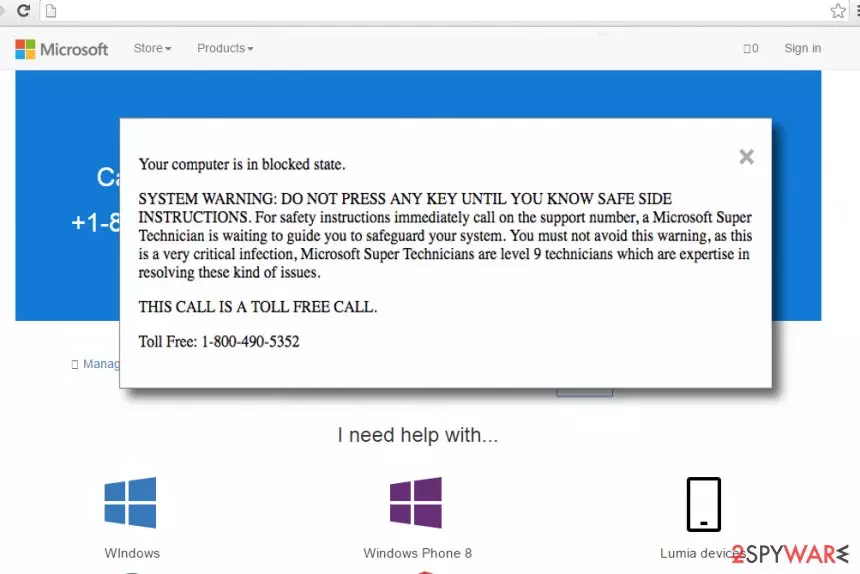
Your Computer Is In Blocked State virus is a deceptive software that presents misleading notifications on the computer's screen. It is actually a scam[1] that is meant to scare computer users and force them to call fake tech support[2] for help regarding the “detected issues.” The malware advises victim to reach out to “certified Microsoft technicians” for safe side instructions.
When the virus redirects the victim to a phishing website, an annoying pop-up immediately shows up. This pop-up says that user’s computer is “in blocked state” because of a “very critical infection.” The rest of the message urges the victim to call “Microsoft Super Technician” for safe side instructions, and without even naming the virus, it manages to frighten the user within a few seconds. In addition, the deceptive message says “do not press any key until you know safe side instructions.”
Scammers even state that “Microsoft Super Technicians” are level 9 technicians and they are the only ones that can save victim’s computer[3], but at this point, the user has to stop and rely on common sense. If you are interested in safe side instructions from Microsoft, you should firstly familiarize with tech support scam types that use the good name of Microsoft to trick unsuspecting victims into providing sensitive information.
Typically, users who encounter such scams admit that their computers were working just fine before such deceptive message appeared on their screens. There are series of similar tech support scams such as “Your Computer Has Been Blocked” (Chrome), “Windows Detected ZEUS Virus” or “Error #268D3”[4] and all of them try to convince the user that there's something wrong with the computer while in reality there is no real threat to the computer.
Therefore, we invite you to scan your computer with anti-malware software. There is no need to call some suspicious “technicians” that are trying to swindle money from you by telling lies about “Microsoft Blocked State.” Scammers are using social engineering tactics by trying to scare the user and also convey the sense of urgency[5].
However, calling these scammers would be a big mistake. Frauds usually try to trick the victim into providing sensitive data or remote access to the computer, and failure to recognize a scam can allow scammers to use your personal information for evil purposes or access your computer to install malware on it.
Do not let frauds to scam you and remove Your Computer Is In Blocked State scam immediately. For that, you should use anti-malware programs like FortectIntego or SpyHunterCombo Cleaner. They can detect the program that causes redirections to these phishing websites and eliminate it for good. We do not recommend users to try to find this program manually because it can hide in the system under various different names.
If you do not want to delete useful programs when trying to track down the main virus’ executive file, we suggest you opt for automatic Your Computer Is In Blocked State removal option.

Tech support scam malware is extremely popular nowadays
Tech support scam viruses such as Your Computer Is In Blocked State or Your Computer Has Been Blocked (Windows 10) are mostly distributed via software bundles, untrustworthy websites or pirated software packs. In other words, if you do not pay attention to the online content you interact with, you might end up with a virus like this one. Once installed, the malware affects web browsers and makes them open phishing websites at random times.
- To prevent such programs from attacking your PC, NoVirus.uk recommends[6] you to install a powerful anti-malware software and pay attention to little details on websites that you visit. If you notice that websites urge you to install something, click somewhere, or provide sensitive information, you should quit such sites immediately.
- Be extremely careful when you download free programs from the Internet – most of the time, they are bundled with extra programs that are either ad-supported or malicious.
- If you do not want to end up with spyware or malware on your PC, choose Custom or Advanced mode when installing new programs and refuse to install suggested third-party programs by removing check marks next to suggestions to add them alongside your chosen software.
Detect and remove Your Computer Is In Blocked State malware instantly
If you’re ready to remove Your Computer Is In Blocked State virus, do it without delay. We recommend you to prepare the computer system for this task and in order to eliminate the virus properly, reboot the system into Safe Mode with Networking first.
It is highly recommended to use an anti-malware software such as FortectIntego for Your Computer Is In Blocked State removal. Once it scans the system and eliminates detected threats, you won’t encounter these annoying redirects and pop-up ads ever again.
Did this guide help?
3 comments
Damian
Damn scammers... I still cant understand how people who work through phone cannot be located and put behind the bars!
Logane
I almost called them... damn tech support scammers. I detected the program that was causing redirects to that phishing website. what I dont know is when did I install it!
NorbertVanz
"Your Computer Is In Blocked State" scam scared my mother, like, really badly!. I hate tech support scammers!!!!