

help@onyon.info ransomware takes files to hostage and demands to pay the ransom
help@onyon.info ransomware is another member from the BTCWare family. This crypto-malware continues the hazardous tasks of Onion and OnionLock ransomware viruses. It encrypts files using sophisticated cryptography and appends [help@onyon.info].master file extension to each of the targeted document, text, audio, video, image and other files. Once all targeted data is locked with strong cipher, the ransomware leaves a ransom-demanding message on the affected computer’s desktop. The instructions how to restore files are presented in “!#_RESTORE_FILES_#!” file. Here victims are told that they have 36 hours to contact cyber criminals and learn how much Bitcoins they need to transfer for the decryption key. Authors of the help@onyon.info ransomware virus want to rush people to send an email by saying that the size of the ransom depends on their speed. The longer they wait, the more money they have to pay. According to the ransom note, after the deadline, the decryption key will be deleted permanently. However, these talks are nothing else but psychological terror. Thus, you should not listen to them and scan the computer with FortectIntego or other reputable malware removal program. It will help to remove help@onyon.info entirely.
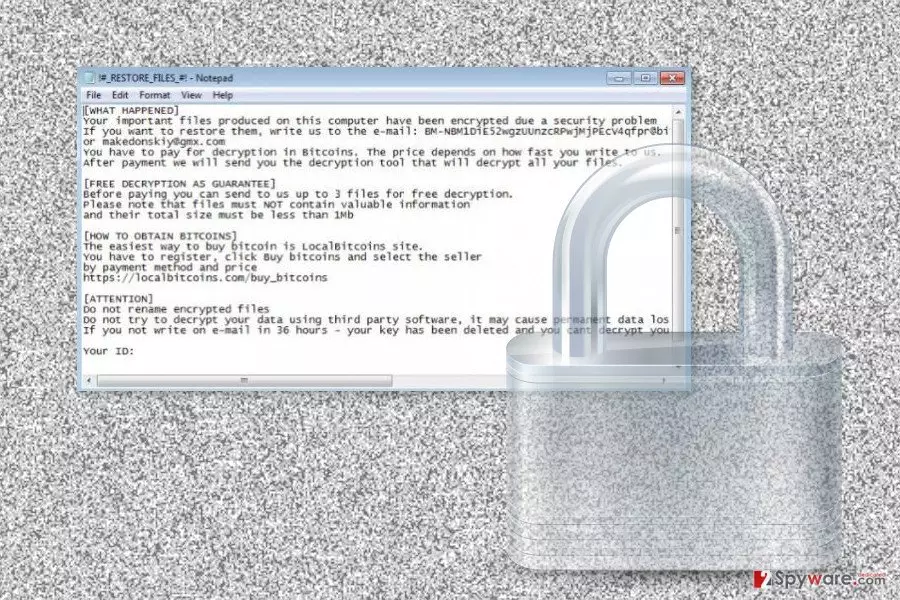
In order to prove the credibility, hackers allow decrypting three files for free. Victims can send files encrypted by help@onyon.info ransomware that are less than 1MB and do not contain valuable information, and hackers will send back decrypted data. However, playing this game and having business with criminals is not recommended. These three files might be the only one that you get back. Once you pay the ransom, cyber criminals might disappear and forget their promise. Bear in mind that the main purpose of this cyber infection is to swindle the money from innocent users. Thus, focus on help@onyon.info removal and later try alternative data recovery methods. Do not believe that attempts to recover your files using third-party software will lead to data loss. It’s a cheap trick to convince people to follow hackers’ orders.

Distribution methods of the ransomware virus
One of the main ways how help@onyon.info ransomware spreads is malicious spam emails. Cyber criminals apply social engineering techniques to convince people into opening infected document or visit a malicious website. Phishing emails[1] often look like sent from delivery services, banks, retailers or even governmental institutions. Thus users can be easily misled by this trick and click on a dangerous content. The attached Word or PDF document is obfuscated and downloads malware payload on the system. The help@onyon.info hijack might also occur when a user clicks on a malware-laden ad.[2] The problem is that safe and malicious ads usually look the same. Indeed, infected advertisements might be delivered on the legitimate websites. Undoubtedly, chances to catch ransomware in high-risk websites is higher than browsing through news portals and regular sites. However, you should be careful and avoid clicking suspicious content. What is more, help@onyon.info virus might also be distributed using fake software updates and downloads. In this form, malware might be distributed on various P2P networks, file-sharing sites, and torrents. Thus, you should stay away from these places and download software from publisher's site.
Remove help@onyon.info ransomware virus from the computer using professional software
For help@onyon.info removal, you have to employ reputable anti-malware program. This dangerous cyber threat might have installed numerous malicious files and affected legitimate system processes. Thus, it needs a proper treatment. We highly recommend dedicating virus elimination procedure to one of these tools: FortectIntego, SpyHunterCombo Cleaner or MalwarebytesMalwarebytes. If you cannot install or update none of these programs, please restart the computer to the Safe Mode with Networking. Furthermore, remove help@onyon.info ransomware by scanning the system with your chosen tool several times. When your device is virus-free, you should try our prepared data recovery options below or use backups.
Did this guide help?
Be the first to comment