

WhyCry attacks unprotected computer systems to extort money from their owners
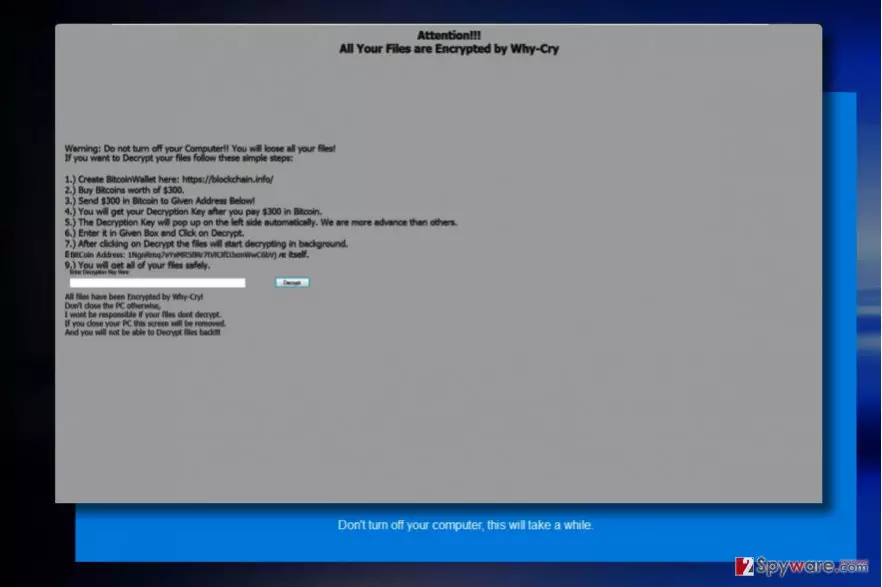
WhyCry ransomware is another virus that seeks to look like it comes from WannaCry ransomware family. It, however, is a poorly programmed virus that encrypts files and marks them with .whycry file extensions. The ransomware actually belongs to FTSCoder malware family that can be decrypted using particular decryption tools. After noticing this virus on your computer, an immediate WhyCry removal is required.
When the ransomware hits the computer, it firstly shows a blue screen showing computer directories and also a loading bar that shows how much volume has been processed (encrypted). The virus tells the victim “don’t turn off your computer, this will take a while.” During the procedure, the malware might trigger a couple of pop-ups saying “please check to make sure that the path and filename are correct and if the file exists.”
Once the ransomware encrypts all data, it then changes the blue screen with a gray screen that informs the victim about “Why-Cry” ransomware attack. The virus suggests that files can be decrypted for $300. This sum must be paid in Bitcoins. Scammers praise themselves by saying that the decryption key will pop on the screen automatically right after the victim transfers the required amount to their Bitcoin address. They name such feature as a sign that shows their “advanced skills.” However, the ransomware is apparently coded by an amateur. We suggest you remove WhyCry and use decryption tool presented at the end of this post to recover your files for free.
Distribution of the virus
This Wannacry-wannabe is expected to use mail spam[1] as the main attack vector. It is the most basic malware distribution technique, and surprisingly, the most efficient one as well as it relies on social engineering. All that cyber criminals do is compose convincing messages and attach some files to them.
The content of the message is meant to trigger victim’s curiosity and make him/her open the malicious attachment that either is an obfuscated ransomware executable or a malicious file intended to download it from a malicious domain. However, you shouldn’t think that simply staying away from suspicious emails can help to protect your PC from ransomware entirely.

Remember that developers of much more sophisticated ransomware, for instance, Cerber or Jaff use completely different distribution tricks that are related to exploit kits, trojans, and malvertising[2]. It is hard to ward off such attacks, so we highly suggest installing anti-malware software for system protection and create a data backup right now.
WhyCry removal tricks
You should not try to remove WhyCry virus on your own – allow a professional malware removal tool to take care of this ransomware. Use a powerful anti-malware software for WhyCry removal so that all of the files related to it would be erased from your system for good. However, if you seek for extra precision, reboot the system into a safe mode using these instructions before launching the anti-malware or antivirus.
Did this guide help?
Be the first to comment