

AES-Matrix ransomware is a file encrypting malware that urges users to pay ransom as “it is not a shame”
AES-Matrix is a file-locking virus that was first discovered in July 2017. It mainly targets mid-to-small businesses, although attacks against regular users were observed by security researchers as well. The virus primarily abuses unprotected Remote Desktop Protocol,[1] weak passwords or generally poor security measures to infiltrate machines or networks. The malware seems to be variant of HiddenTear – the open source ransomware platform. However, unlike the mentioned virus, it does not add extensions to encrypted files (it does encrypt files[2] using AES-256[3] cryptography). Consequently, the malicious program composes a ransom note and saves it in folders with encrypted data. The ransom note suggests contacting criminals via darkpart@tutanota.com or darkware@tutanota.com to get help regarding data recovery.
| SUMMARY | |
| Name | AES-Matrix |
| Type | Ransowmare |
| Cipher used | AES-256 |
| Variants | ACCUDATA |
| Contact emails | darkpart@tutanota.com; darkware@tutanota.com; ACCUDATA1@tutanota.com; ACCUDATA2@tutanota.com |
| Decryptable? | No |
| Distribution | Weak passwords, poor security measures, unprotected RDP configuration, etc. |
| Elimination | Download and install FortectIntego or SpyHunterCombo Cleaner |
In late May 2018, a new version of AES-Matrix ransomware emerged, dubbed ACCUDATA. It uses same cipher to encrypt files and drops ransom note called ACCUDATA_pay and get your data back.txt. The message is identical to the original, apart that it asks users to contact cybercriminals using ACCUDATA1@tutanota.com; ACCUDATA2@tutanota.com.
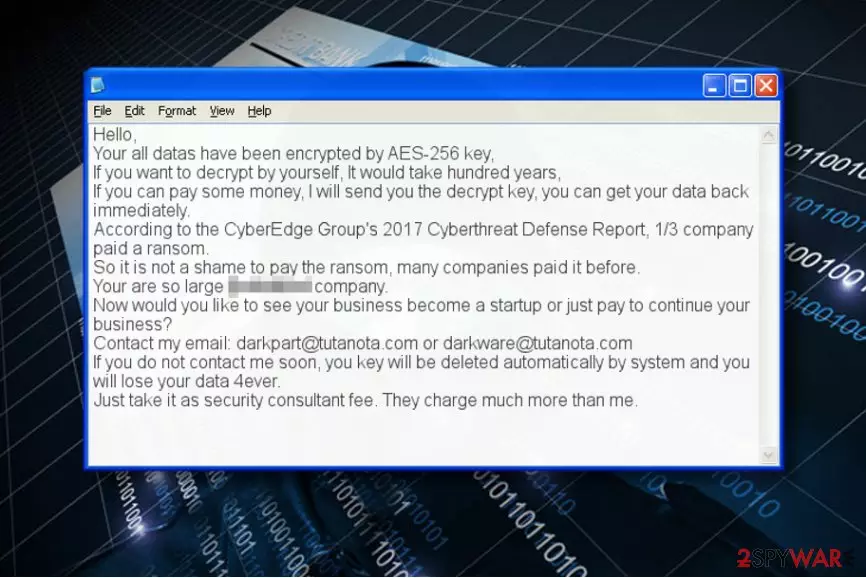
AES-Matrix virus renders documents, images, videos and other valuable files useless by changing their structure. The encryption process can be reversed, but only with the help of a decryption key, which is securely stored in criminals’ servers. There is no way to get it from there. The full message of the ransom note is provided below.
Hello,
Your all datas have been encrypted by AES-256 key,
If you want to decrypt by yourself, It would take hundred years,
If you can pay some money, I will send you the decrypt key, you can get your data back immediately.
According to the CyberEdge Group's 2017 Cyberthreat Defense Report, 1/3 company paid a ransom.
So it is not a shame to pay the ransom, many companies paid it before.
Your are so large […] company.
Now would you like to see your business become a startup or just pay to continue your business?
Contact my email: darkpart@tutanota.com or darkware@tutanota.com
If you do not contact me soon, you key will be deleted automatically by system and you will lose your data 4ever.
Just take it as security consultant fee. They charge much more than me.
It is interesting how hackers taunt users and company owners to pay the ransom, as allegedly to some report, one-third of companies fulfilled crooks' demands and got their data back. It is all a lie, and they are using bogus statistics. Therefore, do not trust people who deceptively infect your machine with malware and then try to convince you that the only way to get files back is by paying the ransom. Do not contact thieves, as you can get your data back using a backup. If you have no backup, we offer some third-party tools that might help with file recovery.

Considering that the virus uses AES encryption only, there is a reason to believe that malware analysts might find a way to decrypt files, especially if the ransomware authors left some mistakes in their code. However, this can still take ages. In the meanwhile, we recommend you to remove AES-Matrix malware.
It is important to eliminate the virus from your computer before trying to use any data recovery methods. You can obliterate the malware from the system using AES-Matrix removal guidances we provided; however, you will still need a decent anti-malware in order to complete the system cleanup. Please remember that ransomware is no regular software and it can’t be uninstalled that easily. In addition, DieViren.de experts[4] point out that this ransomware ISN'T related to Matrix ransomware.
Ransomware distribution peculiarities explained
AESMatrix virus reportedly infiltrates the computer system or network via Remote Desktop Connection (RDP) attacks. RDP allows users to log into a particular Windows computer remotely via RDP client and use the system as if it was local.
- To protect your company from such attacks, use strong passwords (including at least eight characters, upper/lower case letters and digits or symbols) for all accounts but especially for those with Admin’s rights;
- Set your system to block a specific user for a certain period after repetitious unsuccessful attempts to log in. This way, you could interfere the brute-force attack and prevent the attacker from guessing the password that quickly and easily.
- Require two-factor authentication.
Finally, ransomware uses a lot of other techniques to infiltrate systems, for instance, deceptive emails or malvertising. For this reason, we recommend you to enable automatic software updates, stay away from suspicious emails (even if the sender tries to convince you to open an attached resume or an invoice) and protect the entire computer system/network with a decent anti-malware software.

Remove AES-Matrix virus and unlock your files
There is a certain order of tasks you need to complete to remove AES-Matrix virus from your computer or the whole computer network. Firstly, you need to reboot your computer and start it in Safe Mode with Networking regime. This will prevent the malicious processes from starting and allow you to remove the malware without running into unpredicted obstacles.
AES-Matrix removal is required to make the computer appropriate for further use. The automatic spyware/malware tool is recommended because it will delete all of the malicious or potentially unwanted files and programs from the system with ease.
Did this guide help?
Be the first to comment