

Blind ransomware – file encrypting malware that keeps changing
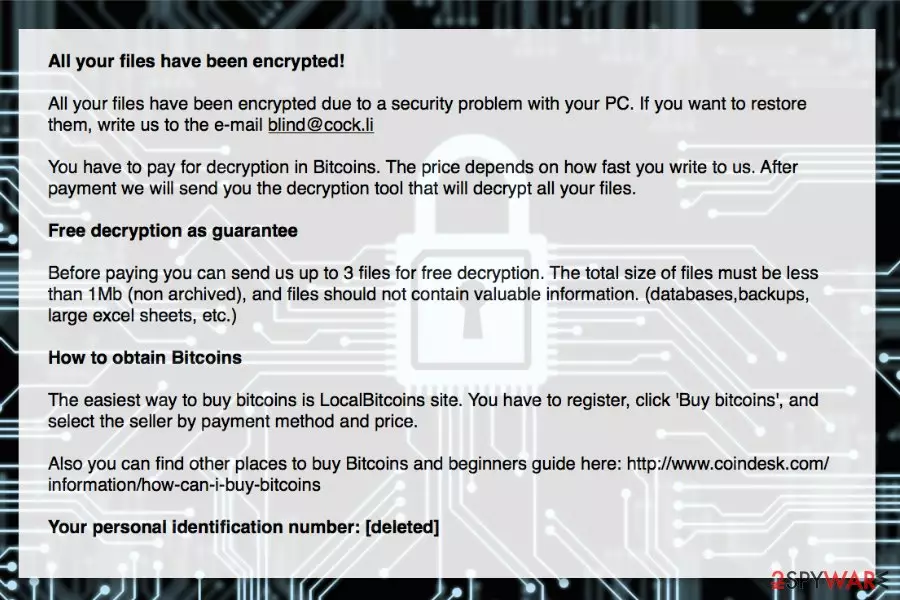
Blind ransomware is a yet another file-encrypting virus that appends .blind, .kill, .leon, .skeleton, .napoleon file extensions. This virus has been changing since September, 2017, but it seems that it still relies on How_Decrypt_Files.hta warning message that informs the victim about the loss of his/hers files and asks to pay a ransom.
Blind ransomware mostly claims that victim’s data was encrypted because of “security problems.” People are asked to send an email to blind@cock.li, sup01@airmail.cc or supportdecrypt2@cock.li, and pay the ransom to malware's[1] developers. Criminals do not reveal how much money they want for the decryption. However, they claim that the faster they write, the less they have to pay.
Crooks who are working behind Blind virus have also been letting their victims to see how their decryption process works – after sending up to three files that are smaller than 1Mb, the victim can get them decrypted for free. However, this procedure should not convince you that you can trust authors of the Blind ransomware virus. It might be a trick to get your money and leave you without decryption software.
have already revealed numerous cases when criminals took the ransom and did not provide a promised decryption tool.[2] Therefore, after the ransomware attack, you should focus on its removal and think about data recovery later.
Blind ransomware removal is necessary because malware makes critical system changes and might inject malicious code into legitimate system processes. Therefore, after the attack, users can no longer use their devices appropriately and safely.
The virus is also expected to disable computer’s security and increase the risk of encountering other malware attacks. Thus, you should not wait and consider paying the ransom. Just install FortectIntego or another anti-malware and remove the Blind virus with it.

Blind ransomware keeps updating – the latest versions
Leon ransomware. One of the newest variants of Blind ransomware. After encrypting persona files on victim's computer, it uses “All your files have been encrypted” warning message asking him/her to use atilla666@tutanota.com to contact people behind Leon ransomware. You can guess that, after doing so, you will be asked to pay a special fee to recover files encrypted by this file-encrypting virus. Please, do NOT do that because you can get involved to another scam.
Napoleon ransomware. This crypto virus showed up in the middle of December 2017. Once inside the system, it encrypts victim's files one-by-one and offers buying Napoleon decrypter to get them back. Victims are asked to use sup01@airmail.cc or supportdecrypt2@cock.li to contact virus owners and get additional instructions on how should they pay the ransom. Beware that there is a huge possibility that you won't get your files bak to you after sending your money to these hackers.
Skeleton ransomware. Another version of Blind that showed up on December 2017. Skeleton virus functions just like other Blind variants: its distribution is implemented with the help of spam, it encrypts user's files once inside the system. To get your files back you are required to open How_Decrypt_Files.txt file and follow its commands. After using skeleton@rape.lol email address to contact virus developers, you will be asked to pay a ransom in btc or similar cryptocurrency.
Kill ransomware. If you see How_Decrypt_Files.hta file on your computer's desktop, your computer is infected with one of Blind ransomware variants. This virus can encrypt your files and block a connection to them. Then, it asks its victim to use kill@rape.lol email address to contact its owners. However, we highly recommend using steps given in the end of this guide to recover your files for free.
Paying attention to cyber-security helps to avoid ransomware
There are numerous ways how crypto-viruses spread. Most of the time the attack is launched when users click, download or install malicious content. Unfortunately, these entries are always obfuscated and might look legitimate. Therefore, in order to avoid this or other malware infiltration, you have to pay proper attention to basic cyber-security tips:
- Never open unknown email attachments. Malware executable often arrives via infected email attachments in spam folders. Thus, never open these emails and especially included content even if it claims to be sent from legitimate organizations. Always double-check the information before opening any doc, xls, pdf or zip file.
- Do not use file-sharing websites, torrents, and questionable download sites. They often include fake and illegal programs that are malicious. You have to install programs from the developer’s site directly.
- Do not click suspicious ads. Security alerts, reminders to update software or offers to scan the system for viruses found on various websites are most likely to infect you with malware. Download updates from the official website only. Besides, you can only check your computer’s state using antivirus installed on your PC.
- Keep software and operating system updated in order to prevent exploitation of security vulnerabilities.
- Install reputable antivirus or anti-malware.
You can find more security tips on our partner's website – NoVirus.uk.[3]
Removal of the Blind ransomware virus
Blind virus removal requires scanning the system with an updated security software. However, before installing FortectIntego, SpyHunterCombo Cleaner or your preferred elimination tool, you may need to reboot the computer to Safe Mode with Networking. This step will help to disable the virus and run antivirus.
Once you remove Blind ransomware from your device, you can plug in an external storage device with backups and copy necessary items. Otherwise, you can try alternative recovery methods presented below.
Did this guide help?
Be the first to comment