

Damoclis – a new name for Losers ransomware
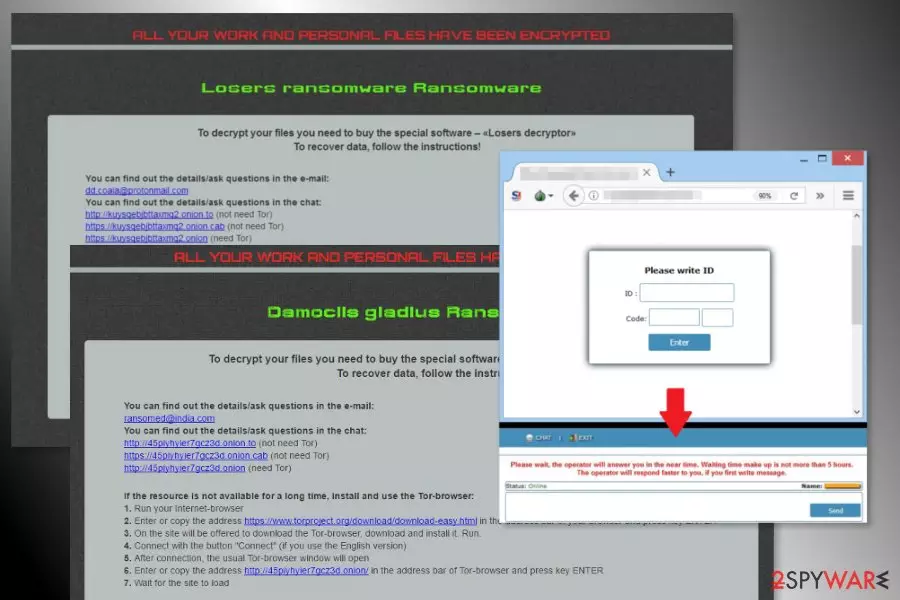
Damoclis (or Damoclis Gladius) is an alternative name of Losers ransomware virus. This file-encrypting malware is a new version of the Nemesis and Cry36 viruses. The crypto-malware might append either .losers or .damoclis file extension. Following data encryption, it changes affected computer’s wallpaper and drops ransom note called HOWTODECRYPTFILES.html in each folder with encrypted files.
The Damoclis Gladius uses AES cryptography to lock various audio, image, video, documents, backups and other files saved on the computer. However, it seems that ransomware does not encrypt PDF and ZIP files. Malware might also delete Shadow Volume Copies in order to make data recovery nearly impossible with third-party tools.
When Damoclis Gladius virus finishes data encryption, it changes computer’s desktop and asks to check the ransom note that can be found in each folder that contains encrypted data. The ransom note tells that victims need to by Losers decryptor that can restore corrupted file.
To restore files using hackers’ offered method (not recommended), victims have to access Tor website and enter personal identification ID number given in the ransom note. The site has a messaging feature that allows communicating with criminals and following their further demands. There’s no doubt that authors of the Damoclis virus ask to pay Bitcoins[1] in order to use the decryptor.
However, paying the ransom is never recommended. Security experts from No Virus[2] warn that developers of ransomware often take the victim’s money and disappear. However, the scenario might be even worse – they might ask even more money. Therefore, after Damoclis attack, you should not rush into paying the ransom to avoid money loss.
The recently emerged is expected to belong to CryptON/Nemesis ransomware family which can be decrypted using several programs. Therefore, you should focus on Damoclis removal and try all possible ways to restore files without paying the ransom.
To remove Damoclis Gladius without causing damage to the system, you have to use FortectIntego or another malware removal tool. However, you may need to reboot the computer to the Safe Mode with Networking first to disable the virus. All the necessary information is provided in the second part of the article.

Distribution strategies used by cybercriminals
Malicious spam emails remain the main ransomware distribution method.[3] Criminals prepared several malspam campaigns that trick people into clicking the dangerous attachment and letting Damoclis inside the system.
Indeed, these emails might be hard to recognize, but you should always double-check the information about the sender before opening any provided email attachment. Bear in mind that Word, PDF and other safe-looking files might contain malicious content as well.
Additionally, ransomware might infect the device by:
- delivering pop-ups with fake software updates;
- spreading malicious programs in P2P networks and other illegal download sources.
Thus, security experts remind to stay away from suspicious ads and freeware download sources because it might lead to the data or money loss. In addition, you should also protect the computer with reputable antivirus.
Removal guidelines for the Damoclis Gladius malware
The only safe way to remove Damoclis from the device is to run a full system scan with an updated security software. The virus might be resistant and prevent from installing FortectIntego, MalwarebytesMalwarebytes or your preferred anti-malware tool. Thus, the instructions below will show you how to deal with these obstacles.
After Damoclis Gladius removal, you can recover your files from backups or try all possible alternative recovery methods. At the very end of the instruction, you will find our suggested ways to recover files after ransomware attack and the list with CryptON/Nemesis decryptors.
Did this guide help?
Be the first to comment