

LanRan v2 — ransomware which demands 0.5 Bitcoin to receive a decryption tool for locked files
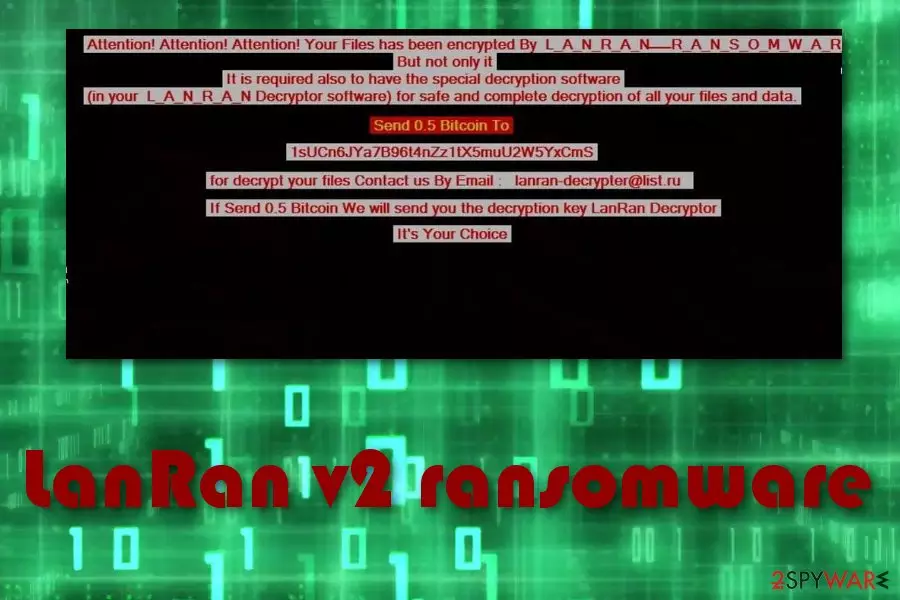
LanRan v2 ransomware is a serious file-encrypting virus which changes computer parameters to launch itself at the startup. It usually makes changes in the Windows Registry[1] section to infiltrate the system and corrupt files. Various data is locked up with the .LanRan2.0.5 extension. After such hazardous activity, the LanRan v2 virus displays a ransom note @___ README ___ @.txt which urges victims to pay the 0.5 BTC ransom to restore encrypted files. The message provides lanran-decrypter@list.ru address so that the users would be able to contact the cybercriminals.
| Name | LanRan v2 |
|---|---|
| Type | Ransomware |
| Extension | .LanRan2.0.5 |
| Ransom message | @___ README ___ @.txt |
| Amount of the ransom | 0.5 BTC |
| lanran-decrypter@list.ru | |
| Distribution | Spam emails |
| Deletion | Use FortectIntego to uninstall LanRan v2 ransomware |
Users cannot identify this cyber threat until it starts encrypting data on the computer. Usually, crypto-malware employs sophisticated algorithms to make the most widely used files unreadable. After it finishes encoding process, users receive the following message by LanRan v2 virus:
################################################## ###############################
Send 0.5 Bitcoin To @ 1sUCn6JYa7B96t4nZz ******* CMS @
################################################## ###############################
to decrypt your files contact us by email: lanran-decrypter@list.ru If Send 0.5 Bitcoin We will send
you decryption key LanRan Decryptor################################################## ###############################
It's your choice
Furthermore, LanRan v2 ransomware enters the system by phishing emails and secretly starts its damaging activity. Cybercrooks use an AES cipher to encrypt important data and turn it unreadable. They keep decryption keys safely stored on external devices which are within reach only for the developers of LanRan v2 ransomware.
Hackers benefit from gullible users who decide to pay the ransom for LanRan v2 decryptor. However, we advise you not to transfer the money and avoid contacting with the cybercriminals. According to malware experts[2], victims are very likely to be scammed. Better choose a reliable solution to recover files encrypted by LanRan v2 ransomware.
Remove LanRan v2 virus from your computer system by using FortectIntego. Also, you can try decrypting corrupted files with third-party software that might be helpful for such case. You can find all professional software suggestions at the end of this article.
In some cases, ransomware-type viruses, like LanRan v2, might even disable the antivirus program. However, that does not mean that the threat is undefeatable. Furthermore, ransomware might open a path for other malware forms to spread easily. To avoid such harmful possibility, perform the LanRan v2 removal as soon as you spot files with the .LanRan2.0.5 extension.
Here are some viruses that have various similarities with LanRan v2 malware:
Be aware of such dangerous computer infections. We suggest keeping copies of important data on remote servers to avoid file corruption in case of LanRan v2 ransomware attack. It wise to store backups on external devices so you could replace them if your files are encrypted by LanRan v2.

Spam emails with malicious attachments spread ransomware
Cryptoviruses are often distributed through spam emails[3]. Such messages might or might not fall in the Trash section pretending to be something legitimate and useful. For example, recommended updates, invoices or shopping receipts.
In case you receive a spam email with a malicious attachment to your default inbox, you should NEVER open it. Such fraudulent letters contain ransomware payloads which are infiltrated to the system once opened. Thus, remain cautious and spot attempts to infect your computer.
We recommend installing antivirus protection. It will help you protect your computer system on a higher level and avoid various threats that might occur in your way unnoticed. Always stay focused whenever you are doing browsing activity to spot if something dubious-looking is trying to be accessed.
Get rid of LanRan v2 virus and restore your data
To remove LanRan v2 virus you will need trustworthy help. As ransomware is known as one of the most serious computer threats, you will need professional tools to proceed with LanRan v2 elimination successfully. We recommend using anti-malware tools such as FortectIntego or MalwarebytesMalwarebytes. However, you can feel free to use any other trusted anti-malware if you are likely to.
If you notice that LanRan v2 ransomware is trying to prevent the installation of the security tool, you should check the instructions at the end of this article. They will explain how to boot the system into Safe Mode and disable the malicious activity by the virus.
After you perform the LanRan v2 removal, you will need to do some system backups. Check the computer, refresh it, and make sure that no ransomware-related components are still active. Later, you will be able to check alternative data recovery methods to fix files encrypted by LanRan v2 ransomware.
Did this guide help?
Be the first to comment