

Bkpx ransomware is a cryptovirus that demands Bitcoins for encrypted users' data
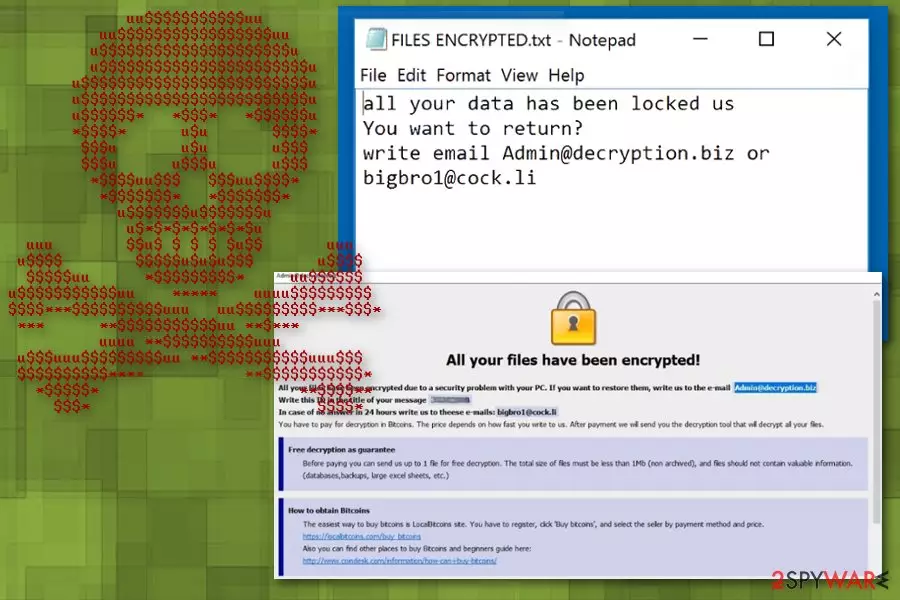
Bkpx ransomware is a cyber threat that hails from a dangerous and popular ransomware family. Dharma ransomware has a lot of versions already, but right now it seems to be more active than ever because in a few weeks malware researchers discovered more than one new variant. Audit ransomware and Adobe ransomware are the most recent. Ransomware family has a few distinct features that are not changed since the start of this threat in 2016. Developers can release version after version with minor changes because ransom note is always placed in the same FILES ENCRYPTED.txt file and additional instructions on ransom payment methods get displayed on the screen in a pop-up program window Info.hta or Admin@decryption.biz. You can easily indicate which data got encrypted by the file extension added in a pattern – .id-.[Admin@decryption.biz].bkpx.
| Name | Bkpx ransomware |
|---|---|
| Type | Cryptovirus |
| Family | Dharma ransomware |
| File extension | .id-.[Admin@decryption.biz].bkpx |
| Ransom note | FILES ENCRYPTED.txt |
| Contact email | Admin@decryption.biz |
| Elimination | Employ MalwarebytesMalwarebytes for Bkpx ransomware removal |
Bkpx ransomware virus is a cyber threat that distributes around the internet using emails with malicious file attachments. Unfortunately, these emails look legitimate and deceive the user that it is important to open and download a suggested file. These file attachments often pose as:
- Invoices;
- Receipts;
- Financial information;
- Order Confirmation.
Unfortunately, Bkpx ransomware distributes on the system when the user initiates malicious macros[1] hidden on the Microsoft Word or Excel document. The malicious script installed from this file can be set to distribute direct ransomware or infect the system further with trojans or other malware.
When the Bkpx ransomware virus gets on the system, it starts the infiltration and cyber infection by altering system files, Windows Registry keys, various system features, functions, and programs. The main issue regarding these changes is the persistence of a malware and data recovery difficulty.
It becomes difficult to remove Bkpx ransomware because of the changed registry keys and altered functions of the security applications. Additionally, ransomware deletes system files responsible for data recovery options and this way influences if you can restore your data or not. However, paying the demanded ransom shouldn't be considered as a solution.[2]
Bkpx ransomware as various other versions in the same family displays the ransom note in a text file named FILES ENCRYPTED.txt that reads the following:
all your data has been locked us
You want to return?
write email Admin@decryption.biz or bigbro1@cock.li
This is a brief message from ransomware developers but a pop-up window presented later on with payment instructions has more information and individual ID that is used to indicate which victim is which. The ransom amount is stated in neither of these files but, in most cases, it depends on the number of data and how long does it take you to write hackers back.
But researchers[3] recommend automatic Bkpx ransomware removal and data recovery instead of contacting cybercriminals. You should perform this procedure using MalwarebytesMalwarebytes, and them employ FortectIntego or similar PC repair tool and eliminate virus damage.

Payload dropper gets activated via hyperlink or malicious file on the spam email
The main ransomware distribution technique is spam email campaigns because of social engineering-based tactics. This strategy allows to spread malware all over the world and achieve cyber infections quickly. Unfortunately, the malicious actor uses various techniques to trick people into opening these emails.
When you get an email that you weren't expecting to get, don't rush to open it because malicious hyperlink may initiate the download of a payload dropper. Also, MS documents attached to these emails can contain a suggestion to trigger macros and install files or even automatically load the malware on the system.
You can avoid these cyber infections if you pay more attention to these emails or scan the document before downloading and opening on the computer. Shortened hyperlinks can also be checked online to make sure that the purpose of it is not malicious.
Remove Bkpx ransomware and use professional tools for system cleaning
Make sure to employ reputable tools for Bkpx ransomware removal because choosing a good program like FortectIntego, SpyHunterCombo Cleaner or MalwarebytesMalwarebytes can ensure the positive results of the virus termination. Also, you should reboot the machine in Safe Mode with Networking before a full system scan with an anti-malware program, so your tool can work properly.
Don't forget to remove Bkpx ransomware and double-check for additional intruders and virus damage after. This is a crucial step before attempting data recovery, especially. You can find a few additional tips on virus removal and data recovery processes below the article.
Did this guide help?
Be the first to comment