

Payransom@qq.com ransomware is a cryptovirus that is related to the Audit ransomware
| Name | Payransom@qq.com ransomware |
|---|---|
| Type | Cryptovirus |
| Related | Dharma ransomware |
| Symptoms | Locks users' files, marks them with a file extension, demands ransom for an alleged decryption key |
| Ransom note | FILES ENCRYPTED.txt |
| Encryption method | RSA or AES algorithms |
| Affects | Personal data like documents, photos, videos or even backups and archives |
| Distribution | Spam email attachments with infected files |
| Elimination | For best Payransom@qq.com ransomware removal results use anti-malware tools and clean the system with FortectIntego additionally |
Payransom@qq.com ransomware virus starts the attack with system changes that may include altering Windows Registry or more important parts of the device that affects the performance significantly or even results in damage to the machine. You should note that the best solution is a full system scan on the computer because anti-malware tools can fix virus damage and remove all related files and programs.
When Payransom@qq.com ransomware infiltrates the device, you cannot notice changes until the encryption process[2] is done. Ransomware runs in the background and loads additional processes, but the main thing that scares people is data locking and ransom demanding.
Payransom@qq.com ransomware virus modifies the original code of your files and then marks encrypted data using the specific extension. It may contain this email address or any additional word ant the end. It goes after the original document name, for example, MyPicture.payransom@qq.com.AUDIT.jpg.
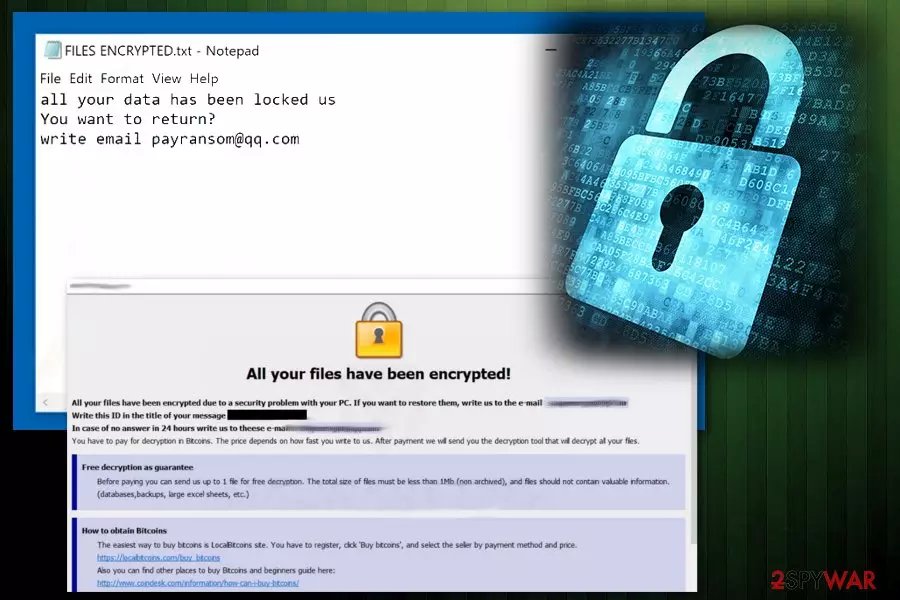
The encryption process is then followed by Payransom@qq.com ransomware message to the victim. This ransom note is placed in a file FILES ENCRYPTED.txt and reads the following:
all your data has been locked us
You want to return?
write email payransom@qq.com
Also, Payransom@qq.com ransomware delivers payment instructions to your screen when the targeted data get locked and encrypted. This is a feature that Dharma ransomware versions always have. The program window states about the possible danger and encourages people following the guide thoroughly.
We do not recommend paying the ransom and as many other security experts[3], we suggest employing reputable anti-malware tools for Payransom@qq.com ransomware removal. For better results scan the system using FortectIntego and make sure that the system is clear.
Since the main problem with ransomware is encrypted data, you need to remove Payransom@qq.com ransomware and make sure that the computer is malware free because you need a clear system for data recovery. Trusting criminals and virus developers is not an option, so you need to have file backups or use data recovery tools and programs. We have a few options below the article for you.

Infected email attachments have the direct macro trigger
When getting emails and various notifications paying attention to the sender can be a crucial step because you may get a legitimate-looking email from the company, but the email is fake and contains the macro virus-filled document.[4] When you open the Microsoft Excel or Word document attached to the email, you may get a message that suggests enabling the content, and when you do so macros get triggered and loads the malicious script on the device directly.
Unfortunately, the email may also contain a direct link or activate the script automatically. This way your machine gets infected immediately after the document gets downloaded and opened on the computer. Various trojans and other malware can be set to infiltrate the system and install ransomware.
You can avoid these infiltrations if you choose to take precautionary measures and clean the email box more often. You can also delete the suspicious emails or scan documents before downloading them on the machine. Having an antivirus program and scanning the device more frequently can also improve the performance of your PC.
Get rid of Payransom@qq.com ransomware and associated files or malicious programs
To properly perform Payransom@qq.com ransomware removal, you should go with the automatic virus termination method using tools like FortectIntego, SpyHunterCombo Cleaner or MalwarebytesMalwarebytes because the anti-malware program can indicate all possible threats besides the cryptovirus. A thorough system scan takes a few minutes and helps improve the performance or fix the virus damage.
To remove Payransom@qq.com ransomware, get the reputable tool from the official provider or trustworthy source and run a full malware scan. Then follow suggested steps and eliminate all cyber threats. Double-check and scan the device again before attempting any data recovery.
Did this guide help?
Be the first to comment