

Advanced Clean Pro is a rogue application that displays fake scan results to make users spend money
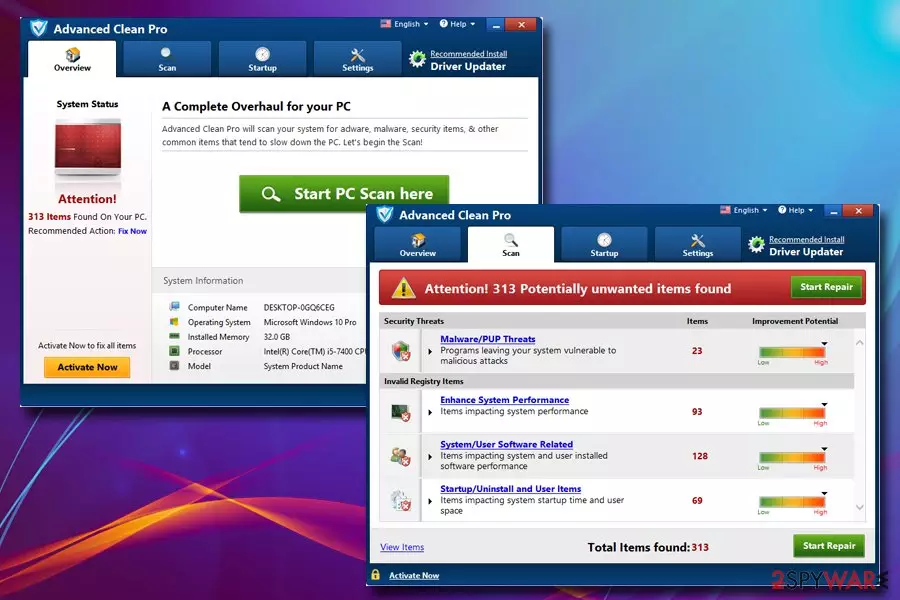
Advanced Clean Pro is a fake system optimizing tool that belongs to the scareware category. Potentially unwanted programs are usually deceptively injected during the installation of shareware and freeware that users download from the internet, so they rarely notice how or when the app got installed. However, it immediately performs a “scan” that usually determines a large number of errors, malware infections, and similar fake issues. Users who want to fix these issues are then led to a payment page, which asks them to pay $19.95 bi-yearly. Because Advanced Clean Pro does not fix anything (although it pretends it does), the whole scheme is a complete scam, and users should never fall for the trick developed by fake software authors. Furthermore, even after paying the required amount, users might be redirected to other rogue software sites, or see intrusive pop-up ads advertising sponsor's content.
| Name | Advanced Clean Pro |
| Type | Scareware/PUP |
| Developer | PCVARK |
| Distribution | Software bundling, official website |
| Bundled with | Driver Updater |
| Symptoms | Initiated scans showing hundreds of errors; ads |
| Main dangers | Money loss, system file corruption |
| Elimination | Check out our manual removal instructions below |
| Recovery | To recover from Advanced Clean Pro modifications, use FortectIntego |
Advanced Clean Pro is one of many programs released by same developers PCVARK,[1] including System Clean Pro, Advanced Mac Cleaner, Mac Auto Fixer, Mac Tweak Pro, etc. These type of tools have an almost identical user interface (UI) and are merely rebranded to be presented as a brand new product. As evident, it is not, and all these applications are the same – they do not boost the speed of the PC, but simply try to trick people into paying for bogus software. Therefore, if you found the application performing scans on your machine, make sure you perform Advanced Clean Pro removal as per our instructions below.
Developers of Advanced Clean Pro claim the following on their official website:[2]
Award-winnig PC ProtectionTrusted by millions of users. Advanced Clean Pro is the world’s most liked and preferred PC protection utility! The most efficient and simple-to-use tool for the users to quickly optimize and get a clean and faster PC.
The truth is, Windows Registry files are so tiny that deleting some old entries would not make any difference in system performance, and neither would it free up space (considering an average modern HDD size is around 1.4 terabytes, removal of a few kilobytes would not impact anything). Yes, Advanced Clean Pro developers are lying in order to make you purchase the counterfeit product.
Besides, Microsoft itself discourages users from running registry cleaners, as the database is so large that Advanced Clean Pro might delete important keys and corrupt the operation of the whole system, making users reinstall Windows altogether.[3]
Therefore, we suggest you remove Advanced Clean Pro virus as soon as possible. There is no need to pay crooks, as your money will be wasted, and you might compromise the operation of the device altogether.
Additionally, instead of using rogue software like Advanced Clean Pro, we suggest you install FortectIntego instead – it stores 25,000 original Windows files that can repair the system without the need to reinstall it.

Potentially unwanted programs usually get installed with the help of software bundling
While the rogue application can be downloaded from the official website, it is not the most common method of installation. In most cases, users find the unwanted program performing scans on their device after the installation of freeware or shareware.
Developers deliberately bundle several affiliated applications within the installation wizard and often use tricks to make users install the program without them noticing. They achieve that with deceptive, grayed out buttons, misleading instructions, pre-ticked boxes, etc. Therefore, people should be vigilant when installing software from the internet.
PUP developers are aware that users often rush the installation process without reading the instructions properly. Thus, software bundling method is so successful. Users should never rush these procedures, remove marks of the pre-ticked boxes, read through ToS/Privacy Policy, and always opt for Advanced or Custom installation mode instead of Recommended one.
Uninstall Advanced Clean Pro with the help of our instructions
As evident, you should not keep Advanced Clean Pro virus on your device, and especially not pay its developers for the full version on of program. Rogue tools like these will not only fail to improve the operation of your device but might also damage Windows Registry, resulting in the corruption of system operation.
To remove Advanced Clean Pro, you should detect the program via in the Programs list, which you can find in the Control Panel. You can find all the detailed instructions below.
Alternatively, you can opt for automatic Advanced Clean Pro removal with the help of anti-virus software that focuses on PUP detection and extermination, such as SpyHunterCombo Cleaner. It recognizes the threat as PUP.Optional.PCVARK.[4]
Uninstall from Windows
Uninstall from Windows 10/8:
- Type Control Panel into the Windows search box and open the result.
- Under Programs, select Uninstall a program.


Uninstall from Windows 7/XP:
- Click on Windows Start > Control Panel (Windows XP users should click on Add/Remove Programs).
- In Control Panel, select Programs > Uninstall a program.


Remove the unwanted program:
- In the Programs and Features window, look for any recently installed suspicious entries, select them, and click Uninstall.
- If User Account Control appears, click Yes to confirm, then complete the removal.


Did this guide help?
Be the first to comment