

Paypal-b Phish is a well-known false positive that is related to PayPal payment service
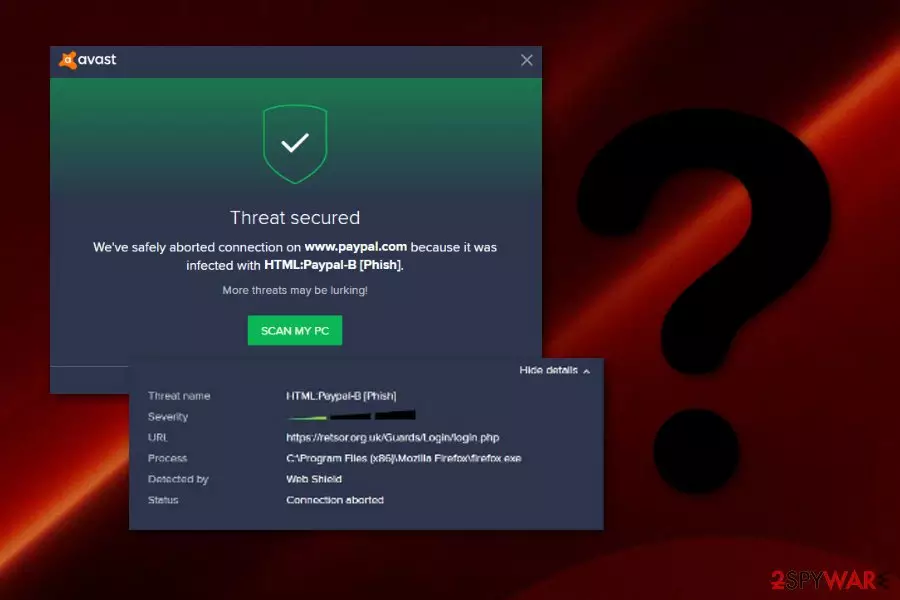
Paypal-b Phish, also known as HTML:Paypal-B [Phish], is a detection used by AVG and Avast security applications. Many users reported about their anti-virus programs detecting the threat when they were trying to pay for an online purchase by using PayPal service, or after a full system scan. Additionally, users tried to delete browser history, cookies and browser add-ons, but the infection was still shown.[1] The anti-virus representatives concluded that the false positive[2] would be fixed, and users should update their security software to stop real PayPal service to be flagged as Paypal-b Phish. However, the definition of detection was created for a reason. Hackers might intercept the connection to PayPal or victims could potentially download malicious files that would be located in the Temp folder. Thus, if your AV engine detected a threat, you should investigate before taking any actions, as it could be related to PayPal virus.
| Name | Paypal-b Phish |
|---|---|
| Also known as | HTML:Paypal-B [Phish], PayPal virus |
| Type | Trojan horse/false positive |
| Detected by | The entry is usually used by AVG and Avast |
| OS infected | Windows |
| Distribution techniques | If it appears to be malware, such malicious content can invade the system via infected email attachments or third-party websites |
| Computer scanning tools | You can use a tool such as FortectIntego to scan the system for suspicious content and make sure it is not dangerous |
| Removal process | Eliminating the trojan is possible only by using automatic virus removal software |
If you have scanned your entire computer system and Paypal-b Phish appears to be a Trojan horse, you can experience very unpleasant effects and damage if you do not get rid of the cyber threat ASAP. Trojans are known for their ability to sneak in the computer system unnoticed and perform a variety of illegitimate and even damaging activities.
Trojan horses, including Paypal-b Phish virus, are capable of invading the system unnoticed and stealing personal data of the user which is found on the infected machine. Sadly, this type of activity might relate to identity theft as your sensitive details might be misused for some kinds of illegal purposes by the cybercriminals themselves.
Additionally, if Paypal-b Phish is indeed malware, the malicious program might serve as malware downloader, which would consequently result in more infections. The virus that is capable of downloading additional payloads is extremely dangerous, as it can be controlled by hackers remotely, and such threats like ransomware, data-stealers, or cryptominers can be uploaded to the host machine at any time.

The infection might also cause overuse of your system's resources, program struggles and crashes while trying to launch them. Also, Paypal-b Phish virus might start redirecting you to suspicious websites, that might steal your login credentials or other personal information.
Remove Paypal-b Phish virus from your Windows computer system if you are guaranteed that the infection is not a false positive. To be completely, sure, we recommend using alternative anti-malware solutions, such as FortectIntego or SpyHunterCombo Cleaner. This way, you will be able to see if the infection is indeed real.
However, Paypal-b Phish removal is necessary only if this application is a virus. If you have scanned the system, and the HTML:Paypal-B [Phish] detection name appeared to be a false positive note that such applications are harmless and cannot cause any damage.
Trojans can invade the system via phishing content or unsafe websites
Malware is a type of programs which install on the targeted system automatically without the user's consent. However, according to Virusai.lt experts,[3] these viruses appear on the system due to the user's carelessness while performing browsing work and other activities, e.g., opening suspicious email message attachments or clicking on links inside.
Mostly, malware such as trojans infiltrates the system through infected files such as executables which come attached to spam email messages. You need to be very careful with all the emails you receive, identify all letters that have been sent to your inbox section also. If you are not entirely sure that the content is legitimate, hurry up and remove it from your inbox.
Additionally, malware-related content might be distributed on rogue web pages or infected hyperlinks. Usually, crooks inject malicious payload to P2P networks[4] such as Torrents, eMule, or The Pirate Bay. This way users can accidentally infect their computer when trying to download a movie, game, or program downloading hyperlink.
However, Torrent viruses can be mostly avoided when using ad-blocking applications like AdBlock or AdGuard.

Paypal-b Phish automatic removal guide from Windows computer system
If you have been infected with HTML:Paypal-B [Phish] virus and anti-malware programs have alerted that this application is found as a malware-related trojan, you should take some actions to eliminate it. Remember, that the Payal-b Phish removal can be accomplished only by using robust anti-malware tools, otherwise, you might only mess all things up by trying to terminate the cyber threat on your own and leave compromised system files all over the PC.
Remove HTML:Paypal-B [Phish] virus by using only expert-tested tools. Furthermore, if you are looking for software which will help you detect the trojan and all malicious components that it has left behind, we advise leaning on programs such as FortectIntego, SpyHunterCombo Cleaner, or MalwarebytesMalwarebytes. Also, check the below-given guide and reboot your computer in order to disable the activity of the Trojan horse and bring your machine back to its previous state.
Remember, Paypal-b Phish is most likely to be a false positive, but you should investigate further before you delete some vital files related to PayPal service.
Did this guide help?
Be the first to comment