

Totmania is an iPhone virus that sends suspicious messages with links to malicious websites
Totmania is the adware-type virus that has mostly been bothering iPhone users. Technically, it is a technique used to drive users' traffic to a specific domain without their consent. In this case, it has been misused against iPhone users to redirect them to various commercial sites and infect their devices with additional PUPs/trick them into revealing their personal information/etc. The suspicious message with the link to Totmania appears to be sent from a friend.[1] However, it has nothing to do with your closest people. Beware that you should not interact with this site as the more you do so, the more intrusive messages you may get on the screen. Although this program mostly appears for iPhone users, there is an opportunity to get the message on Android devices. You should note that iPhone virus has tons of different versions, so your device can get even more affected, so remove Totmania virus as soon as possible.
| Name | Totmania |
|---|---|
| Type | Adware/Potentially unwanted program |
| Category | iPhone virus |
| Main symptoms | Sends messages with links to suspicious domains, e.g. hxxt://totmania.net/o |
| Affects | iPhones |
| Possible danger | Can expose to malicious content, install other programs without users consent |
| Distribution | Malicious sites, deceptive ads, make messages with hyperlinks |
| Elimination | Clean the system by installing an anti-malware application |
When you receive a message with a suspicious link and questionable text make sure to not click on any hyperlink because hxxt://totmania.net/o and similar links have nothing to do with the message from your friends as it may appear from the first sight. If you have been receiving the same message from the same contact over and over again, this indicates two scenarios:
- Your system is affected by a malicious app (adware-type virus or similar PUP);
- Your friend who is sending these messages to you has the adware on his/her phone.
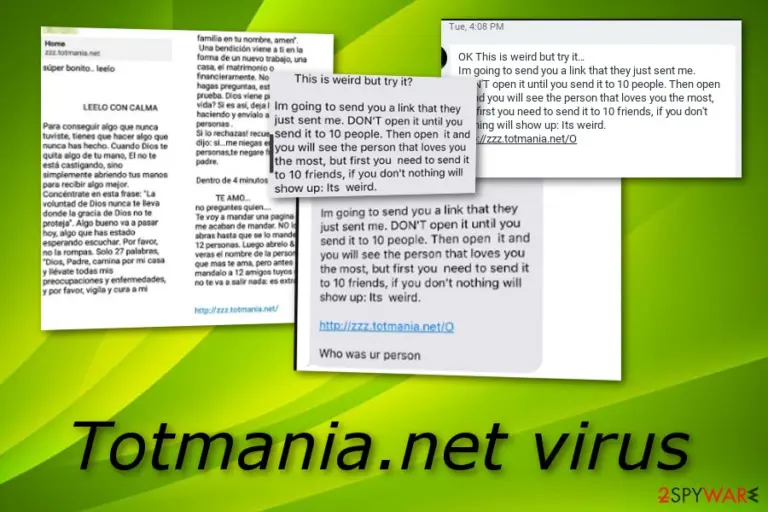
Similar to any other Text message viruses or Messenger virus, this type of scam sends a legitimate-looking text.[2] It contains words that users commonly use on an everyday basis. The message that delivers a link to Totmania net also displays the following text:
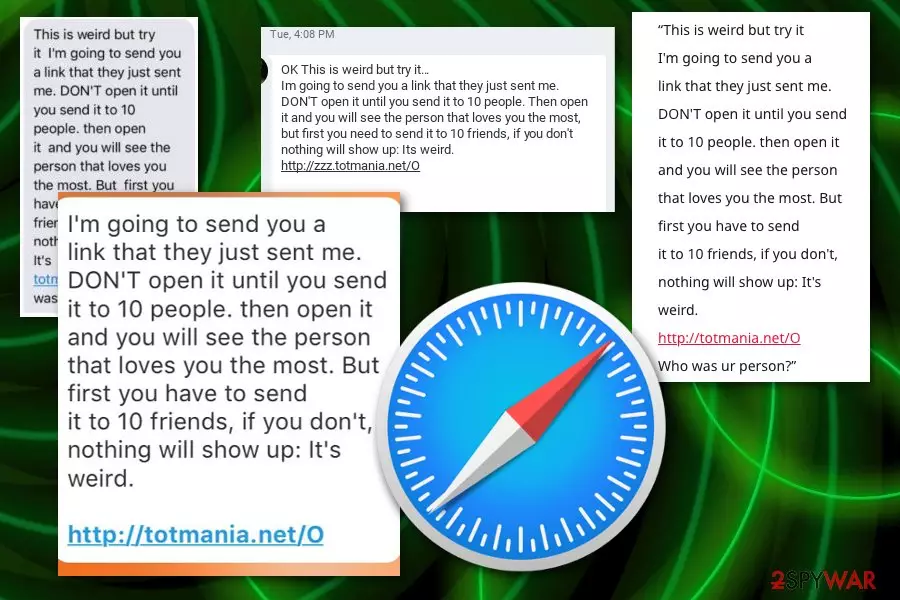
This is weird but try it
I'm going to send you a
link that they just sent me.
DON'T open it until you send
it to 10 people. then open it
and you will see the person
that loves you the most. But
first you have to send
it to 10 friends, if you don't,
nothing will show up: It's
weird.
http://totmania.net/O
Who was ur person?
You should note that reacting to such messages is a potentially dangerous activity that mostly focuses on promoting unsafe sites. As a result, you can be presented with unsafe information, download links, or commercial content that is collecting views and page visits.[3] Pay-per-click revenue-generating is the primary purpose of these cyber infections since advertisers are the main sponsors.
While from first sight it seems that Totmania does nothing, its social engineering techniques are intrusive and, in most cases, annoying because they are used to deliver useless content and redirects to affiliated sites. You should leave the page right when you find yourself on an unfamiliar website.

Although leaving the domain may not work while trying to get rid of Totmania virus, it will help you to get some time and avoid further cyber infection. Additionally, clean your device from unknown/unsafe apps. For that, you can use a guide given at the end of this post. If you can't find anything suspicious, you might need to reset your device to its factory settings.
Getting an anti-malware application is also recommended to remove Totmania.net completely. Go to the app store and download an anti-virus tool for your device and scan the system entirely. Then pay attention to suggested removal steps and make your device malware-free.
Types of dangers that might be brought by Totmania.net

Installation of malware
If you click on the hyperlink that is provided in the dubious message, you might land on an infectious website. In some cases, you might be lured into a malware-laden page where you can get infected with a dangerous Trojan horse or some other malicious programs.
Data theft
Getting infected with malware such as trojans often relates to data theft of personal information. Preventing this adware-based program from staying on your system is very important as once you catch a trojan infection it might be too late to take care of your data's safety and you might find valuable information misused by hackers.
Possible device damage
If this adware program takes you to a malicious website and infects you with dangerous malware, the computer virus can relate in damage of particular system components, software crashes due to CPU overusing that might be caused by malware that is carrying out a big variety of activities on your computer.
Continuous browsing online and visiting suspicious pages can expose to malicious content
If you don't pay attention to processes happening on the device or content you view constantly, you can get cyber infections without even noticing. Various commercial content-filled sites deliver PUPs and other applications that later on affect the general performance of your computer or mobile phone.
When you install software from random websites or questionable providers, you can also get unwanted programs installed automatically. Choosing Advanced or Custom options during the software installation may help you avoid this unwanted behavior.
Once infected, use the anti-malware app and get rid of Totmania
If you already noticed Totmania virus behavior on the system or even more questionable content, scanning the system thoroughly with an antivirus program can improve the performance and eliminate all useless programs from the device.
For Totmania.net removal, we recommend using professional anti-malware tools because those programs have features needed to eliminate this type of intruder. The process is rather quick and straightforward, you only need to rely on the instrument.
Make sure to remove Totmania.net, other possible intruders, and additional browser extensions or tools and scan the machine again. This way you can make sure that the system is malware-free. Also, keeping antivirus on the system can prevent cyber infiltrations in the future.
Having in mind that Totmania is the mobile virus, experts[4] recommend resetting the iOS to its factory settings to ensure a full virus removal. Finally, we highly recommend changing your passwords to make sure that you are fully protected.
- Go to Settings;
- Navigate to General;
- Tap on Erase All Contents option.
Delete from macOS
Remove the unwanted application:
- From the menu bar, select Go > Applications.
- In the Applications folder, look for any suspicious entries, then drag them to Trash (or right-click and pick Move to Trash).


Delete leftover files and folders:
- Select Go > Go to Folder.
- Enter /Library/Application Support and remove any suspicious folders related to the unwanted program.
- Repeat the same check in the /Library/LaunchAgents and /Library/LaunchDaemons folders, deleting any suspicious entries.

- Finally, empty the Trash to permanently remove the leftovers.

Remove from Google Chrome
Delete malicious extensions from Google Chrome:
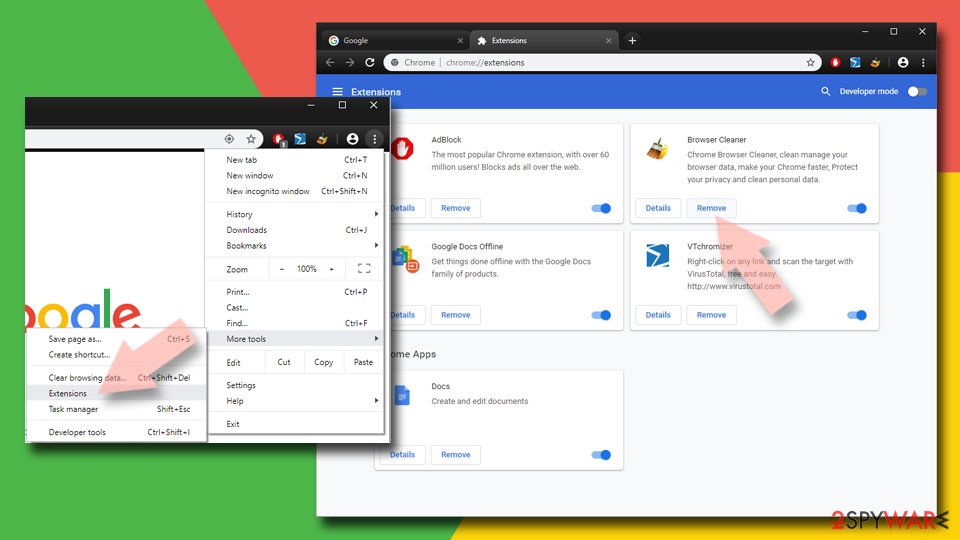
- Open Google Chrome, click on the Menu (three vertical dots at the top-right corner) and select More tools > Extensions.
- In the newly opened window, you will see all the installed extensions. Uninstall all suspicious extensions related to the unwanted program by clicking Remove.

Clear cache and web data from Chrome:
- Click on Menu and pick Settings.
- Under Privacy and security, select Clear browsing data.
- Select Browsing history, Cookies and other site data, as well as Cached images and files.
- Click Clear data.


Change your homepage:
- Click menu and choose Settings.
- Look for a suspicious site in the On startup section.
- Click on Open a specific or set of pages and click on three dots to find the Remove option.
Reset Google Chrome:
If the previous methods did not help you, reset Google Chrome to eliminate all the unwanted components:
- Click on Menu and select Settings.
- In the Settings, scroll down and click Advanced.
- Scroll down and locate Reset and clean up section.
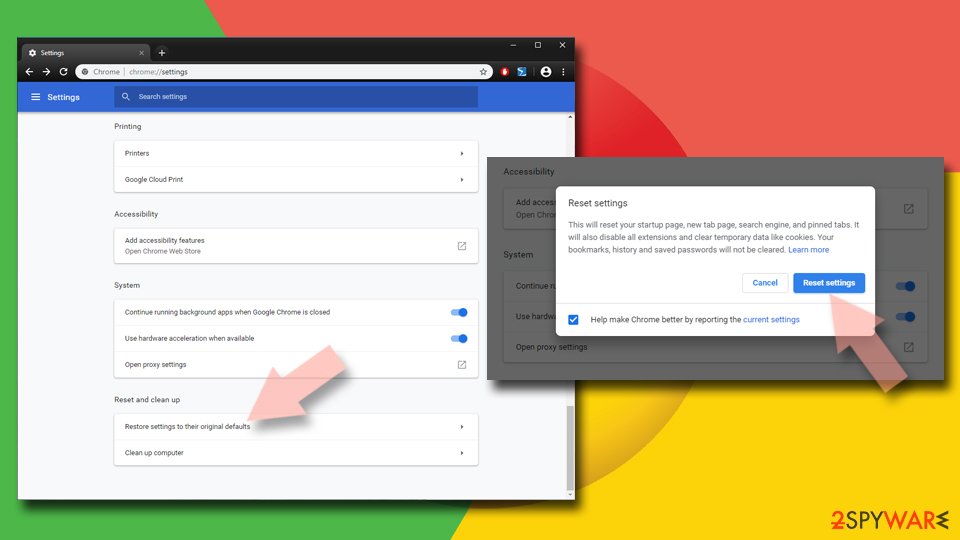
- Now click Restore settings to their original defaults.
- Confirm with Reset settings.

Delete from Safari
Remove dangerous extensions:
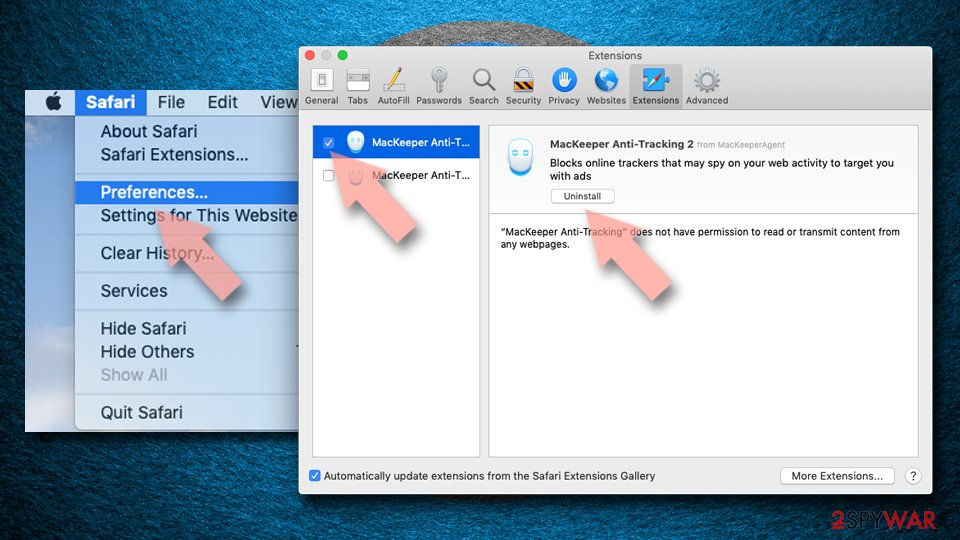
- Open Safari, click Safari in the menu at the top-left of the screen, and select Preferences.
- Go to the Extensions tab, look for any suspicious entries, and click Uninstall to remove them.

Clear history and website data:
- Click Safari in the menu and pick Clear History.
- Set Clear to all history and confirm with Clear History.


Reset Safari:
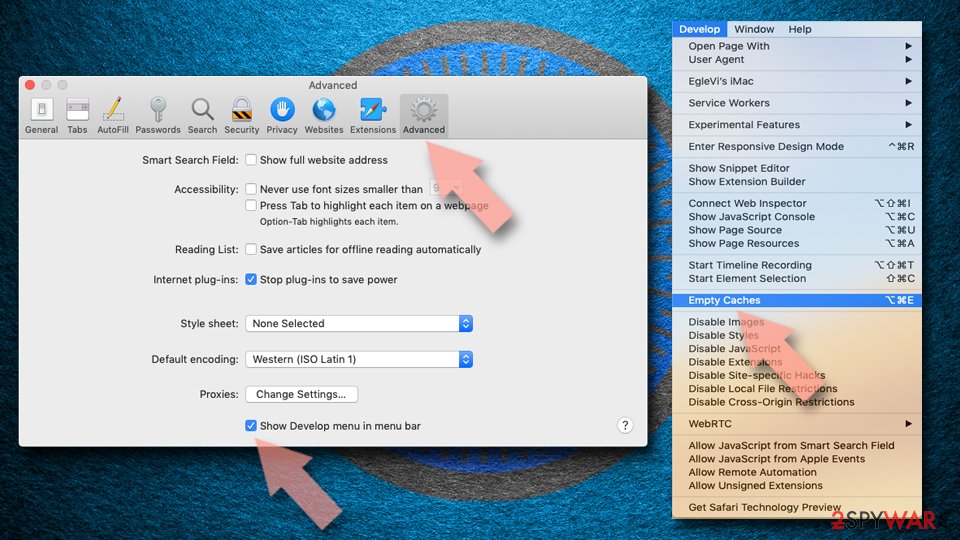
- Click Safari in the menu and select Preferences > Advanced.
- Enable Show Develop menu in menu bar.
- From the menu bar, click Develop and select Empty Caches.

Did this guide help?
Be the first to comment