

Carcn ransomware is the cryptovirus that demands ransom in the file named FILES ENCRYPTED.txt
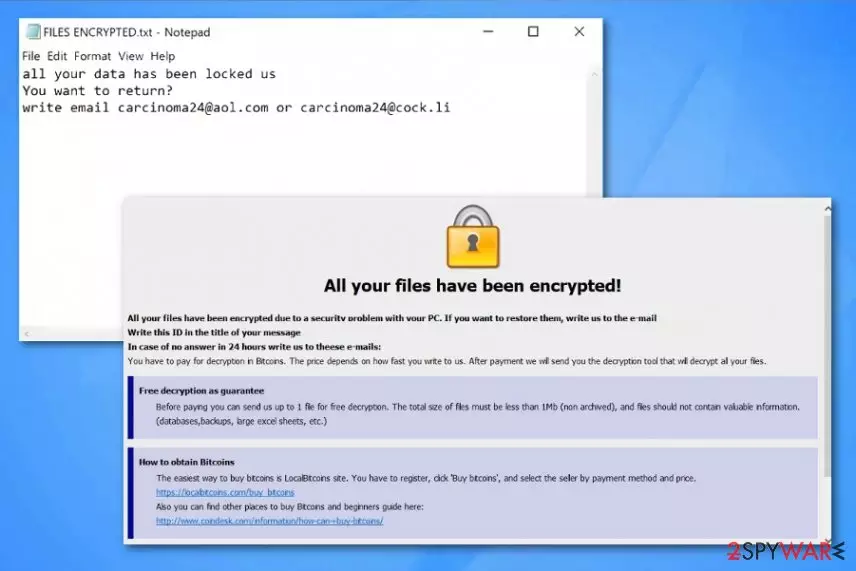
Carcn ransomware – is a variant of the well-known ransomware that uses various methods to make users files locked so the ransom can be demanded. The encryption-based cyber threat uses .id-XXXXXXXX.[Carcinoma24@aol.com].carcn pattern of file extension to mark encoded data and then delivers the ransom note to inform victims about the further steps. FILES ENCRYPTED.txt file contains only contact emails carcinoma24@aol.com and carcinoma24@cock.li and encourages people to pay as soon as possible to get their file recovered. However, Dharma virus family developers are not trustworthy and paying shouldn't be considered as an option. This virus is only one of many variants released in Spring 2019, so it seems not much changed from Frend ransomware, 888 ransomware, or Stun ransomware.
| Name | Carcn ransomware |
|---|---|
| Type | Cryptovirus[1] |
| Virus family | Dharma virus |
| Ransom note | FILES ENCRYPTED.txt |
| File marker | .id-XXXXXXXX.[Carcinoma24@aol.com].carcn |
| Contact emails | carcinoma24@aol.com and carcinoma24@cock.li |
| Distribution | Breaking through unprotected RDP, spam email attachments, infected files, other malware |
| Elimination | You need to install FortectIntego and scan the system fully to remove Carcn ransomware |
Carcn ransomware starts the infection by scanning the system for files that show if the system was encrypted before. Then it starts to encrypt data like documents, videos, images, or archives. When the original code of those files get changed the file marker .carcn gets to the end of those files, and the user cannot open important data.
Then Carcn ransomware virus delivers a message to its victims. FILES ENCRYPTED.txt is the ransom note that reads the following:
all your data has been locked us
You want to return?
write email carcinoma24@aol.com or carcinoma24@cock.li
This is the main symptom of threats like Carcn ransomware because developers focus on data altering and ransom demanding. However, this virus is known for altering files in system directories and disabling various functions and programs like security software.
Carcn ransomware virus belongs to a fairly active and dangerous ransomware family that targets companies and services as well as everyday PC users so paying is not a recommended solution.[2] When users pay the demanded ransom, often developers are not decrypting their files and disappear right away. Data might also get deleted instead of recovered.

Cybercriminals develop such threats like Carcn ransomware, so avoid even contacting them. You should focus on system cleaning first, and then worry about recovering affected data. When you plug in the external device with data backups, ransomware can encrypt those files too, if still active on the computer.
Based on Carcn ransomware detection rate, the anti-malware programs are the best for the malware termination process because multiple AV engines can indicate this ransomware as malicious and even delete it from the machine completely.[3]
Get a reputable tool for Carcn ransomware removal and scan the system fully. Experts[4] always recommend using the official sources, reputable providers for software, especially when it comes to antivirus programs. We can also suggest getting FortectIntego for virus damage elimination and general system optimization processes.
You need to remove Carcn ransomware if you want to use your device and files again. Since the official decryption tool was not developed yet, you can store encrypted data and wait for that tool. In the meantime, you should restore files using data backups or file recovery software. We have a few methods listed down below.
Ransomware gets on the system from an infected file
Cryptovirus is the cyber threat that spreads around using various techniques. The primary method involves spam email campaigns and file attachments with malicious macros or direct payload droppers and hyperlinks. Unfortunately, emails often pose as legitimate notifications from companies or services and users tend to open them without consideration.
Once the user gets tricked into opening the email and even downloading the file attachment, infection loads on the targeted device. A document, PDF or executable file contains a malicious script of ransomware delivering malware or launches the cryptovirus directly after the installation.
This infiltration happens behind your back, so to avoid such malware infections you need to take precautionary measures. For example, keeping antivirus program running on the machine can help block the threat before malicious processes. Also, cleaning the email box more often helps.
Terminate Carcn ransomware and recover files back to a normal working state
Your device may still be affected by Carcn ransomware virus, even when there is no activity on the system. You need to clean the machine fully to ensure that the computer is malware-free and cryptovirus is eliminated completely.
For the proper Carcn ransomware removal, we recommend using reputable anti-malware programs and scanning the computer for potential threats. When FortectIntego, SpyHunterCombo Cleaner, or MalwarebytesMalwarebytes checks the machine and indicates all harmful programs.
Then you only need to follow the suggested steps and remove Carcn ransomware this way. All associated files and programs should get deleted during the system cleaning, so you can restore affected files.
Did this guide help?
Be the first to comment