

Actin ransomware is the cryptovirus that uses a long file extension with the contact email and victims' ID to mark encrypted files
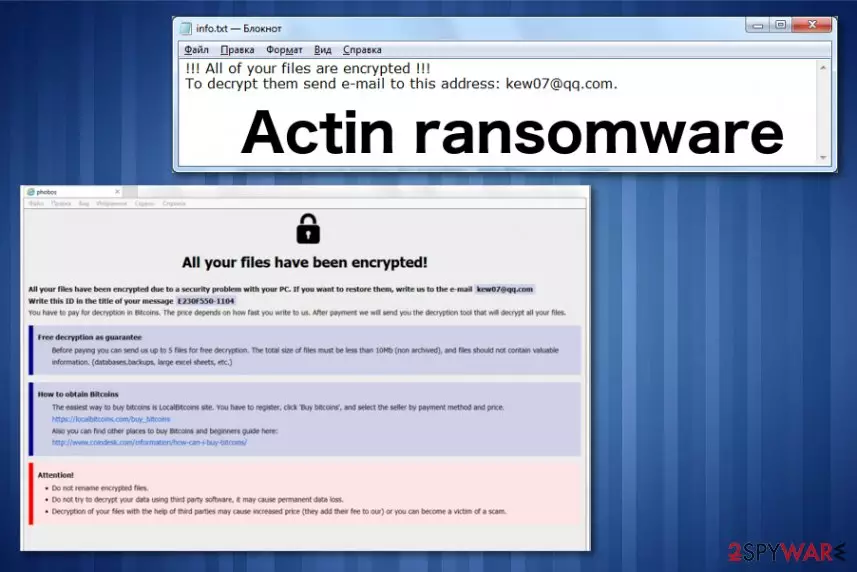
Actin ransomware – is the virus that belongs to the Phobos virus family and resembles another family of ransomware with a program window as the ransom note file. The text file info.txt and info.hta program window deliver instructions and ransom demand when the main purpose of this virus – file encryption is done. This feature is common for Dharma ransomware that is questioned to be related with this Phobos ransomware virus for a while. Researchers tend to confirm the relationship between these two significantly similar threats.[1]
Nevertheless, Actin ransomware virus is not very different from previous Phobos virus versions that came out in the same month of May 2019 like Mamba ransomware. The same pattern of file marker with a contact email and victims' identification key – .[ID].[Kew07@qq.com].Actin, same ransom payment instructions in the program window and a brief message in the text file with contact information. Remember that this is a version of a dangerous cryptovirus, so avoid contacting criminals and DO NOT pay the ransom since it doesn't guarantee the file recovery.
| Name | Actin ransomware |
|---|---|
| Type | Cryptovirus |
| Symptoms | Encrypts files and marks them with file appendix, demands payment in the ransom message, changes system settings, deletes files, disables security functions |
| Distribution | Spam email attachments with infected files |
| File marker | .[ID].[Kew07@qq.com].Actin |
| Contact email | Kew07@qq.com |
| Family | Phobos virus |
| Ransom note | info.hta, info.txt |
| Elimination | Install FortectIntego and remove Actin ransomware |
Actin ransomware is the file-encrypting cyber threat that makes peoples' files locked with the encryption process during which various personal data like photos, videos, documents, or even archives get encoded and becomes useless.[2]
Unfortunately, this data gets affected, and the only solution is replacing those files with safe ones from the backup on an external device or cloud service. When you don't have reliable data backed up, you can rely on particular software designed to restore accidentally deleted or encrypted files. We have a few suggestions for you below the article.
Virus developers claim to have a decryption tool that you need to pay a hefty amount in cryptocurrency for. However, the test decryption offer that gets displayed in the ransom note alongside the ransom demand and payment instructions is there to create trust between Actin ransomware developers and the victim.
Actin ransomware displays the message in the info.txt file that shows the following:
!!! All of your files are encrypted !!!
To decrypt them send e-mail to this address: kew07@qq.com.
Additionally to this not, Actin ransomware provides payment instructions on the program window:
All your files have been encrypted!
All your files have been encrypted due to a security problem with your PC. If you want to restore them, write us to the e-mail kew07@qq.com
Write this ID in the title of your message
You have to pay for decryption in Bitcoins. The price depends on how fast you write to us. After payment we will send you the decryption tool that will decrypt all your files.
Free decryption as guarantee
Before paying you can send us up to 5 files for free decryption. The total size of files must be less than 10Mb (non archived), and files should not contain valuable information. (databases,backups, large excel sheets, etc.)
How to obtain Bitcoins
The easiest way to buy bitcoins is LocalBitcoins site. You have to register, click 'Buy bitcoins', and select the seller by payment method and price.
hxxps://localbitcoins.com/buy_bitcoins
Also you can find other places to buy Bitcoins and beginners guide here:
hxxp://www.coindesk.com/information/how-can-i-buy-bitcoins/
Attention!
Do not rename encrypted files.
Do not try to decrypt your data using third party software, it may cause permanent data loss.
Decryption of your files with the help of third parties may cause increased price (they add their fee to our) or you can become a victim of a scam.
Although it seems that paying the ransom is the only solution in this Actin ransomware attack, but you need to focus on virus removal and to clean the damage that this threat has already made on the computer behind your back. Paying the demanded amount can only lead to money loss or even permanently damaged files.

Actin ransomware can change system preferences, registry entries and disable antivirus functions, programs and add other applications or files to keep needed processes running on the machine. To end all those processes that may affect the initial virus elimination, reboot the computer in Safe Mode with Networking.
This Safe Mode function gives the advantage in the primary Actin ransomware removal because your anti-malware program can run a proper system check and remove needed issues, malware, or files. You can find a guide below that explains how to enter the Safe Mode.
Remove Actin ransomware using anti-malware program as experts[3] always advise. Choose a reputable tool and make sure to download that from the official source to avoid any rogue applications. We can also recommend FortectIntego for virus damage elimination.
Infected file attachments install malicious script that spread malware
Cybercriminals responsible for spreading ransomware, use various techniques to deliver their products on the targeted devices. That includes exploiting vulnerabilities and system flaws, delivering malware installing trojans and direct ransomware payload from the infected file attachments.
Spam email campaigns include such scripts and ransomware payloads as legitimate-looking word, PDF or Excel documents or even EXE files and archives. Forged header information stating that the email contains shipping details from the company like FedEx or DHL tricks people into downloading files from such emails.
Unfortunately, once the documents get downloaded and opened malicious macros get triggered, and various processes can get launched. Some email attachments contain a direct cryptovirus payload, others install trojans or worms that are set to spread ransomware on the machine. Avoid such infiltrations by deleting suspicious emails you were not expecting to get.
Get rid of Actin ransomware and additional programs or files during the system cleaning
You should pay close attention to Actin ransomware virus capabilities and don't forget that the malware itself can alter many preferences. Also, this threat installs other programs and files that can affect virus termination process or even cause more severe issues with the PC.
For the proper Actin ransomware removal, employ an anti-malware program, and scan the machine. During the system check professional anti-malware tool finds and indicates all issues with malicious programs or corrupted files and general system errors.
Employ FortectIntego, SpyHunterCombo Cleaner, or MalwarebytesMalwarebytes and remove Actin ransomware completely with one tool. This process also helps improve the performance of your computer because it cleans virus damage at the same time.
Did this guide help?
Be the first to comment