

Sysfrog ransomware is a type of malware that blocks all personal files and demands a ransom of 0.3 BTC for the decryption tool
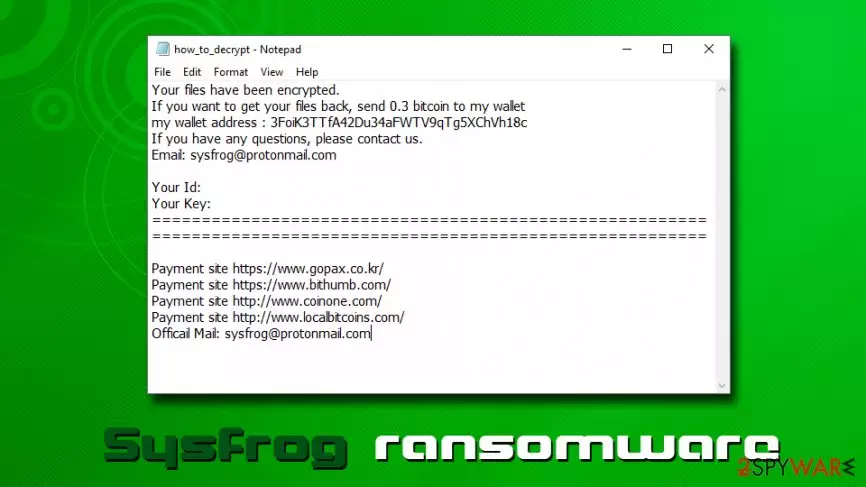
Sysfrog ransomware is a cryptolocker which sample was spotted by security researcher Michael Gillespie at the end of May 2019.[1] The malware stems from Katyusha ransomware which first struck its victims back in October 2018 and locked victims files with AES encryption algorithm.
Sysfrog virus is most likely using the same cipher to infect its users and marks pictures, videos, music, databases, documents, and other files with [Sysfrog@protonmail.com].sysfrog extension. From that point of time, users are unable to open any data, apart from applications and the ransom note how_to_decrypt.txt that is conveniently placed into each of file folders.
The message from threat actors claims that the only way to decrypt data is to pay them 0.3 Bitcoins into the 3FoiK3TTfA42Du34aFWTV9qTg5XChVh18c wallet. However, security experts highly discourage contacting or paying hackers, as the possibility of getting scammed is very real. Instead, you should remove Sysfrog ransomware from your computer and use alternative file retrieval methods, instructions of which we provide in the recovery section below.
| Summary | |
| Name | Sysfrog |
| Type | Ransomware |
| Origin | Katyusha ransomware |
| File extension | [Sysfrog@protonmail.com].sysfrog |
| Ransom note | how_to_decrypt.txt |
| Contact | Sysfrog@protonmail.com |
| Ransom size | 0.3 BTC |
| Decryption | Only available via backups or third-party recovery tools |
| Termination | Use anti-malware software, such as SpyHunterCombo Cleaner |
| Recovery | Scan your system with FortectIntego to fix virus damage |
Victims infected with Sysfrog ransomware can see the following message inside the text file:
Your files have been encrypted.
If you want to get your files back, send 0.3 bitcoin to my wallet
my wallet address : 3FoiK3TTfA42Du34aFWTV9qTg5XChVh18c
If you have any questions, please contact us.
Email: sysfrog@protonmail.comYour Id:
Your Key:
========================================================
========================================================Payment site https://www.gopax.co.kr/
Payment site https://www.bithumb.com/
Payment site http://www.coinone.com/
Payment site http://www.localbitcoins.com/
Officail Mail: sysfrog@protonmail.com
While 0.3 Bitcoin might not seem like a lot (especially when precious family photos or important work documents are on the line), be aware that Bitcoin price varies greatly, thus, depending on when you got infected, the ransom can reach 2.6k US Dollars. Additionally, paying Sysfrog ransomware authors will only encourage them to develop the virus further and infect more victims.
Speaking about ransomware transmission techniques, hackers behind Sysfrog virus might use a variety of methods. While some of them are more sophisticated than the others, most are as equally as effective, depending on how well phishing or malvertising campaigns are established. Here are some examples:
- Spam emails
- Exploits[2]
- Unprotected Remote Desktop
- Fake updates
- Pirated software or its cracks
- Hacked websites, etc.
Regardless of how you might have been infected, what matters now is Sysfrog ransomware removal. To do that, you need to employ powerful security software that can recognize the threat and terminate it automatically. Be aware that file locking malware also modifies Windows OS files (alters the registry, spawns additional processes, terminates Windows recovery, etc.) so for virus damage fix, use FortectIntego.

Don't be a victim of ransomware – follow tips from industry experts
Ransomware is possibly one of the most devastating cybersecurity and, at the same time, extremely profitable,[3] threats in the wild. Maybe that's why its popularity grew rapidly since very first modern strings showed up in 2012 and malware like CryptoLocker, Locky, SamSam, WannaCry, and others wreaked havoc around the world. While some cypromalware might be extremely flawed and easily decryptable, other samples use sophisticated infection, encryption, and evasion techniques. While paying crooks might seem like an option, there is never a guarantee that the decryptor will be delivered. Finally, cybersecurity experts are constantly working on techniques to fight ransomware; that's why keeping an updated security software on your device is so important.
Other tips from experts:[4]
- Update the operating system, along with all the installed software, regularly;
- Be aware that email attachments that require you to enable macro function are extremely dangerous (same goes for hyperlinks);
- If you are using Remote Desktop, make sure you protect it with a secure password;
- Use a password manager and two-factor authentication where possible;
- Enable ad-block on high risk-sites (do not forget to add exclusions for sites you want to support);
- Do not download pirated software and its cracks;
- When installing new software, always opt for Advanced/Custom settings in order to avoid optional installs.
Only after Sysfrog ransomware removal you can attempt to recover your data
While Sysfrog virus is currently not decryptable (AES encryption is a sophisticated method to prevent file access and is not easy to crack), you could use alternative solutions. For example, some third-party recovery applications might be able to retrieve at least some of your files, although chances are quite low. Of course, the best way is to use backups – most of the damage done is then negated. However, before you attempt file recovery, you need to remove Sysfrog ransomware from your system.
Be aware that not all security applications are capable of performing Sysfrog ransomware removal, as they use different databases. Therefore, a system scan with several tools might be necessary – we recommend using SpyHunterCombo Cleaner. While security software can delete malware, it cannot fix infected system files. For that reason, we highly recommend using FortectIntego after virus termination.
Did this guide help?
Be the first to comment