

Rezuc ransomware is a file-locking malware that encrypts important data to receive ransom payments
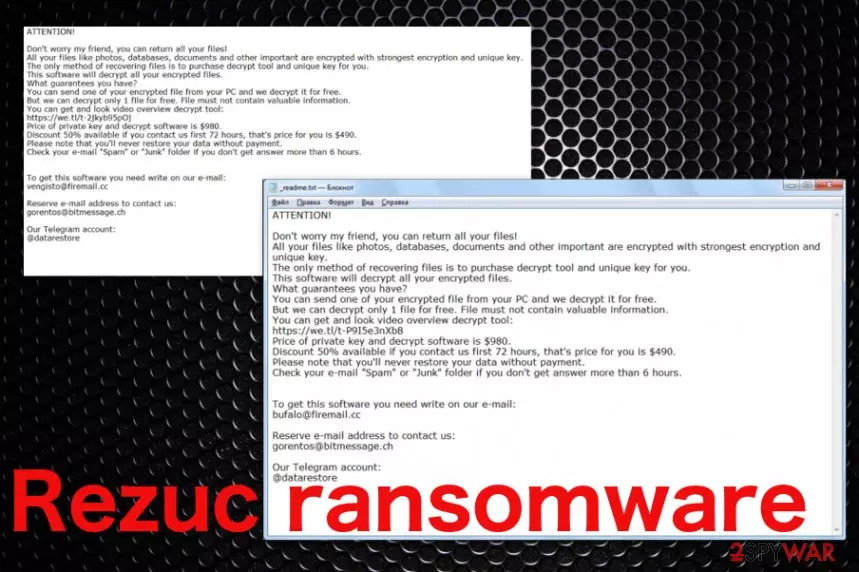
Rezuc ransomware is a version of the cryptovirus family that asks money from victims for the alleged decryption tool. Unfortunately, Djvu ransomware family, that this variant belongs to, is known for releasing a new version after version, so the decryption is highly questionable. In most cases of such ransomware attacks, developers keep files encrypted and disappear when money gets transferred.[1] However, there is good news for victims of this virus. Michael Gillespie keeps updating the STOP virus decrypter that can help with files affected by this family of cryptovirus. Keep an eye on this researcher or wait until our update on this article comes out.
Nevertheless, you need to clean the machine and remove Rezuc ransomware completely from the PC. Since files get marked with .rezuc file appendix, you can see which data got affected. You can store those encrypted files on an external device and clean the machine from malware with automatic anti-malware tools. Malware elimination should happen as soon as possible because ransomware can install programs or files to affect more significant parts of the system and cause more damage to the PC.
| Name | Rezuc ransomware |
|---|---|
| Type | Cryptovirus |
| Family | Djvu ransomware |
| Symptoms | The system gets slower due to additional processes, files get encoded and marked with a file extension, other applications installed without permission |
| Distribution | Trojans, malware, infected email file attachments |
| Ransom note | _readme.txt |
| File marker | .rezuc |
| Decrypter | Try STOP ransomware decryption tool for unlocking files |
| Elimination | Get anti-malware tool and run a full system scan to remove Rezuc ransomware |
Rezuc ransomware is the virus that focuses on file encryption and locks files by changing the original code with the help of AES and RSA military grade encryption algorithms.[2] Since this is a version of a previously known ransomware, tactics are not changed that much as the virus itself.
The first thing Rezuc ransomware virus does on the machine – scanning the system to see details about the location, software, hardware. Often developers target specific countries, or except locations from the list of victims, this is why the area is important. However, this scan ends with finding files for the main event – encryption process.
Rezuc ransomware affects photos, videos, documents, images or even databases and marks files with the particular .rezuc file extension. Then _readme.txt is delivered on the desktop, in folders with encrypted data. This is the ransom note that displays the following:
ATTENTION!
Don’t worry my friend, you can return all your files!
All your files like photos, databases, documents and other important are encrypted with strongest encryption and unique key.
The only method of recovering files is to purchase decrypt tool and unique key for you.
This software will decrypt all your encrypted files.
What guarantees you have?
You can send one of your encrypted file from your PC and we decrypt it for free.
But we can decrypt only 1 file for free. File must not contain valuable information.
You can get and look video overview decrypt tool:
https://we.tl/t-oEUEuysYiZ
Price of private key and decrypt software is $980.
Discount 50% available if you contact us first 72 hours, that’s price for you is $490.
Please note that you’ll never restore your data without payment.
Check your e-mail “Spam” or “Junk” folder if you don’t get answer more than 6 hours.To get this software you need write on our e-mail:
bufalo@firemail.ccReserve e-mail address to contact us:
gorentos@bitmessage.chSupport Telegram account:
@datarestoreYour personal ID:
Rezuc ransomware developers focus on getting money from victims, so don't trust them and forget about paying the ransom. Although these criminals offer a discount and test decryption of one file for free, there is no reason to believe them. Knowing how fast these criminals develop new versions, you should focus on system cleaning and data recovery instead of contacting developers.

Rezuc ransomware affects valuable files, so data recovery is an important issue. However, you need to remember that experts[3] always note how important is to clean the machine from malware before doing anything else. If you restore your files from a cloud service or plugin the external device to the system that is still infected, you can get your files permanently damaged or deleted.
So remove Rezuc ransomware first, then make sure that the computer is malware-free and restore data using the method of your choice. We recommend using file backups, but you can also try data recovery software or different methods listed below the article. Get FortectIntego for virus damage elimination before restoring files, to make sure it is safe to do so.
It is important to note that automatic Rezuc ransomware removal is the way to go for many reasons:
- ransomware alters various preferences on the machine,
- cryptovirus installs other programs that cannot be easily found manually,
- the malware hides the primary payload in system files, other directories;
- anti-malware tools can check the machine entirely and indicate all malicious programs and system issues.

Rezuc ransomware might perform changes to different types of Windows computer locations. For example, the cyber threat can plant malicious registry keys in the Windows Registry section,[4] run suspicious-looking processes in the Windows Task Manager some of which will allow the malware to renew its activities within each system boot.
Furthermore, criminals who spread Rezuc ransomware might think about ways which will make the decryption process of blocked files very hard for even advanced computer users. In some cases, crooks inject a specific module into the ransomware virus which launches and permanently deletes Shadow Volume Copies of encrypted documents/files.
Malicious payload gets on the system via spam email attachments
When browsing online, you can notice false advertisements and other possibly malicious content, but spam email campaigns are more advanced than any other deceptive method used to spread malware. Infected email attachments are the primary vectors used to deliver ransomware payload directly on the targeted machine.
Once you receive the email and it seems suspicious, avoid downloading the attachment or opening the email altogether. You should note that emails from big companies, online services, and shopping sites can be malicious and deliver malware directly on the machine and spread cryptovirus further. Delete any questionable email once received.
For automatical protection purposes, you should always have an updated and active antivirus tool on your machine. Do not be afraid to invest in truly reliable automatical security software as you will definitely benefit from this program. Make sure that it included as many protective features as possible and you will not regret your spent money.
Remove Rezuc ransomware from the system with anti-malware tools and clean the machine from all malicious objects
Rezuc ransomware virus can disable some security functions, alter registry entries or even delete Shadow Volume Copies[5] and other important files to ensure the persistence. For this reason, we recommend rebooting the machine in Safe Mode with Networking before scanning the computer.
Generally, for Rezuc ransomware removal, you need to get a reliable anti-malware tool and scan the computer thoroughly to find all associated malicious files, programs, and clean virus damage fully. Tools like FortectIntego, SpyHunterCombo Cleaner, or MalwarebytesMalwarebytes can run a system check in less than 20 minutes and detect cyber threats that you need to delete.
Once the machine is checked, you can remove Rezuc virus from the system by following the suggested steps. Double-check and run additional PC scan to ensure the device is malware-free. Then you can recover your files. Take a look at the following guidelines and perform each step as required to reach the best results possible.
Did this guide help?
Be the first to comment