

Mogera ransomware – a complex malware form that might be capable of several malicious activities
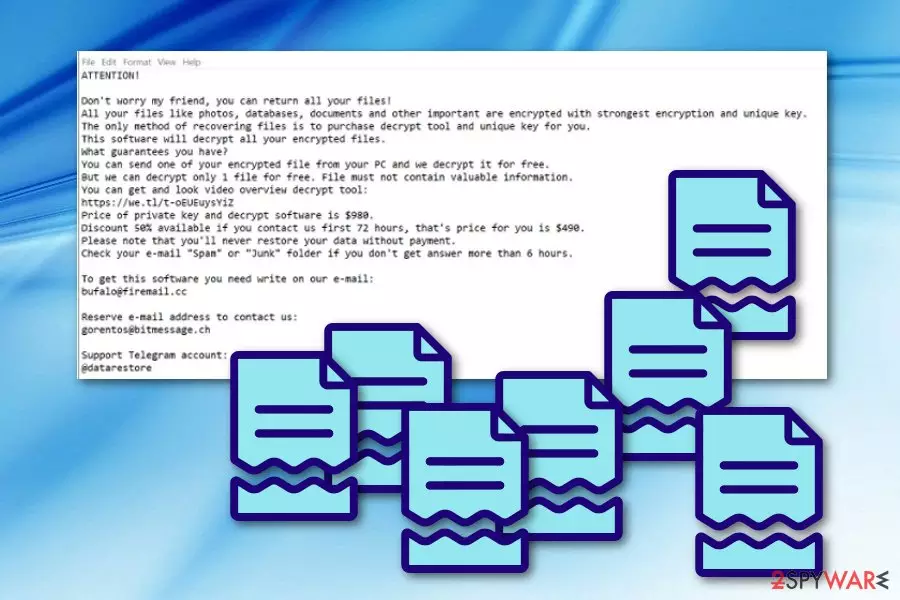
Mogera ransomware is a sibling of Djvu and STOP viruses which includes a complex structure. The main working principle of this ransomware is to stealthily infiltrate the targeted system, drop the malicious payload and start performing the encryption process after which files end up with the .mogera appendix attached. Later on, Mogera virus launches a ransom note named _readme.txt which presents all important information about receiving the decryption tool for locked files. Crooks state that contact needs to be made in a three day time period and the ransom price will drop from $980 to $490. All the victim needs to do is text these hackers by emails bufalo@firemail.cc, gorentos@bitmessage.cc, or by telegram @datarestore.
Mogera ransomware will drop its malicious payload in the form of an executable file which is located in the %AppData% or %LocalAppData% folder. Once this happens, the malware can launch its malicious code and start using unique algorithms such as AES or RSA[1] for data encrypting purposes.
| Name | Mogera |
|---|---|
| Type of malware | Ransomware |
| Family | Djvu/STOP |
| Extension | .mogera |
| Location | Malicious payload can be found in the %AppData% or %LocalAppData% folder |
| Ransom note | _readme.txt |
| Price | The ransom can decrease from $980 to $490 if communication with criminals is made in 72 hours |
| Emails | emails bufalo@firemail.cc, gorentos@bitmessage.cc |
| Decryptable | You can try STOP decryptor. |
| Detection tool | Malware-laden objects can be discovered with software such as FortectIntego |
However, file locking might be not the only malicious activity that Mogera ransomware is capable of performing. These cyber threats are known for their ability to collect various sensitive information about the user and his/her used machine. Later on, these types of details might be misused for illegitimate actions, for example, identity theft.[2]
If some particular data about the computer's system is gathered, Mogera ransomware virus might also misuse this information for security bypassing purposes. Some malware uses fake but legitimate-looking computer security certificates so that they could easily install on the system and plant their malicious components in it.
Mogera ransomware can leave all types of damaging content in locations such as the Windows Task Manager or even modify the Windows Registry to create and inject its own malware-based registry keys. These entries might cause various system changes also they might let the ransomware to activate itself after every machine reboot.
What is more, Mogera ransomware might also end up planting other forms of malware on the infected computer system. Usually, these types of threats let in malicious programs such as spyware, trojans, cryptocurrency miners, and similar. These infections might also relate to slow computing work, severe software damage, data theft, and so on.
As you have already read about Mogera ransomware, you should have been getting thoughts about a fast removal of this cyber threat before severe damage approaches your system. Talking about encrypted files, you will have a chance of restoring them with the official STOP decryptor or by using other software presented at the end of this article.

Be aware of all claims that the criminals provide you with. Mogera ransomware _readme.txt message might try to trick you into paying for the decryption tool by offering a specific discount or sending files for free decryption as evidence of the decryptor's existence:
ATTENTION!
Don't worry my friend, you can return all your files!
All your files like photos, databases, documents and other important are encrypted with strongest encryption and unique key.
The only method of recovering files is to purchase decrypt tool and unique key for you.
This software will decrypt all your encrypted files.
What guarantees you have?
You can send one of your encrypted file from your PC and we decrypt it for free.
But we can decrypt only 1 file for free. File must not contain valuable information.
You can get and look video overview decrypt tool:
hxxps://we.tl/t-tK15NNEcw6
Price of private key and decrypt software is $980.
Discount 50% available if you contact us first 72 hours, that's price for you is $490.
Please note that you'll never restore your data without payment.
Check your e-mail “Spam” or “Junk” folder if you don't get answer more than 6 hours.To get this software you need write on our e-mail:
bufalo@firemail.ccReserve e-mail address to contact us:
gorentos@bitmessage.chOur Telegram account:
@datarestoreYour personal ID:
–
Mogera ransomware removal is the best thing you can do if you spot this malware on your system. We urge carrying out the elimination by using reputable antimalware programs only as not to mess up with your system even more. Additionally, try performing a full machine scan with a tool such as FortectIntego in order to discover all infected objects.
Once you remove Mogera ransomware from your operating system and clean all infected locations, do not forget to take care of your future data. The best thing you can do is purchase a USB Flash Drive or any other external device in which you will be able to store all of your important files and keep them out of touch for anyone except yourself.
Malicious payload carrying methods
According to specialists from Virusai.lt research page,[3] malicious payload can be carried throughout the Internet straight to users computers in various ways. Mostly, a malware-based file that usually is a Word document, executable, ZIP, IMG, or PDF comes attached to a dubious-looking email message.
Once the victim opts for opening or downloading the suspicious attachment, malware such as ransomware gets installed on his/her system slightly. What is more, such payloads can carry a big variety of threats and does not always have to end up with ransomware. Using malicious executables hackers also distribute trojans, crypto mining malware, etc.
The best way to avoid secret installation of a particular cyber threat is by carefully managing all of your received emails and their attachments.[4] We also suggest all users launching antivirus software and scanning all attached documents/files before opening them or installing into the computer system.
Advanced removal guidelines for Mogera ransomware
If you have discovered the ransomware in your computer system, there should be no doubts about the removal's importance. Such process needs to be completed as fast as it can be. For the Mogera ransomware removal, we recommend using only expert-tested and advanced antimalware programs that will take care of the threat and also clean your entire computer.
However, first of all, you need to find all infected locations before you can start the Moger ransomware elimination process. All possibly-infected directories such as the Windows Registry, Task Manager, and various folders need to be search and investigated with specific computer tools. For this process, we recommend using FortectIntego, SpyHunterCombo Cleaner, MalwarebytesMalwarebytes.
You should not try to remove Mogera virus just by putting your own effort. Note that you can easily fail in such process and cause only even more harm to your system and its components. Just launch the antimalware and wait until the job is finished. After that, take a look at the file recovery solutions which we have displayed for you below.
Did this guide help?
Be the first to comment